
Zendesk on Zendesk is a discussion about a specific topic and how Zendesk Support uses Zendesk. Each topic is written by a member of our Zendesk Customer Support team.
This session is about how our Support agents use the Play button to work through tickets. It covers our goals for using Play, how we piloted and rolled out the Play mode workflow, and the changes in ticket metrics we saw as a result.
See all of our Zendesk on Zendesk series discussions.
Introduction
On the Customer Support team, our primary responsibility is to solve customers' requests by working on tickets. With a high number of tickets to deal with, and as we grow globally, it's increasingly important to optimize and define our ticket workflow. To that end, we've implemented a Play button-centered workflow for our teams.
If you're not familiar with Play mode, it's a way for agents to work through the available tickets in a view automatically. In Play mode, agents press the Play button to open the first ticket in the view.
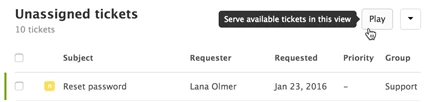
After submitting the ticket with their updates, the next ticket in the view automatically opens.
Note: On Enterprise and Enterprise Plus, you can require agents to use Play when working through tickets. For more information, see Setting up Guided mode.
Here's why we decided to use it:
- Efficiency: Using the Play button allows agents to spend their mental energy on solving tickets rather than combing through the queue. It also saves time by automatically skipping tickets that others are already viewing.
- Workflow definition and priority control: Using Play ensures tickets are addressed in order according to the view. We assign tickets a priority level during triage, and this makes sure we use that field appropriately and consistently.
- Broader agent experience: Agents have the opportunity to grow their skills in product areas they would usually bypass, giving them better overall product knowledge and understanding.
Rolling out the Play button workflow
We introduced the Play button to agents gradually to identify any issues early on. We knew this would be a significant workflow change to adjust to, and wanted to make sure we could dedicate time and attention to advocate happiness and performance.
Deciding which teams should use it
When we implemented the Play button, our Customer Support team was split into three tiers to address the varying level of technical expertise and time needed to solve incoming tickets.
- Tier 1 takes incoming phone calls and resolves email requests about our product and its features; these are typically questions that can be resolved in less than 15 minutes.
- Tier 2 spends more time digging into issues and the related logs and handles requests that typically can be resolved in less than an hour.
- Tier 3 addresses the most complex or time-consuming tickets before sending qualified issues on to our Development team.
Higher tier ticket queues have relatively few tickets and a lower ticket-to-agent ratio. With shorter queues, it's not as time consuming or chaotic for advocates to scroll through and open individual tickets.
Additionally, higher tier agents specialize in specific product areas, so it makes more sense for them to pick and choose their tickets.
Tier 1 has a high volume of tickets that don't require intensely specialized knowledge to solve.
As a result, we decided to try it out initially with only Tier 1 and Tier 2 agents.
Piloting and gathering feedback
A pre-selected pilot group tried out the Play button for 30 days. Managers of pilot group agents also set up regular meetings with them to gather feedback and review their ticket stats (see Agent feedback below). Each day, we sent surveys to the pilot group to gather their feedback. The surveys asked about the overall experience, how much their workflow felt disrupted, and general comments on what they thought. We tracked this feedback, in addition to other key metrics, in a dashboard.
What we've learned
We tracked agent feedback and ticket metrics throughout our initial Play button pilot.
Metrics
We had a relatively small pilot group and tested over the holidays, a time when ticket volume is also low, so the statistical significance of the results is somewhat limited. However, we did notice a few interesting patterns.
CSAT
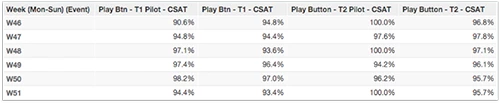
Before the Play button workflow was rolled out, there was a tendency for CSAT to fluctuate based on the day of the week. With the majority of tickets submitted Monday to Friday, the smaller groups of agents working on tickets during the weekend would often end up with the trickier tickets passed over during the week. As a result, CSAT might dip on the weekend and be higher during the week. After implementing the Play button, this stabilized and became more consistent across the entire week.
Escalation percentage
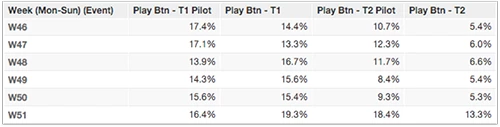
Another trend we saw was changes in escalation percentage. This metric refers to the number of tickets that are sent to a higher support tier. For Tier 1, there was an initial increase in escalated tickets for the first two weeks of the pilot. This can probably be attributed to the fact that the first couple weeks involved clearing out previously passed over, difficult tickets. It could also be related to the agents using Play being exposed to tickets in areas they hadn't previously worked on. After the first weeks, Tier 1 escalation percentage returned to about the same as pre-pilot.
For Tier 2, escalation percentage seemed to increase overall. Our best hypothesis for this is that the tickets being skipped were consistently the ones that would take over thirty minutes, or would need even more of a technical deep dive, making them appropriate for Tier 3.
Agent feedback
The numbers we collected on agent satisfaction were overall positive.
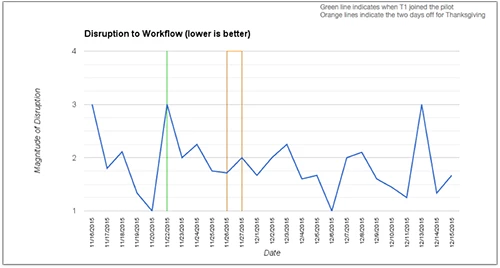
Workflow disruption was rated as minimal with the exception of a few outliers. Interestingly, the highest disruption was reported on days ticket queues were the lowest. One possible reason for this is that, as previously mentioned, the Play button is the most appropriate for higher amounts of tickets that don't require a specialized subject matter expert.
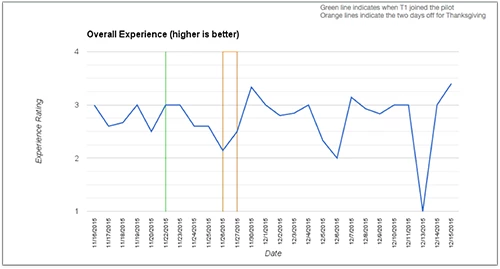
There was an initial trend of somewhat negative advocate experience ratings for the first two or three days of the pilot. However, once agents became more accustomed to the new workflow, the ratings turned around to be much more positive.
Agent comments included both positive and negative feedback, but was overall encouraging. Many mentioned how they appreciated the experience of "working on tickets they wouldn't normally necessarily pick out" and "mixing up the tickets they are involved in instead of just the tickets they already have solutions for", improving their overall product knowledge. As one agent put it, "I did take tickets outside of my comfort zone and the next time a customer asks me the same questions, I will have a quicker answer."
Another comment was that it made them more efficient by "taking the guess work out of choosing which tickets to work." One comment explained, "I get to the ticket faster because I don't have to look through the View to see which tickets are available."
Questions?
We want to hear about your own experience with Play and agent ticket workflows. If you're using it, what impact have you seen on ticket stats and agent experience? If you're not using it, what factors have made you decide to stick to a pick-and-choose workflow? Let us know all about it in the comments below.

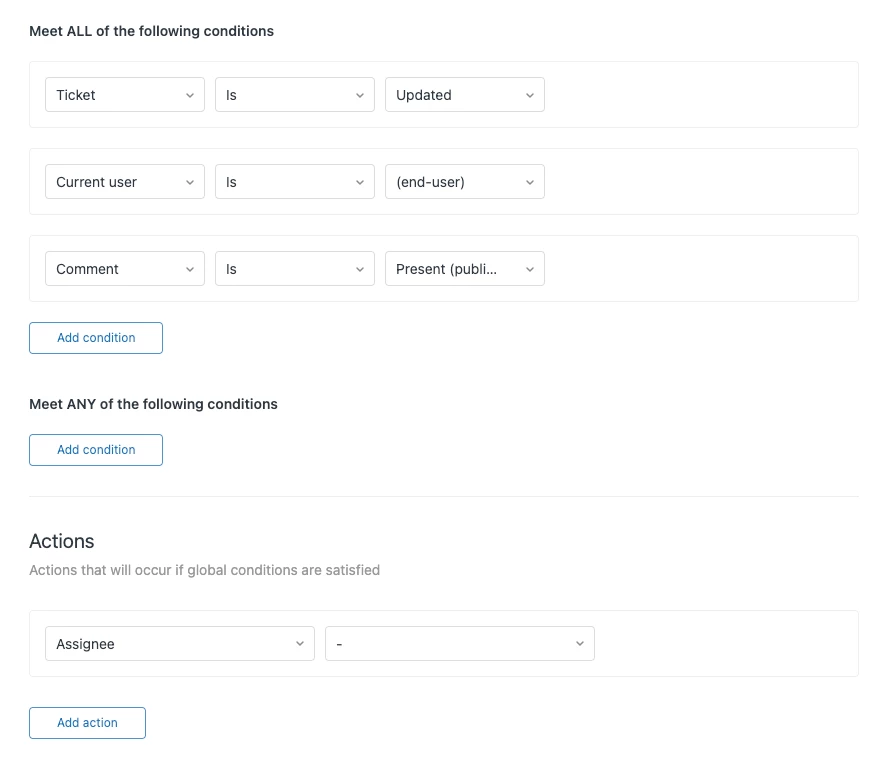


Thanks for reaching out! Unfortunately, this is not an option with the Play button, it cannot automatically assign tickets to your agents, option is to manually assign/skip tickets once they are on guided mode.
A feature that can do this is what we call omnichannel routing, you can check this out if this fitts your workflow.
Hope that helps!