
Note: Zendesk removed Net Promoter Score (NPS) survey functionality on April 30, 2023. For more information, see Announcing the removal of Net Promoter Score (NPS).

Zendesk on Zendesk is a day-long discussion about a specific topic and how Zendesk Support uses Zendesk. Each session is hosted by a member of our Support or Marketing team.
This session is about how Zendesk analyzes and follows up on NPS data. It covers:
- Grouping customers according to NPS responses in Zendesk
- Analyzing Detractor comments effectively to identify root causes of dissatisfaction
- Sharing NPS results with internal teams to encourage cross-departmental efforts
See all of our Zendesk on Zendesk series discussions.
Overview of NPS
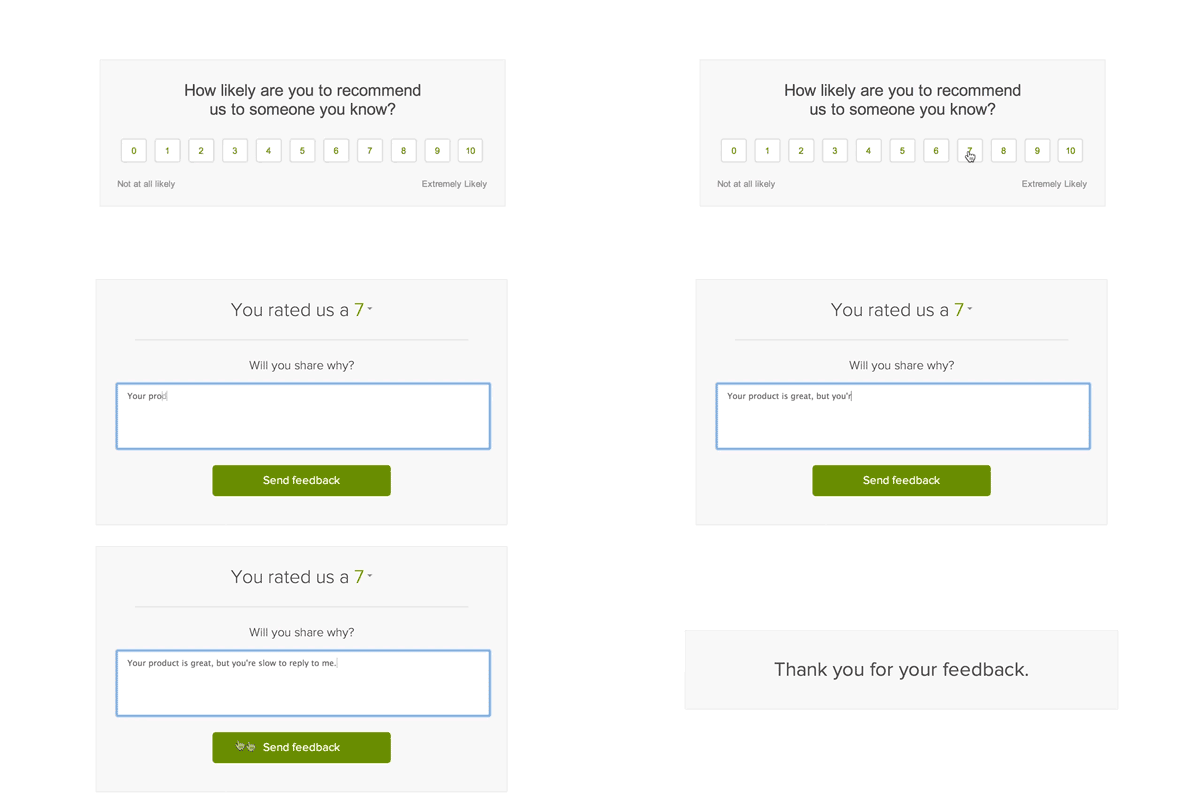
Net Promoter Score® is a tool Zendesk uses to proactively engage with all of our customers, not just those that contact us for support. We use our own native NPS product, which asks customers to rate how likely they are to recommend us to someone they know and prompts them to share a bit more feedback as to why they chose the rating they did. The question typically looks something like this:
You can learn more about NPS in general in our product documentation.
Organizing customers by NPS group
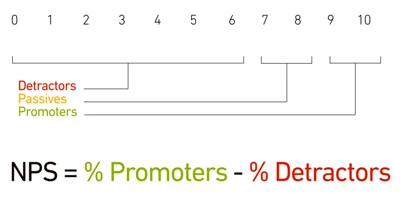
Once we've sent out the NPS survey and collected responses, we then group customers’ ratings according to NPS guidelines:
- 0 to 6 are known as Detractors. Scores in this category could indicate a dissatisfaction with your company
- 7 or 8 are known as Passives
- 9 or 10 are Promoters
The score itself is calculated by simply subtracting the percentage of Detractors from the percentage of Promoters. Passives are excluded.
To display these groups in Zendesk, we have a customer list for each segment: Promoters, Passives, and Detractors. Customer lists, which are part of the same add-on that includes NPS surveys, are like views, but for customers instead of tickets.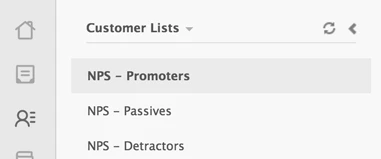
From the list, we have the option to engage with those customers through an email campaign using MailChimp or SurveyMonkey. For more details and instructions, see Creating a customer list of Promoters, Passives, or Detractors.
NPS-based customer lists also make it easy to review a list of customers who fall into each group and identify potential trends. For example, are there significant differences between small businesses, mid-market, and enterprise companies? Do certain industries tend to consistently have issues with the product? These insights can help us determine where to focus our energy to best serve our customers' needs.
Sharing data with internal teams
We share our quarterly NPS survey data internally with all employees so they have the opportunity to review and dig into the results. Sharing this across the entire company helps all roles develop more customer empathy and reflect on how they can individually improve the customer experience. Improving the customer experience is a team effort—from product to support to sales to marketing.
To share our NPS results, we export the data into a CSV file. For instructions, see Exporting NPS survey responses to a CSV file. Teams and individuals can review responses by organization, region, or plan type, as well as search the comments by keyword to drill down into specific product areas.
Analyzing comments
In the past, we’ve relied quite heavily on text analysis software, but we’ve found that their algorithms frequently miss the real reasons why customers are unlikely to recommend Zendesk. These text analysis programs are great at synthesizing what survey respondents say, but fail miserably at discerning why they are saying it. Such insights often require a human touch.
As shown above, our NPS surveys include a follow-up free form question asking customers to explain their rating. We've found that digging deep into the comments provided is a great way to understand the real reasons behind their frustrations.
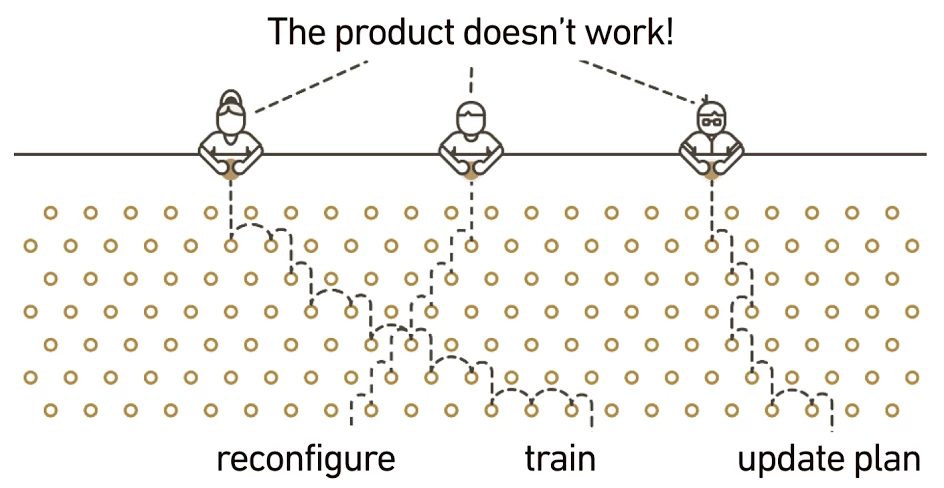
Customers can sometimes misidentify exactly what's causing them difficulty. For example, our customers may comment that they’re not likely to recommend Zendesk because of an issue with the product. Yet when we review those same comments within a broader context, we often find the “product issues” can be remedied with advice, training, or plan updates. Some questions we ask include:
- Is the customer’s Zendesk properly configured?
- Have they received the training they need to use the product effectively?
- Have they outgrown their plan? Would another plan be more appropriate?
Following up
To keep the conversation going after a customer has responded to the survey, we follow up on their feedback. First, it's important to let customers who've responded know how we appreciate their time and honesty by thanking them for our feedback. A simple "Thanks for your valuable feedback" is usually a good start.
Then, using the lessons learned from analyzing Detractor comments as described above, we reach out to individual customers to help with identified pain points. This might involve advising a change in the customer's specific configuration, additional training, or a different Zendesk plan.
In addition to reaching out to individual customers, we take steps internally based on trends in feedback we've seen. This involves all of our departments, not just customer-facing roles. Our customer support team does not own the customer experience alone; the overall customer experience is influenced by how we build our product, the conversations our sales team has, and how we communicate Zendesk on our website. Accordingly, our teams set up cross-departmental task forces to create action plans for current customer pain points.
So that’s the Zendesk approach to getting the most out of NPS data. How about you? What approaches have worked for your organization? Let us know in the comment section below!
**Net Promoter and NPS are registered trademarks, and Net Promoter Score and Net Promoter System are service marks, of Bain & Company, Inc., Satmetrix Systems, Inc. and Fred Reichheld.