
ZCLI Image upload Issue | Community
Skip to main content

ZCLI Image upload Issue

  • June 10, 2024
  • 15 replies
  • 0 views

Harshit

We have created a Zendesk application, and we need to upload an image and use the response ID in the side conversation mail API.

We have implemented the Zendesk Attachment API and are familiar with how it works. We have tested the side conversation attachment API in POSTMAN, and it works fine. However, when we try to use the same API in our Zendesk application using the Client. Request API call, we encounter the following error.  We have tried multiple things like changing the content type and debugging the uploaded file data but nothing works. Please take a look at the screenshot and sample code provided.


Following ENDPOINT we are referring: https://developer.zendesk.com/api-reference/ticketing/side_conversation/side_conversation_attachment/

https://developer.zendesk.com/api-reference/ticketing/side_conversation/side_conversation/
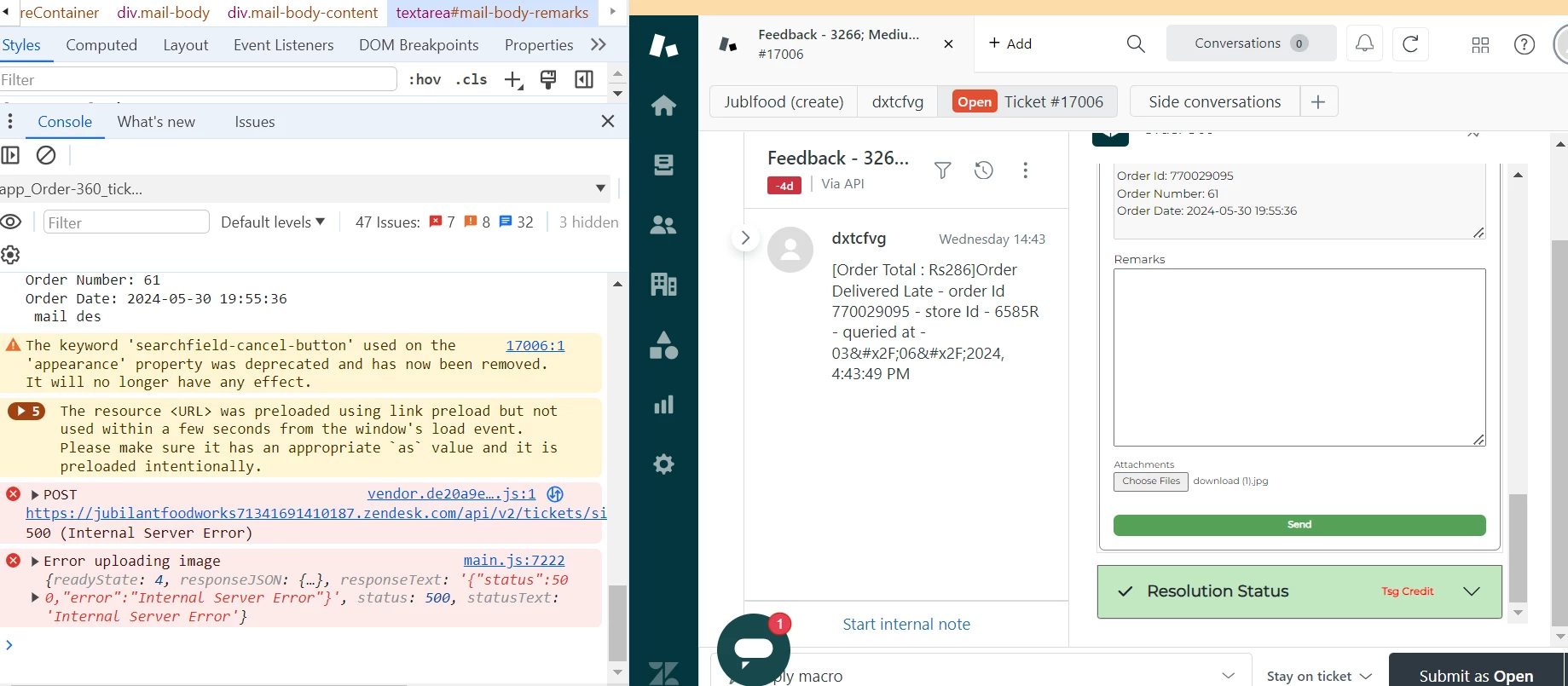


function uploadImage() {
 
  let files = document.getElementById("mail-body-input").files;
  const fileToUpload = files[0];
 
  const formData = new FormData();
  formData.append("file", fileToUpload);
 
  client.request({
    url: `/api/v2/tickets/side_conversations/attachments.json`,
    method: "POST",
    contentType: "multipart/form-data", // Let the browser set the content type with boundary
    body: formData,
    redirect: "follow"
  })
  .then((response) => {
    console.log("Image uploaded successfully", response);
  })
  .catch((error) => {
    console.error("Error uploading image", error);
  });
}
15 replies

  • June 18, 2024
Hi Harshit!
 
Hmm that is odd behavior. Out of curiosity, how long is the file name that you're using? 

Harshit
  • Author
  • June 24, 2024

we tried passing “test” and other keywords still same issue.


  • June 25, 2024
If you don't mind, I can go ahead and pull you into a ticket so I can get a better look at what's going.

  • June 26, 2024

Tagging along with this as we're currently experiencing the exact same issue, hope that's fine.
Could any findings be shared on this thread?


  • July 2, 2024

Im experiencing the exact same issue. I'll be glad if there would be a solution to the problem.


Tagging along as well, since we are having the same issue with this exact call, tried multiple ways to do it including setting the contentType to false, passing the contentType as header etc. Share details in this thread if a resolution has been found. 


  • July 15, 2024

UPDATE: I was able to get support via a ticket and it turns out the ZAF client doesn't support the uploading or downloading of binary files.
This will instead have to be done via your preferred HTTP client.


  • July 17, 2024

This is a absolute disaster, because using another HTTP client makes the whole process insecure.
https://support.zendesk.com/hc/en-us/community/posts/5200263029914-Uploading-attachments-securely-to-a-ticket


  • July 17, 2024

I agree, and looking at how little communication there has been on the thread you linked, I don't imagine support will be added to the ZAF client anytime soon.
I'll likely have to go with the backend proxy approach.


  • October 28, 2024
Hi all! Just wanted to follow-up to let yu all know that this issue has looked at and since been resolved. If you're still having issues please feel free to let us know!

  • December 23, 2024

The issue is still present as of December 2024. I encountered the same "AttachmentUnprocessable" error (status 422) when trying to upload files using the ZAF client. I implemented the file upload using the regular uploads endpoint like this:


const uploadRequest = {
    url: `/api/v2/uploads?filename=${file.name}.${file.fileExtension}`,
    method: 'POST',
    contentType: 'application/binary',
    data: file.url  // ArrayBuffer from FileReader
};

Even with proper ArrayBuffer handling through FileReader and following the API documentation exactly, the ZAF client still fails to process the attachment. This confirms what @Shawn mentioned earlier about ZAF client not supporting binary file uploads, and the issue appears to remain unfixed despite the recent update.


Carl13
  • December 26, 2024

I agree, too. The only way I was able to get it to work was to use a regular fetch request that necessitated including API credentials which is far from optimal. I'm considering using secure parameters as is done for third-party  requests, but it would be great to just have support in the ZAF client.


            const currenturl = `https://<yoursite>.zendesk.com/api/v2/uploads.json?filename=${encodeURIComponent(file.name)}`

            let zendeskEmail = 'youruser@email.com';
            let zendeskApiToken = 'yourapitoken';
            let auth = 'Basic ' + btoa(zendeskEmail + '/token:' + zendeskApiToken);

            const request = await fetch(currenturl, {
                method: 'POST',
                headers: {
                    'Content-Type': 'application/binary',
                    'Authorization': auth
                },
                body: file
            });
            const uploadResponse = await request.json();

  • December 31, 2024

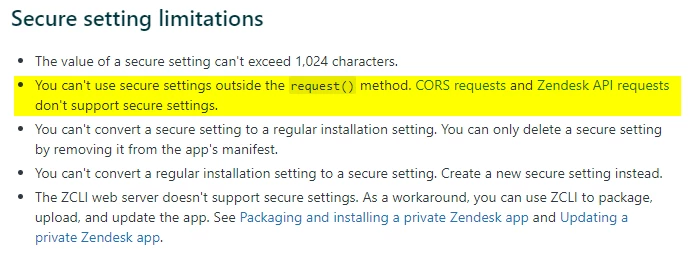
I tried using secure settings too, will not work because:


Carl13
  • January 11, 2025

Thanks @tuomas! Looks like that is exactly the case. @erica26 when you mentioned the issue has been resolved would you mind letting us know what we are missing?


Carl13
  • January 21, 2025

Hi, thank you for creating a ticket about this issue. Any updates?