Xcode 13.3 Beta 3 - artifact not found for target | Community
Skip to main content

Xcode 13.3 Beta 3 - artifact not found for target

  • February 24, 2022
  • 48 replies
  • 0 views

I've seen some issues testing the new Xcode 13.3 Beta releases with the Zendesk SDKs. Wanted to make sure this was on the team's radar as Apple is expected to release Xcode 13.3 in the coming weeks.

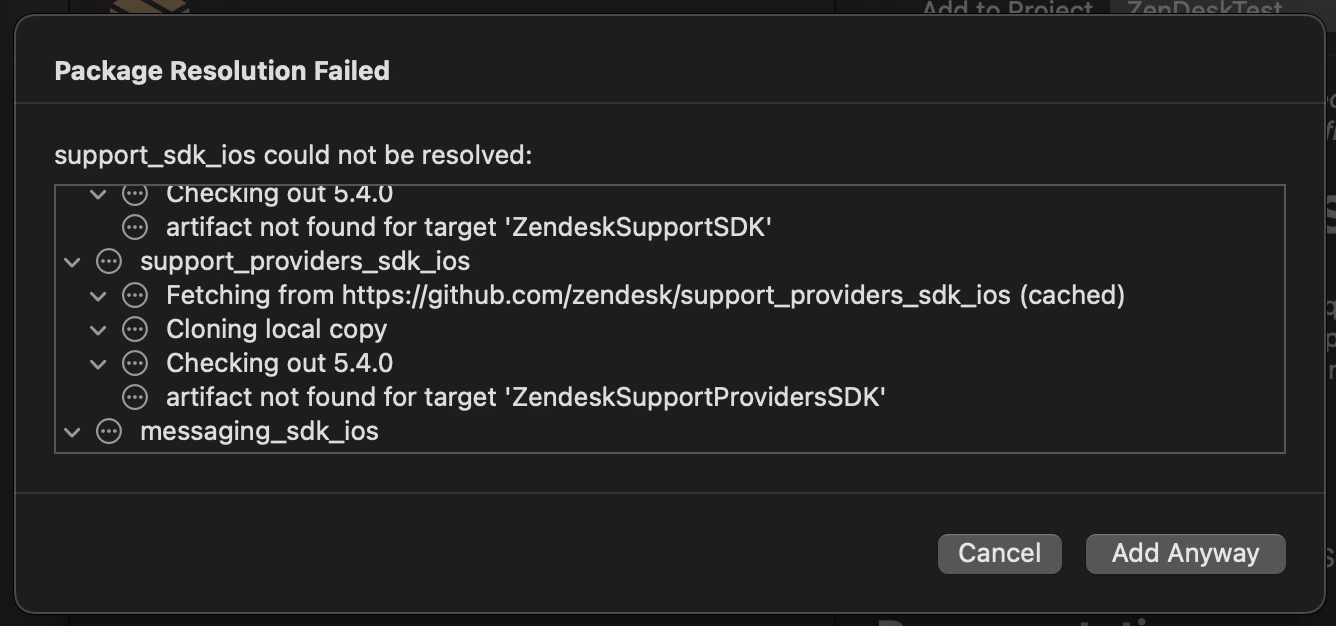
The error is: artifact not found for target 'ZendeskSupportSDK' (this repeats for all sub-modules as well)

Steps to reproduce:

1. Launch Xcode 13.3 Beta 3

2. Start new Project

3. Add new Swift Package: https://github.com/zendesk/support_sdk_ios

4. It should produce the error there, seen below, and if you say "Add Anyways" the error continues in Xcode. 
This works fine in Xcode 13.2.1. 

Thanks,

Patrick McCarron

48 replies

Mick11
  • February 25, 2022

Hi Patrick,

Thanks for reaching out. We had an issue with the public artifacts for version 5.4.0 of the Support SDK not being published. This has since been corrected and the artifacts are now available. Do you mind retesting with Xcode 13.3 Beta 3 now please? You should no longer experience the issue. 


  • Author
  • February 25, 2022

This is with v5.4.0 and tried again today with no difference than yesterday, as 5.4.0 is still the newest version.

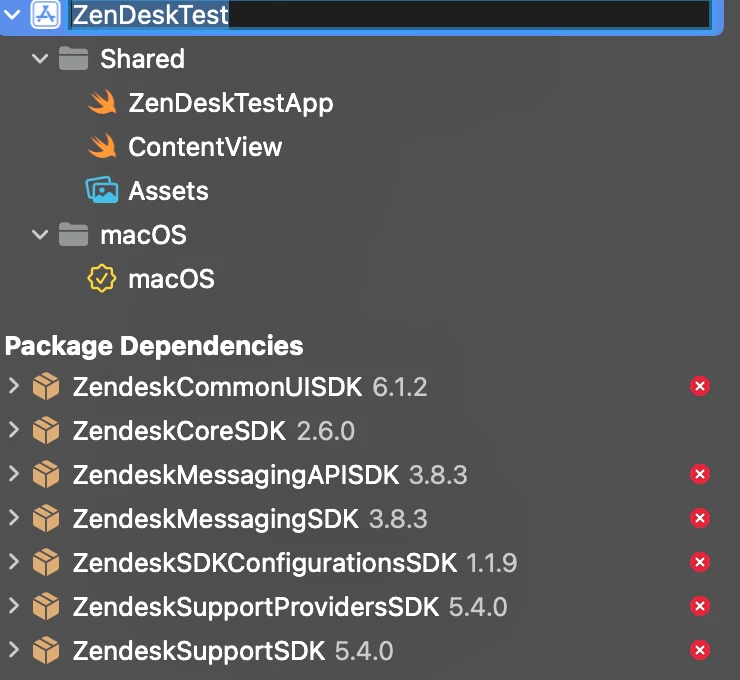
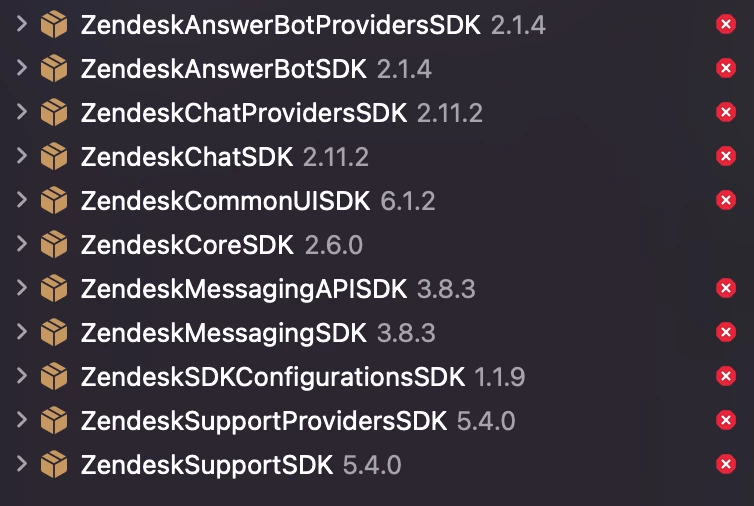
Attached is all the effected submodules and their versions. The error is the same for all of them.


Steven46
  • February 28, 2022

The problem is that the artifact name needs to match the target name. I solved/worked around this in e.g.

https://github.com/stevenkramer/support_sdk_ios/commit/b0baee520c844d472ade93c4a5fcfd475236b529 

This has to be applied to all binary frameworks though.


  • March 15, 2022

The same issue in public Xcode 13.3. How to solve this issue?


Sebastian38

We have the same issue with Xcode 13.3 Appstore version.


Steven46
  • March 15, 2022

Depending on your level of desperation, you could fork the package you need and apply the following changes to it and recursively for all its dependencies. In short, the binaryTarget's name and path need to be spelt the same. I created a symlink for the path, instead of renaming the framework.

E.g, this change.

(fixed the link, links are mangled when pasting)


Stavros
  • March 15, 2022

We are facing the following issue:

`artifact not found for target 'ZendeskSupportProvidersSDK'`


Any plans to update https://github.com/zendesk/support_providers_sdk_ios soon?


Alexander49

We are having the same issue as well with xCode 13.3


Josh68
  • March 15, 2022

We are on the public version of Xcode 13.3 and experiencing the same problem. We are pulling the dependencies in using a Package.swift file and not the "Package Dependencies" tab. This was working fine until Xcode 13.3.

artifact not found for target 'ZendeskSupportSDK'

artifact not found for target 'ZendeskMessagingSDK'

artifact not found for target 'ZendeskSDKConfigurationsSDK'

artifact not found for target 'ZendeskSupportProvidersSDK'

artifact not found for target 'ZendeskMessagingAPISDK'

artifact not found for target 'ZendeskCommonUISDK'


  • March 15, 2022

We are having the same issue on the App Store version of Xcode 13.3


  • March 15, 2022

Same issue here.


Eric27
  • March 15, 2022
Hey Folks,

Appreciate all the info everyone has dropped in this thread. I'm working on getting the mobile dev team's eyes on this asap. As soon as I have any info, I'll pin a post in this thread.

Thanks!

Jane21
  • March 15, 2022

The problem is that the artifact name needs to match the target name. I'm not sure, but I having the same issue on the App Store version of Xcode 13.3. Any clue?


  • Author
  • March 15, 2022

I having the same issue on the App Store version of Xcode 13.3. Any clue?

Yes unfortunately this is also present in the final Xcode 13.3 not just the betas, we need Zendesk to resolve this via a Framework update before we can use the Framework with Xcode 13.3.

If you must use Xcode 13.3 there is a workaround posted above by Steven Kramer if you are comfortable forking the framework. 

I was hoping by reporting this issue during the betas they would fix the issue before Xcode 13.3 was finalized, but alas that didn't happen.


  • March 15, 2022

Bump, having same issue, had to manually download 13.2.1 to be able to start developing again.


Kevin94
  • March 16, 2022

Another bump. This is a simple fix that Steven Kammer has already done. Pointing to Steven Kammer's fork has resolved it temporarily.


  • March 16, 2022

Good to know I'm not alone! Just a heads up that this is happening to me with the Chat SDK, as well.


  • March 16, 2022

I wish I would have seen this yesterday before I spent the whole afternoon purging and reinstalling Xcode thinking that it was an Apple issue!


Davide15
  • March 18, 2022

Hello,

any news on this? We can not use the latest version of Xcode due this error.

We need a fix asap.


Eric27
  • March 18, 2022

Hey Folks,

Thanks for everyone's patience on this. We are actively working on a fix for this. As soon as I have more info, I'll be posing in this thread.


Irfan14
  • March 21, 2022

Hello,

   Any updates on this?


  • March 21, 2022

Hey, could you please provide any timeline on this?


Alex137
  • March 21, 2022

This a quick fix for Zendesk Dependencies, working on Xcode 13.3.

Instead of forking, I've created a SPM Package with references to original libs

https://github.com/Dimentar/Zendesk-SP-iOS

Targeting `ChatSDK` + it Dependencies, if you need more, ask, or create PR


Robert98
  • March 21, 2022

No release in sight and it's becoming a big problem!

Please propose a solution quickly


  • March 21, 2022

@robert98, for now just downgrade to Xcode 13.2.1. It's the easiest fix until Zendesk can ⌘+F the bad code :-)