SDKConfigurations.framework/SDKConfigurations contains bitcode | Community
Skip to main content

SDKConfigurations.framework/SDKConfigurations contains bitcode

  • September 20, 2024
  • 21 replies
  • 0 views

Andrew46

Xcode 16 does not let us upload our apps because SDKConfigurations framework still contains bitcode. The update to the Support SDK released on September 17th (8.0.4) did fix this issue in other frameworks.


However, SDKConfigurations was not updated and this prevents us from releasing app updates with Xcode 16. Please fix ASAP

Here is an error which we get during the upload:

Invalid Executable. The executable '******.app/Frameworks/SDKConfigurations.framework/SDKConfigurations' contains bitcode.

21 replies

Hyunjoon
  • September 24, 2024

I have the same problem. Here is a more detailed log:

"Error Domain=ContentDelivery Code=90482 \"Asset validation failed\" UserInfo={NSLocalizedFailureReason=Invalid Executable. The executable 'Mubeat DEV.app/Frameworks/SDKConfigurations.framework/SDKConfigurations' contains bitcode. (ID: fe66e8cc-553c-4745-a3a6-1781aad93434), NSUnderlyingError=0x600000b4ee80 {Error Domain=IrisAPI Code=-19241 \"Asset validation failed\" UserInfo={status=409, detail=Invalid Executable. The executable 'Mubeat DEV.app/Frameworks/SDKConfigurations.framework/SDKConfigurations' contains bitcode., id=fe66e8cc-553c-4745-a3a6-1781aad93434, code=STATE_ERROR.VALIDATION_ERROR.90482, title=Asset validation failed, NSLocalizedFailureReason=Invalid Executable. The executable 'Mubeat DEV.app/Frameworks/SDKConfigurations.framework/SDKConfigurations' contains bitcode., NSLocalizedDescription=Asset validation failed}}, iris-code=STATE_ERROR.VALIDATION_ERROR.90482, NSLocalizedDescription=Asset validation failed}"

Cesar21
  • September 24, 2024

We are having the same issue. Please, we need an urgent fix as we cannot distribute updates of our app.


Moosung
  • September 25, 2024

We are also experiencing the same problem. Due to issues with your SDK, we are unable to release new versions of the app. This is a very serious problem. Bitcode has been deprecated since Xcode 15, so you have had plenty of time to prevent this. Your company should respond as quickly as possible and release a corrected version of the SDK. Otherwise, we have no choice but to consider applying another service instead of yours.


Andrew46
  • Author
  • September 25, 2024

I urge everyone who has the same issue to open a support ticket. I've opened one on Sep 21 and they STILL haven't fixed it.


Clearly, their iOS dev team is not testing anything at all and they just don't care about the experience we are having.

Started actively looking for another support solution, as this level of service from Zendesk is utterly unacceptable


Andrew46
  • Author
  • September 25, 2024

I wonder who are the people who put a “thumbs down”? If you know how to fix this without waiting for Zendesk to fix their SDK – please let everyone know .


Otherwise seems like Zendesk employees are trying to downvote this issue instead of actually fixing it.


Nara
  • September 25, 2024
Hi all, appreciate the reporting here. Our team is currently working on a fix for this. I'll update the thread here when we have more news.

  • September 26, 2024

Hi everyone,

Thank you for bringing this issue to our attention. Our development team is currently working on a fix, and we’ll provide an update with the expected timeline as soon as it’s available.

In the meantime, you can try the following workaround to unblock Apple validation:

  • Navigate to Xcode Settings > Frameworks, Libraries, and Embedded Content, and select the "Embed & Sign" option.

We appreciate your patience, and we’ll keep you posted with any further updates.

Best regards,

Onur


Cesar21
  • September 27, 2024

Thanks for the workaround. In our case we added the framework via Cocoapods so we don't have SDKConfigurations in Frameworks, Libraries and Embedded Content. Is there any workaround for frameworks added with Cocoapods?


Garrett19
  • September 27, 2024

Same, using cocoapods, so interested in workaround there if any


Hyunjoon
  • September 30, 2024

@cesar21 I'm also using CocoaPods and found a way to solve this. Since I'm not using the UI provided by Zendesk, but only the API, the following worked for me:

  1. Change pod ‘ZendeskSupportSDK’ to pod ‘ZendeskSupportProvidersSDK’ in the Podfile.
  2. Run pod install or pod update in the terminal.
  3. Go to where Zendesk is implemented and replace import SupportSDK with import SupportProvidersSDK.
  4. Clear and build the app.

If you're using any of ZendeskCommonUISDK, ZendeskMessagingAPISDK, ZendeskMessagingSDK, ZendeskSDKConfigurationsSDK, or ZendeskSupportSDK, this method won't work.


Guillaume19

Hi, with cocoapods, what You can do, is adding following code to Your podfile.

post_install do |installer|
    
    bitcode_strip_path = `xcrun --find bitcode_strip`.chop!
    
   def strip_bitcode_from_framework(bitcode_strip_path, framework_relative_path)
     framework_path = File.join(Dir.pwd, framework_relative_path)
     command = "#{bitcode_strip_path} #{framework_path} -r -o #{framework_path}"
     puts "Stripping bitcode: #{command}"
     system(command)
   end
   
   framework_paths = [
     "Pods/ZendeskSDKConfigurationsSDK/SDKConfigurations.xcframework/ios-arm64/SDKConfigurations.framework/SDKConfigurations"
   ]
   
   framework_paths.each do |framework_relative_path|
     strip_bitcode_from_framework(bitcode_strip_path, framework_relative_path)
   end
   
  end

Cesar21
  • September 30, 2024

Thanks Hyunjoon Ko. In my case I'm using the ZendeskChatSDK pod.


Unfortunately the workaround posted by Guillaume DROULEZ didn't work.


Cesar21
  • September 30, 2024

I removed Zendesk from the Podfile and used SPM to add ZendeskChatSDK. This time I didn't have any problems uploading to Apple.


Anant
  • October 4, 2024

Hi Onur,


Can you please give us an approximate timeline when Zendesk support SDK (https://github.com/zendesk/support_sdk_ios ) will get updated to resolve this issue, so that we can update pod itself (to address this issue)


Thanks.


Ammar12
  • October 9, 2024

Any updates on this?


Michael222
  • October 10, 2024

Hello guys , to submit my app I had to manually  go to the framework location :

/Users/your user/Your project/Pods/ZendeskSDKConfigurationsSDK/SDKConfigurations.xcframework/ios-arm64/ and perform

 xcrun bitcode_strip -r SDKConfigurations.framework/SDKConfigurations -o SDKConfigurations.framework/SDKConfigurations 

  • October 10, 2024

Hi everyone,

Earlier this week, we released a new version of the SDK (v9.0.0) that addresses this problem. (See our release notes.)

Thanks again for your patience, and please let us know if you have any further questions or feedback!

Best,
Onur


Yash14
  • October 11, 2024

@onur14 Hii sir,
I am currently using the react-native-zendesk-chat package in my React Native application and have encountered the same issue . I was wondering if it would be possible to address this within the package as well.


  • October 15, 2024

Hi Yash,

Thanks for reaching out! While our SDKs don’t officially support React Native, the latest version (v9.0.0) might help resolve the issue. Have you had a chance to try this version yet?

Let us know how it goes!

Best,
Onur


Sunil18
  • November 15, 2024


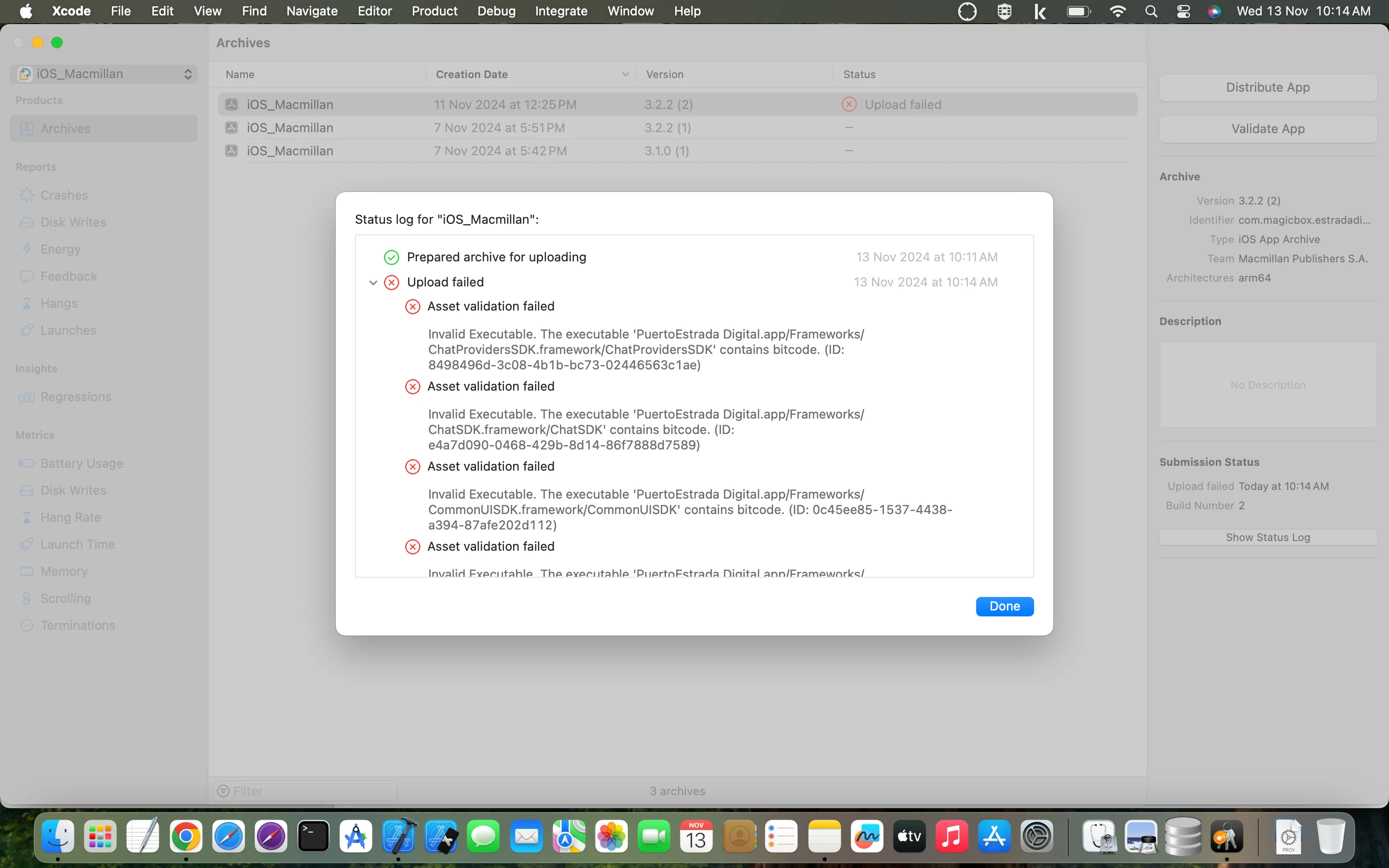
Getting error in uploading on TestFlight. 

Asset validation failed:-
Invalid Executable. The executable 'PuertoEstrada Digital.app/Frameworks/ ChatProvidersSDK.framework/ChatProvidersSDK' contains bitcode. (ID:

8498496d-3c08-4b1b-bc73-02446563c1ae)


Please help into it ASAP


Hi Sunil,
 
Are you still seeing this after updating the Chat SDK to version 5.0.5?