How to use the formdata in the client request method? | Community
Skip to main content

How to use the formdata in the client request method?

  • September 4, 2023
  • 13 replies
  • 0 views

fahev

I making an API calls inside the SDK application with the Axios POST method and Formdata, you can in the below code.

const axios = require('axios');
const FormData = require('form-data');
let data = new FormData();
data.append('username', 'balu');
data.append('key', jhjjjjhjjjhh');
data.append('email', 'anish.k@spritle.com');

let config = {
  method: 'post',
  maxBodyLength: Infinity,
  url: 'https://opencart.ajithr.com/index.php?route=zendesk/customer',
  headers: { 
    'Content-Type': 'application/json', 
    'Cookie': 'OCSESSID=0c4898f4cd2a443a21c3fb3324; currency=USD', 
    ...data.getHeaders()
  },
  data : data
};

axios.request(config)
.then((response) => {
  console.log(JSON.stringify(response.data));
})
.catch((error) => {
  console.log(error);
});

How can I change this Axios method into a client method? 

I documentation also can't able to find it.

Thanks in advance.

13 replies

Greg29
  • September 5, 2023
Hi Balu! The Zendesk client.request method is documented here and shouldn't require much modification, if any, from the above code that you already have in place.

fahev
  • Author
  • October 3, 2023

Hi Greg Katechis,

Proxy error: {:code=>"UnprocessableEntity", :status=>"422", :title=>"Unprocessable Entity", :message=>"Failed to get installation and oauth information for app."}

is being encountered when attempting to use the provided code. It appears that FormData needs to be passed in the body of a POST request, but the documentation does not provide guidance on how to do so.

How should I proceed to resolve this issue?


let data = new FormData();
    data.append("username", username);
    data.append("key", key);
    data.append("email", email);

    let config = {
      method: "post",
      maxBodyLength: Infinity,
      url: `${shopURL}/index.php?route=zendesk/customer`,
      headers: {
        "Content-Type": "application/x-www-form-urlencoded",
      },
      crossOriginIsolated: true,
      data: JSON.stringify(data),
      secure: true,
  };

    return client.request(config);


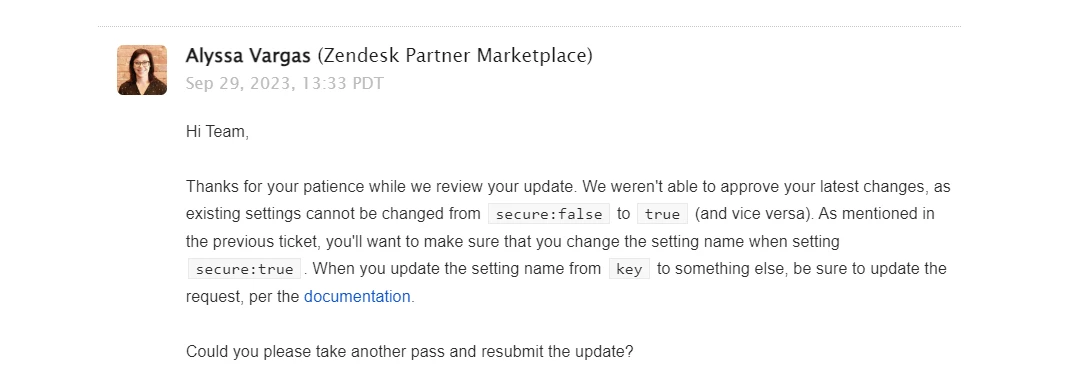
When I passed the build for review process marketplace team rejected it because of security issues, I am using Axios inside the Zendesk SDK, I could not figure it out where is the mistake.


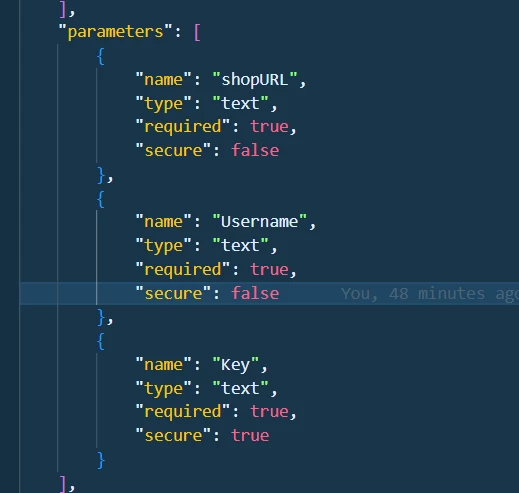
this is my manifest parameters


fahev
  • Author
  • October 4, 2023

Hi Greg Katechis,

is there any update on this, how we can proceed?


fahev
  • Author
  • October 20, 2023

Hi @Zendesk Team, 


Is there any update on this?


fahev
  • Author
  • October 24, 2023

Hi Zendesk Team, 

Is there any update on this matter?


fahev
  • Author
  • October 25, 2023


Is there any update or progress on the issue we've raised? We greatly value your assistance and insights in helping us resolve this matter.

Your prompt response and guidance would be greatly appreciated.

Thank you for your attention.


  • September 11, 2024

I have the same problem. Fahev Dalebig, did you find a solution for this?


Tipene
  • October 6, 2024
Hi Bruno,
 
Can you provide the context of the issue you're running in to plus a screenshot of any errors you are seeing? 
 
Thanks,
 
Tipene

rajesh14
  • November 26, 2024

Hello @tipene 

I have an issue with the POST request using client.request. Here is the code I'm working with:
 

const base64Response = await fetch(mediaData.data);
const blobData = await base64Response.blob();
const file = new File([blobData], mediaData.fileName, {
type: blobData.type,
});
const formData = new FormData();
formData.append("media", file);
formData.append("title", file.name);
formData.append("content_type", file.type);
formData.append("account", spokiAccount?.id);
const metadata = await client.metadata();
const sendMedia = await client.request({
 url: `${BASE_URL}/media/`,
 type: "POST",
 data: formData,
 headers: {
   "Content-Type": "multipart/form-data",
   [zendeskHeaderKey]: typeof metadata.installationId === "string" ? spokiAccessKey : "{{setting.spokiAccessKey}}",
 },
 secure: !(typeof metadata.installationId === "string"),
});
 

The issue is that when I make the API call using Axios, like this:
 

const sendMedia = await axios.post(`${BASE_URL}/media/`, formData, {
 headers: {
   "Content-Type": "multipart/form-data",
   ...spokiHeaders,
 },
});
 

It works fine and returns a response. However, when I call the API using the client.request, the payload doesn’t show up in the browser, and I get a 400 error with the following message:
 

{
 "media": [
   "No file was submitted."
 ]
}
 

Can you help me identify what might be wrong with the client.request approach?


  • November 26, 2024
Hi Rajesh, 
 
It looks like you might be dealing with a content type mismatch. So the default for the client request method is application/x-www-form-urlencoded. It could possibly be that the server isn't reading the nested contentType value in the header and falling back on its default. As you'll see here, contentType is it's own standalone property to be passed and read. However, I also see you're using FormData() so you shouldn't have to specify the content type. Have you tried setting application/binary?

rajesh14
  • November 27, 2024

@erica26 
i add ‘application/binary’ as contentType but still not work 


  • December 3, 2024
Have you tried uploading the media first via the Upload API and then sending it with the token? Even though you're sending this request to an external server, if you're passing it through the proxy first you might want to try uploading it to your instance then making the request. 

Labor
  • May 28, 2025

I did something very similar to your use case. Give this a try:

(function waitForZendeskForm() {
 const formCheck = setInterval(() => {
   const form = document.querySelector('form[action*="/requests"]');
   if (form) {
     clearInterval(formCheck);

     form.addEventListener("submit", function (e) {
       e.preventDefault(); // stop default submission

       const values = new FormData(form);
       const newForm = document.createElement("form");
       newForm.method = "POST";
       newForm.action = form.action;
       newForm.style.display = "none";

       // Populate cloned form with actual values
       for (const [name, value] of values.entries()) {
         const input = document.createElement("input");
         input.type = "hidden";
         input.name = name;
         input.value = value;
         newForm.appendChild(input);
       }

       document.body.appendChild(newForm);
 

       // Listen for form submission to complete via fetch
       fetch(form.action, {
         method: 'POST',
         body: values,
         credentials: 'include'
       }).then(response => {
         if (response.ok) {
           window.location.href = 'https://xxxxxxxxxxxxxx.com';  // redirect to external site
         } else {
           console.error('Form submission failed:', response.status);
         }
       }).catch(err => {
         console.error('Form submission error:', err);
       });
     });
   }
 }, 500);
})();