Getting Proxy error: Invalid request | Community
Skip to main content

Getting Proxy error: Invalid request

  • March 7, 2024
  • 6 replies
  • 0 views

Hi Team,

I am encountering the error "Proxy error: Invalid request" when attempting to create a request to a third-party server.

Manifest code:

{
  "name": "Sample App",
  "author": {
    "name": "Company1",
    "email": "support@test.in",
    "url": "https://test.in"
  },
  "defaultLocale": "en",
  "private": false,
  "location": {
    "support": {  
      "ticket_sidebar": {    
        "url": "assets/iframe.html",
        "flexible":true,    
        "size": {
          "width": "450px",
          "height": "1500px"
        }
      }
    }
  },
  "parameters": [
      {
        "name": "Zendeskurl",        
        "type": "url",
        "required": true,
        "secure": false  
      },
      {
        "name": "Zendeskemail",        
        "type": "text",
        "required": true,
        "secure": false
      },
      {
        "name": "Zendesktoken",        
        "type": "password",
        "required": true,
        "secure": true
      },  {
        "name": "Azuredevopsurl",        
        "type": "url",
        "required": true
       
      },
      {
        "name": "Azuredevopstoken",        
        "type": "password",
        "required": true,
        "secure": true  
      }
    ],  
 
  "domainWhitelist": ["{{setting.Zendeskurl}}","{{setting.Azuredevopsurl}}"],
  "version": "1.0",
  "frameworkVersion": "2.0"
}

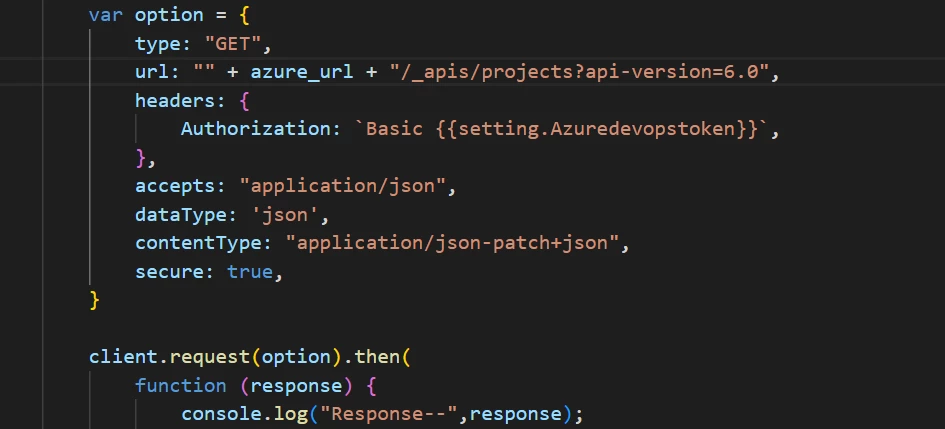
Request:
    var option = {
                type: "GET",
                url: "" + azure_url + "/_apis/projects?api-version=6.0",
                headers: {
                    Authorization: `Basic x:{{setting.Azuredevopstoken}}`,
                },
    accepts: "application/json",
   dataType: 'json',
 contentType: "application/json-patch+json",
 secure: true,
            }            
           
 client.request(option).then(
function (response) {
console.log("response",response);
},
function (error) {
 console.log("error:", error);
}

Previously, we were using btoa to encode the API key, and it was working fine.

However, since it is recommended to use secure settings for submitting the app in the marketplace, attempting secure settings throws us an error both locally and in the deployed private app. The Azure API only accepts encoded API keys.

Kindly assist us in resolving this issue.

6 replies

Tipene
  • March 13, 2024

Hi Pavithra,

I noticed you're attempting to use secure settings within the manifest file, specifically, under the domainWhitelist property. This is likely causing issues since the setting values won't be inserted by the Zendesk proxy here. To start, I'd suggest updating the domainWhitelist URLs to the correct string values and try again.

Let me know if you have any questions.

Tipene


  • Author
  • March 14, 2024

Hi Team,


Thanks for the response.

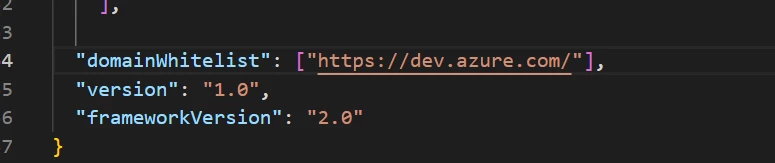
In manifest i have updated the value like below.


But still facing the same issue in deployed private app.Kindly check below screenshot.


Kindly let us if know if there is any other options to schedule for call with team.It would helpful to resolve issue.
 
Thanks in advance


Tipene
  • March 14, 2024
Thanks for the update, Pavithra.
 
One other thing to check, are you running the app locally or is it installed in your Zendesk instance?

  • Author
  • March 15, 2024

Hi Tipene,

I have installed app in zendesk account and checking.


kami13
  • May 28, 2024

Gratitude for the update, Pavithra.

Another thing to check, would you say you are running the application locally or is it introduced in your Zendesk occurrence?


Brett13
  • Community Manager
  • December 3, 2024

Hey @pavithra , a little late to the party here but another user wanted to point out that the problem is the trailing backslash "/" that was added after the whitelist address. Hope this helps!