ZCLI App - Hello World app not working | Community
Skip to main content

ZCLI App - Hello World app not working

  • April 12, 2024
  • 4 replies
  • 0 views

Hello,

I am novice to Zendesk App development and trying to build my first ZCLI based app. 


I followed steps mentioned here: https://developer.zendesk.com/documentation/apps/getting-started/zendesk-app-quick-start/?_ga=2.50402921.1993983129.1712802811-1865722041.1701923098&_gl=1*o8uu7b*_ga*MTg2NTcyMjA0MS4xNzAxOTIzMDk4*_ga_0G6FC9CS2V*MTcxMjkwNDg3NC4yMC4xLjE3MTI5MDY2ODUuNjAuMC4w


In step: Creating the app files, there were no errors, but app directory was not created and in the root directory, I can see folder: “app_scaffolds-master” and ZIP file: “scaffold.zip”.


In step: Running the app locally,  I got an error message. 

Error: Invalid app path: c:\temp\zendesk\projects 

projects is the root folder and zcli app create command supposed to create folder: hello_world, but did not create the folder.


Later, i changed the root path to “C:\temp\zendesk\projects\app_scaffolds-master\packages\basic” and local server started. But I was not able to access the new app using “?zcli_apps=true”  using below URL: 

https://{subdomain}.zendesk.com/agent/tickets/{ticket_id}?zcli_apps=true 


Regards,

Jagadeesh


4 replies

Greg29
  • April 12, 2024

Hi Jagadeesh! I actually have recently seen this error myself  and it looks like others are reporting it as well. I'm going to raise this issue with our dev team, however they are based in Australia and already have started their weekend, so I won't get any response until next week. For the time being, you can package the app and upload it as a private app…which I know isn't the same development experience you're looking for…and that should at least allow you to do some basic testing.


I'll drop you an update sometime next week when I hear back from them.


  • April 16, 2024

I am really keen to hear an update on this, too. I'm seeing the same issue. No errors - it simply doesn't create the directory. I'm running latest macos.


  • April 18, 2024

I am encounting same issue too. I 'm running in Windows Server 2019.

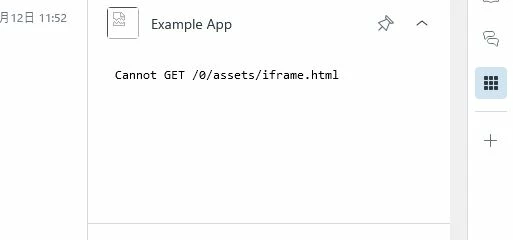
I changed path to “\app_scaffolds-master\packages\react\src” and ran apps:server. “Example App” was appered, like the attached image.


Théo17
  • May 22, 2024

Any update on that matter, i am facing the same issue for simple sccafold app as well