

Hi everyone,
I'm using the React Gardens Combobox component in my Zendesk sidebar app, and I ran into an issue with how the selected options are displayed after a page refresh/initial load.
What’s Working?
- I coded the Combobox according to the documentation.
-
When I select options, the labels display correctly in the dropdown and the selection box.

What’s the Issue?
- After refreshing the app or reloading the app (initial load with data saved from before), instead of showing the labels, the values of the selected options are displayed.
-
It seems like the component is not properly mapping the stored values back to their corresponding labels on initial render.
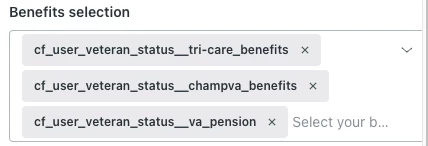
Code:
<Combobox
style={{ width: '100%' }}
isMultiselectable
maxHeight='auto'
isEditable={false}
isExpanded
onChange={handleChange}
{...benefitsState}
>
{options && options?.map((option, index) =>
'options' in option ? (
<OptGroup key={index} aria-label={option['aria-label']} legend={option.legend}>
{option?.options.map(subOption => (
<Option
key={subOption.value}
label={subOption.label}
value={subOption.value}
hasSelection={hasSelection(subOption.label)}
{...subOption}
>
{subOption.label}
</Option>
))}
</OptGroup>
) : (
<Option
key={option.value}
label={option.label}
value={option.value}
hasSelection={hasSelection(option.label)}
{...option}>
{option.label}
</Option>
)
)}
</Combobox>
I'm curious how to properly set the initial selection values when the values were already saved from the previous session. It seems that when I set the last saved selection values using whatever was saved from before (which is an array of values), the combobox is only displaying the values and not the labels. Has anyone else encountered an issue like this?
Thanks in advance!