I need help with modal | Community
Skip to main content

I need help with modal

  • July 10, 2021
  • 11 replies
  • 0 views

jose28

I have a problem when creating the modal, the service does it well, it brings me the data of the side bar well, but when closing the modal it gives an error cannot access instance and I don't know why

11 replies

Eric27
  • July 12, 2021

Hey José,

Can you provide the relevant code so that we can take a look?

Thanks!

Have a wonderful day!

Eric Nelson | Manager - Developer Advocacy


  • September 16, 2021

@eric27

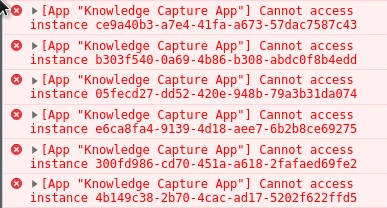
I ran into the same issue. I was able to create a modal and populate it with the desired content. However, after I close the current modal and open a new modal, a yellow dot appears in the app. Hovering over the dot, as well as observing the browser console, I will see the error "Cannot access instance [guid of previous modal]".

I think the instance of the modal should've been destroyed on modal closing however it seems as though there is vendor javascript that's trying to access the same modal guid and returning undefined (possibly related to rollbar?) I'm not sure how to resolve it.

Here's some code snippets for how I set up the modal:
https://github.com/rdai10/zendesk/blob/master/knowledge-capture-app/src/javascript/modules/SearchResults.js#L54-L78

https://github.com/rdai10/zendesk/blob/master/knowledge-capture-app/src/javascript/modules/app.js#L37-L48

Any feedback would be welcome, thanks!


Eric27
  • September 20, 2021

Hey @rebecca30,

Am I correct that this line is the only place you're triggering the modal closing from?

Thanks!
Eric


  • October 7, 2021

Hey @eric27,

Sorry I didn't see your response until now!

Yes, presently it is the only place where I'm manually triggering modal destroy. However, I believe destroy should've been called under the hood when the x button on the modal is clicked. Let me know if that assumption is incorrect.

Previously, I have tried invoking the destroy when the 'modal.close' event is called in modal creation (here) and also in the modal instance itself (here). I observe the same error with and without these code there. Please let me know if I didn't set up correctly. Thanks!


Eric27
  • November 4, 2021

Hey Rebecca,

So sorry for the lack of response. Seems your post got lost in the shuffle to our new community. I've spent some time debugging this issue this morning and it seems to be an issue with the way your app is utilizing the context provider (located in the Global.js file). You can see this by logging the props to the console:


It looks like you are expecting the context that you're passing it to reset upon modal close or dynamically, though you don't have anything triggering that so it's just adding on the existing props. If you were to clear the context on the 'modal.close' event, it should resolve your issue. 

Hope this helps, 

Eric


  • November 4, 2021

@eric27

Thanks for taking the time to respond! My understanding is that when

ticketSidebar.instance(modal.instanceGuid)

is called, a new instanceClient is added to the ticketSidebar client. So every time a new modal is opened, the instanceClient object grows larger if not properly removed.

While looking at the ZAF client API docs, the only clean up relating to removing the instance of the modal is through calling destroy. However, as mentioned in a previous comment, invoking it manually doesn't seem to remove the obsolete instanceClients on the ticketSidebar client. Is there an idiomatic way to achieve this? Or perhaps areas on the doc that you can point me to?


Eric27
  • November 11, 2021
Hey Rebecca,

Apologies! It seems that there is something going on with me receiving notifications for this thread. Do you mind if we pull this into a ticket to continue this conversation? In the interim, I'm testing out some different possible solutions for clearing out the instancecClient from the ticketSidebar. 

  • November 11, 2021

Sounds good @eric27, I went ahead and proceeded to create a ticket to further the conversation.


  • September 5, 2023

@rebecca30 and @eric27, I know this is from years ago, but I'm having the same exact problem: I can't re-create a modal and get the yellow script error. It looks like y'all successfully solved the problem in a ticket, but I'd be keenly interested to know how you did it.


  • September 5, 2023

I do note one difference: the error I get says it cannot access the GUID of the current client, not the modal client.


  • September 7, 2023

I was able to resolve my problem. I had created a wrapper around the ZAF client, but failed to bind some of the methods to the client, so at some very late point in the app lifecycle the modal broke.