
Facing issue in securing sever-side app | Community
Skip to main content

Facing issue in securing sever-side app

  • July 12, 2022
  • 6 replies
  • 0 views

Neeraj11

Hi, We are working on building a server-side app to generate content for the iframe (to be shown in the sidebar). We have created a sample application so far. Now, We are trying to secure the app following this article - https://developer.zendesk.com/documentation/apps/build-an-app/building-a-server-side-app/bonus-part-secure-the-app/.

This tutorial explains adding a security feature in which Zendesk includes JWT token in the request for the initial page.

Problem

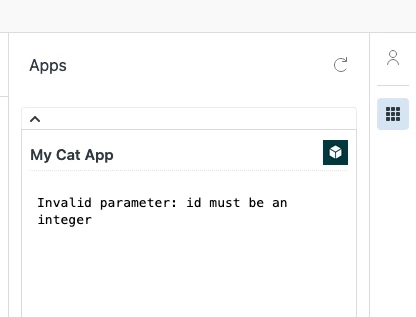
If we set `signedUrls` to true to make the app secure, it shows the following error message on the sidebar.
 

manifest.json

{
  "name": "My Cat App",
  "author": {
    "name": "Zendesk",
    "email": "support@zendesk.com",
    "url": "https://support.zendesk.com"
  },
  "defaultLocale": "en",
  "private": true,
  "signedUrls": true,
  "location": {
    "support": {
      "ticket_sidebar": {
        "url": "https://neeraj.free.beeceptor.com/zendesk",
        "flexible": true,
        "size": {
          "height": "375px"
        }
      }
    }
  },
  "domainWhitelist": ["thecatapi.com", "api.thecatapi.com"],
  "version": "1.0",
  "frameworkVersion": "2.0"


How do we resolve this issue? Please let us know if you need any other information.

6 replies

Greg29
  • July 12, 2022

Hi Neeraj! Could you share the contents of the iframe.html, or if you're referencing from a .js file, the iframe and .js files? It looks like something in your code is returning an incorrect value or incorrect type and the signed urls portion may just be a red herring.


Neeraj11
  • Author
  • July 12, 2022

Hi Greg, thank you for your prompt response. I have updated the complete codebase on a Github public repo here. https://github.com/Cerebro92/zendesk-sample-app/tree/main/src


Greg29
  • July 12, 2022
Thanks for sharing that...I'm able to reproduce this issue. It looks like we're returning a UUID instead of the installation_id of the app. I'm going to do some testing and I'll get back to you in a bit.

Greg29
  • July 12, 2022
Hi Neeraj! I just realized what the issue is here...when testing locally, secure settings won't work. If you package and install the app, this will work.

Neeraj11
  • Author
  • July 13, 2022

thanks Greg! let me try deploying this application.


Neeraj11
  • Author
  • July 13, 2022

Greg! I just now deployed the app and it is working correctly now. I see API is called with JWT token in the request payload. thanks again!