Zendesk API Custom Fields | Community
Skip to main content

Zendesk API Custom Fields

  • October 13, 2016
  • 18 replies
  • 0 views

Is that possible to get custom field value from ticket using custom field name in zendesk apps ?

18 replies

  • October 13, 2016

Hi Erhem

Yes it is. What kind of app are you building?


  • Author
  • October 13, 2016

Zendesk Apps.. I want to show data from custom fields in zendesk apps..I already try this link https://support.zendesk.com/hc/en-us/community/posts/203460606-How-to-get-current-ticket-field-in-JS- , but object ticket doesn't have customField object..


It will depend on the ZAF you're using.For ZAF V2, you could use 

client.get('ticketFields:fieldName')

More info about that here and here.

For ZAF V1, you could use

var ticket = this.ticket();
ticket.customField("custom_field_45678");

More info about that here. Good luck with your app!


  • Author
  • October 14, 2016

I'm using ZAF V2, and already tried 

client.get('ticketFields:fieldName')

but it doesn't give me value , response from that code is like this :

ticketFields:custom_field_1234:Object

  • isEnabled:true
  • isRequired:false
  • isVisible:true
  • label:"label_test"
  • name:"custom_field_1234"
  • type:"text"

  • November 9, 2016

Was a correct approach to this issue found? I am in a similar situation where I would like to update the value of a custom field on a new ticket using the API, but cannot access the field value.

Contrary to the docs (https://developer.zendesk.com/apps/docs/apps-v2/support_api#ticket-object), I do not see a ticket.customField property when calling:

client.get('ticket')

And as stated earlier

client.get('ticketFields:fieldName')

does not expose the field value. Any help would be appreciated.


  • June 27, 2017

Any update on this? I cannot see the value of the customField being exposed, as well.


  • June 27, 2017

Here's the syntax for getting a custom field's value:

client.get('ticket.customField:custom_field_12345678')

...where the '12345678' value is *your* custom field's unique ID, prefixed by the literal string "ticket.customField:custom_field_"

This is documented here:

https://developer.zendesk.com/apps/docs/apps-v2/support_api#ticket.customfieldfieldname

One way of getting your custom field's ID value in Zendesk is by going to to Admin > Manage/Ticket Fields > edit -- it will be listed at the top of the Ticket Field Edit page.


  • June 28, 2017

Excellent Bryan, that works, many thanks.

And it actually is in the docs ;-)

https://developer.zendesk.com/apps/docs/apps-v2/support_api#ticket.customfieldfieldname


  • June 13, 2018

Apologies if this is a late answer, but this method works for me:

client.get('ticketFields').then(function(data) {

// Get all fields to query against
var fields = data["ticketFields"];
var CustomFieldName;

// Iterate through each field
for (var field in fields) {

// Find the one that match
if (fields[field].label == "Your Custom Field Name") {
// console.log(fields[field].label);
// console.log(fields[field].name);
// Grab your custom field ID
CustomFieldName = fields[field].name;
}
}

// Do some custom field magic for your Zendesk
client.set('ticket.customField:' + CustomFieldName, DataForYourField).then(function(data) {
// https://SomeDomain.zendesk.com/api/v2/ticket_fields
console.log(data); // { 'ticket.subject': 'Printer Overheating Incident' }
});

});

Happy Coding!!


This worked :


client.get('ticket.customField:custom_field_360010330451').then(

function(data){

var fieldValue= Object.keys(data)[1];
console.log( data[fieldValue]);

}
);


  • September 5, 2018

Thanks for sharing, Prashanth!


  • June 12, 2020

All of these answers seem to point to how to SET the value of a custom field despite the original question asking how to GET the value of a custom field. This is the closest forum I've found regarding the issue I have but it also looks like many moderator's comments have been redacted and URLs are no longer valid. As far as I can tell, the following approach seems like the most appropriate endpoint for the .get method of the ZAFClient initialized object.

client.get('ticketFields:custom_field_123456789').then(function(data) {
console.log(data);
}

yields:

{
hasOptions: boolean,
isEnabled: boolean,
isVisible: boolean,
label: "Name of Field",
name: "custom_field_123456789",
requireOnStatuses: Array [],
type: "regexp",
}
 

How do you get the actual value of the field? Is there another way to go about getting the value of a custom field and I'm just not seeing it in the docs?


  • June 24, 2020

Hi Brandon. It is a bit confusing. There's the ticket field's meta information (the example you gave), which is the "schema" of the field, no matter the ticket. Then there's the custom field's actual value stored for a given ticket.

To get the a custom field's value for the currently displayed ticket use:

client.get('ticket.customField:custom_field_123456789')

Hope this helps!


  • January 21, 2021

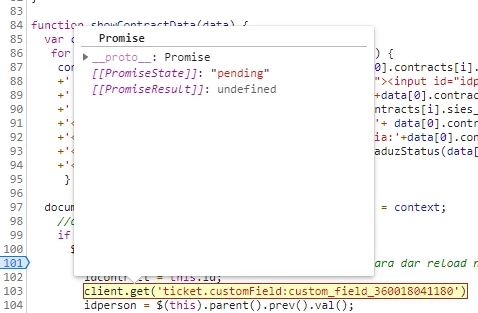
Hello, I´m trying to set a value on a custom field

But it´s returning a Promise

I got the ID from the top page
Any help, please?


Tks!


mccabe.tonna

@Administradores IZA

Set or get?

If you're trying to set a value you need to include what value you're trying to set - zafClient.set('ticket.customField:custom_field_360018041180', value)

but a Get could look like the following if you want to store to a var - i use this method below to get multiple values at once

client.get(['ticket.customField:custom_field_360018041180']).then(function(data){

     let value = data['ticket.customField:custom_field_360018041180']

})


  • January 26, 2021

Thank you McCabe!! Worked perfectly!!!


mccabe.tonna

@Administradores IZA

Great!, you can add multiple objects within that get function [array], then when setting values, point each variable to each item in the array


Blog
  • March 12, 2022

@mccabe.tonna I am unable to get the value of a custom field. Following is the code I wrote. Is there something I am doing incorrectly ?

I have tried all possible ways but no luck. Basically I want to read value from one custom field and set it to another custom field. It works fine when I try to assign hardcoded string. But the get part somehow isn't fetching the field information.  


const client = ZAFClient.init();

const getAccountName = document.getElementById('get-account-name-button')

const getAccountNameFunc = async () => {
  //let myData = client.get('ticket.customField:custom_field_4614118609940')
  let myData = client.get('ticketFields:custom_field_4614118609940')
  //let myData = client.get('ticketFields')
  //client.get(['ticket.customField:custom_field_4590824941204']).then(function(data){
let myString = JSON.stringify(myData);
client.set('ticket.customField:custom_field_4731199018772', myString)
}
client.on('app.registered', function () {
});
getAccountName.addEventListener('click', getAccountNameFunc);