
Ticket Field events on read only fields | Community
Skip to main content

Ticket Field events on read only fields

  • January 11, 2022
  • 9 replies
  • 0 views

I have a few ticket fields that needs to be locked down after the ticket creation and only accessed if there is a mistake in the initial entry.  It is causing reporting issues as these fields get changed or otherwise messed up during the lifetime of the ticket.

Is there a way to fire off an onclick event on a read only field that I can then throw up a input/edit box?

9 replies

Eric27
  • January 13, 2022
Hey Ronald,

You could accomplish this by creating a small app using our apps framework. I've went ahead and built a small example application where you can see how to accomplish this. You'll need to expand on this so that it takes into account your multiple fields, but should get you started. Feel free to check it out here.
 
Hope this helps,


  • Author
  • January 13, 2022

I see where in the Manifest you change the properties of a field.  Perhaps I did not clearly state what I meant.  The agent will be entering data into the fields in question.  Once that is done, I need to lock down the fields so that they don't get inadvertently changed (which apparently happens during the life cycle of the ticket).  So it would be nice to lock them down after initial data entry and only allow editing when an extra step is done (like pressing a button or double clicking on the read only field)...

Can you maybe explain how your app helps in that way?


Eric27
  • January 13, 2022

Hi Ronald, 

I'm not sure what you're referring to in the manifest file, but the application follows the workflow you outlined.When an agent creates a ticket, they can input into the field as expected. Any other time they need to click the "Enable Field" button to be able to type. I've went ahead and added some screen recordings showcasing the functionality in the readme of the repository.


  • Author
  • January 13, 2022

My mistake.  I did not look directly into the Iframe file.  Thanks, I will look it over.


Eric27
  • January 14, 2022
No worries Ronald, let us know if you have any questions.

  • Author
  • January 18, 2022

Ok, I have a working local version, thank you very much. 

The struggle I have now is deploying to sandbox and storing the IDs for the fields.  It's currently in a settings.yml file but I am little confused about where this data resides on the host side


  • Author
  • January 18, 2022

Additionally I am getting 

validate Unsupported MIME types detected in node_modules/acorn-jsx/node_modules/acorn/bin/update_authors.sh, node_modules/babel-polyfill/scripts/build-dist.sh, node_modules/buffer/bin/update-authors.sh, node_modules/constants-browserify/build.sh, node_modules/exit/test/fixtures/create-files.sh, node_modules/watch/release.sh.

When I validate.  How do I go about fixing that?


Eric27
  • January 18, 2022

Hey Ronald,

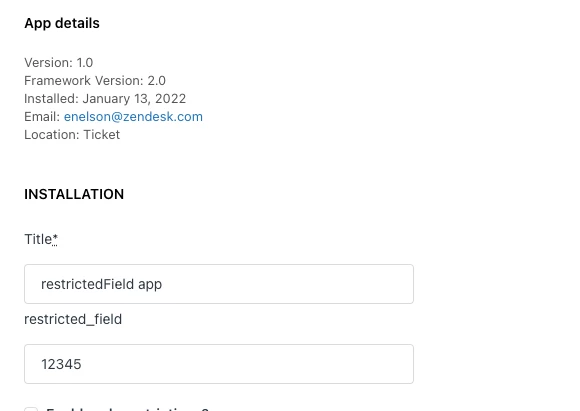
In a production environment these would be input from the settings page (which is built off the information provided in the manifest file) of your application once installed. For my app it looks like this:


As for the validation issue. The app I provided doesn't use any node modules. If you're getting this issue for that repo, I'd assume you're running the command against the wrong directory.  

Have a wonderful day!

Eric Nelson
Senior Manager, Developer Advocacy


  • Author
  • January 18, 2022

OK, got it