Setting a ticket field on ticket creation with Classic Web Widget | Community
Skip to main content

Setting a ticket field on ticket creation with Classic Web Widget

  • September 3, 2025
  • 4 replies
  • 0 views

I have a custom checkbox field in Zendesk ticket form that I need to set to ‘True’ on ticket creation that I will later use in some triggers/automation.  I do not need the customer to see this field when submitting a ticket - i just want it to be checked by way of the Web widget submitting a ticket.  I cannot get this functionality to work and have tried everything - 


// Method 1: webWidget:set with contactForm
zE('webWidget:set', 'contactForm', {
   'customField:1234567891011': true
});

// Method 2: webWidget set with contactForm  
zE('webWidget', 'set', 'contactForm', {
   'customField:1234567891011': true
});

// Method 3: Event listener for widget open
zE('webWidget', 'on', 'open', function() {
   // Set custom field logic
});


Error Messages Received:

  • Method webWidget:set.contactForm does not exist
  • Method webWidget.set does not exist
  • Method webWidget.on does not exist


What is the correct API syntax for setting custom field values in the Classic Web Widget?

4 replies

Jacob20
  • September 3, 2025

Hi Josh. 

I may be able to dig up something like that, any reason you're not just using a trigger to set the checkbox on ticket creation?


  • Author
  • September 4, 2025

Thank you Jacob.  I have the classic web widget installed on 2 sites.  One of those sites is for standard product support and the other site needs to be routed to a web developer team for example.  I need a way to route tickets created by the same web widget to 2 different groups depending on what site the ticket originated from.  I do not need the box to always be checked.  I only want it checked when this specific form is submitted.


Greg29
  • September 4, 2025

Hi Josh! It's been a while since I've looked at the Classic web widget docs, but I believe what you're looking for is here. However, I don't believe that you can set values like checkboxes or dropdowns with this API. If your use case is that you just want to identify tickets from the widget, as Jacob noted above, you could use a trigger condition like Channel is Web Widget to then set the checkbox field.

If that doesn't get you what you need, could you explain your use case in more detail so that we can figure out a better solution for you?


Jacob20
  • September 5, 2025

Hey @josh23 

I wasn't able to find my old classic web widget settings, unfortunately. You may find something in the documentation that Greg shared, but I think it is probably simpler to use a trigger for your use case.

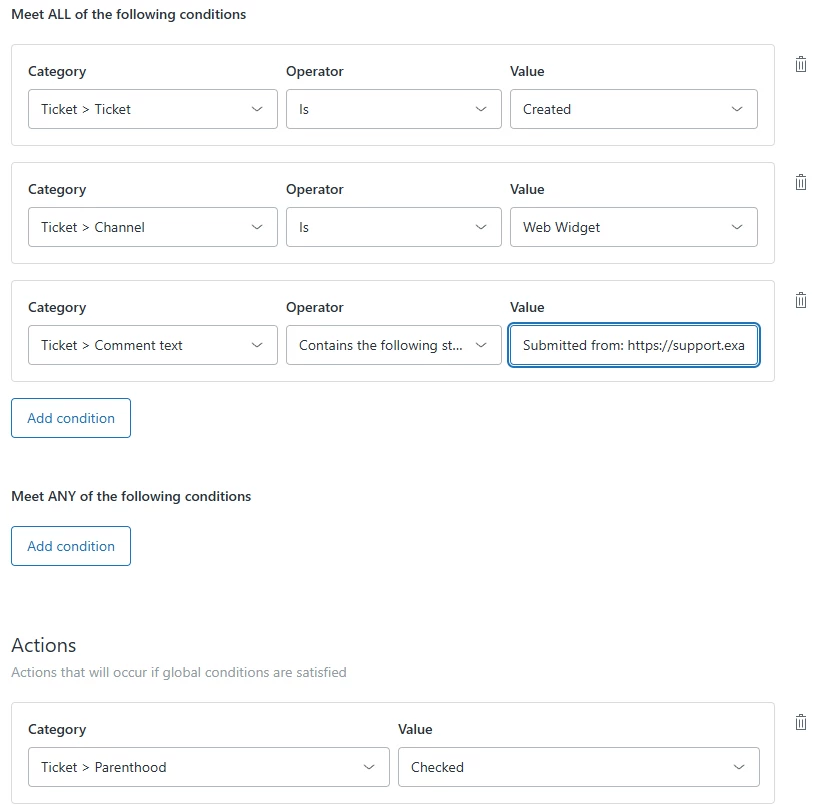
Something like the below may work. I believe the description on web widget submissions always includes the URL where they were sent from, this should let you use that as a unique string condition.


Hope that helps.