No access to customer website, despite sharing my IP address! | Community
Skip to main content

No access to customer website, despite sharing my IP address!

  • June 2, 2022
  • 7 replies
  • 0 views

Wilhelm11

Hi guys, I have a problem that I'm not sure if it's me or the customer. I get a response back via the API of the customer. In this I get a link, which I save and then open it in a new browser tab. The browser tab also opens with the correct URL, but I can't get access to the page. The customer server only allows certain IP addresses through. For this I have given him my external IP address. The customer then set up a sandbox that I should be able to access with my IP address. But this is not the case. Is there another possibility / issue in Zendesk that I may not know yet, why the page is not displayed to me? Maybe I still need to configure something in manifest.json. Am a bit stumped at the moment. I also do not use a proxy! At the moment I can only imagine that the customer something does not fit with the release. At the moment the website to be opened shows me only the following.

The website is not reachable ... has refused the connection.
Try the following:

Check connection
Check proxy and firewall
ERR_CONNECTION_REFUSED


Can someone help me with this?

7 replies

Eric27
  • June 2, 2022
Hey Wilhelm,

Can you share the code snippets of how you're trying to access this API? This will help us to be able to debug more effectively. 
 
Thanks!

Wilhelm11
  • Author
  • June 2, 2022

Hi Eric, 

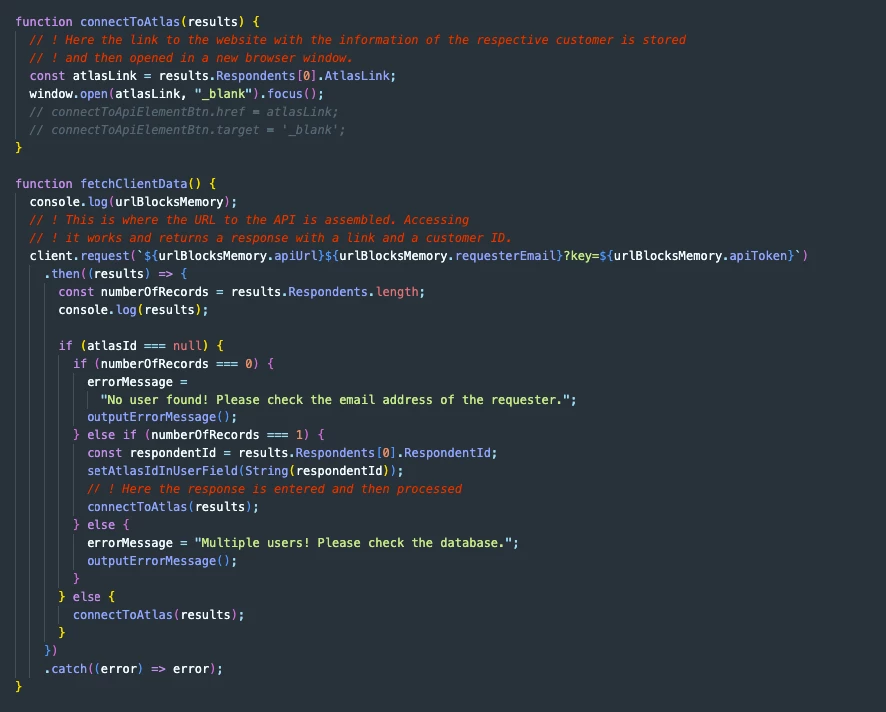
here are the code snippets.


Wilhelm11
  • Author
  • June 2, 2022

As I said, access to the API works. The URL itself is specified in the manifest.json as a parameter. The API token for access is currently specified there as well. Later, our customer should enter the token himself when installing the app. Via the API I get a link as response, which should be opened in the browser. And exactly that does not work. A new browser window with exactly this link opens, but the window then says that the customer website does not allow access. I just want to know if it is possible that I have to set something else in the Zendesk app? At least our customer says that the release to the website is released for me.


Eric27
  • June 2, 2022
Hey Wilhelm,

As you're doing this request via a Zendesk app, it's not your ip that's making the request - but the Zendesk servers. Then when the request URL is opened in a new browser window it'd use your IP. I'd assume that the customer's website is disallowing access as the IP address is different than the one making the request. As far as the Zendesk side, everything looks to be functioning as expected. Without knowing the customer's set up, it's tough to say for certain - though you may want to have them whitelist the Zendesk IP's as well.

Hope this helps!

Wilhelm11
  • Author
  • June 2, 2022

Great, thank you Eric. I'll try it out tomorrow. If it works, I will also give feedback so that others with similar problems can also solve this.

Thank you so much.


Wilhelm11
  • Author
  • June 3, 2022

Hi Eric, did I understand you correctly? Our customer might want to whitelist the Zendesk IP's as well, since that is what they are configuring.


Eric27
  • June 3, 2022
Hey Wilhelm,

That's correct! Let me know if there is anything else I can answer for you.

Thanks