
I have a number of forms in Zendesk using custom fields into which I am attempting to pass liquid markup values, as I've seen in a number of other community posts. However, I am not seeing the same results.
Date to date, as seen here:
Using PUT with the /api/v2/tickets/{{ticket.id}}.json endpoint.
{
  "ticket" : {
    "custom_fields": [
      {
        "id": 123,
        "value": "{{ 'today' | date: '%F' }}"
      }
    ]
  }
}
Zendesk's response:
{"error":"RecordInvalid","description":"Record validation errors","details":{"base":[{"description":"Appointment Date: is invalid","error":"InvalidValue","ticket_field_id":123,"ticket_field_type":"FieldDate"}]}}Troubleshooting for the above:
- Sending "value": "2023-01-12" updates the field.
- The liquid value {{ 'today' | date: '%F' }} appropriately renders 2023-01-12 in a ticket comment.
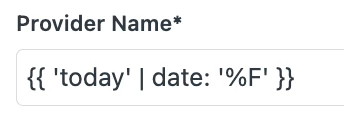
- Sending the above to a text field yields the liquid markup as plain text (see below).
- This can be replicated in other custom fields, where liquid markup does not seem to be accepted even when it works appropriately elsewhere.
- Also having this issue with user field to custom field as seen in this comment.
Any help is greatly appreciated. Feeling like I'm missing something obvious.
Are you running this test on a live test ticket via trigger? Or are you do so with a custom payload using the Test Webhook feature?