Hide Category from Search | Community
Skip to main content

Hide Category from Search

  • September 28, 2022
  • 2 replies
  • 0 views

Anis

Hello sir,

I want to hide the video category, when doing a search. is there a way to do that?
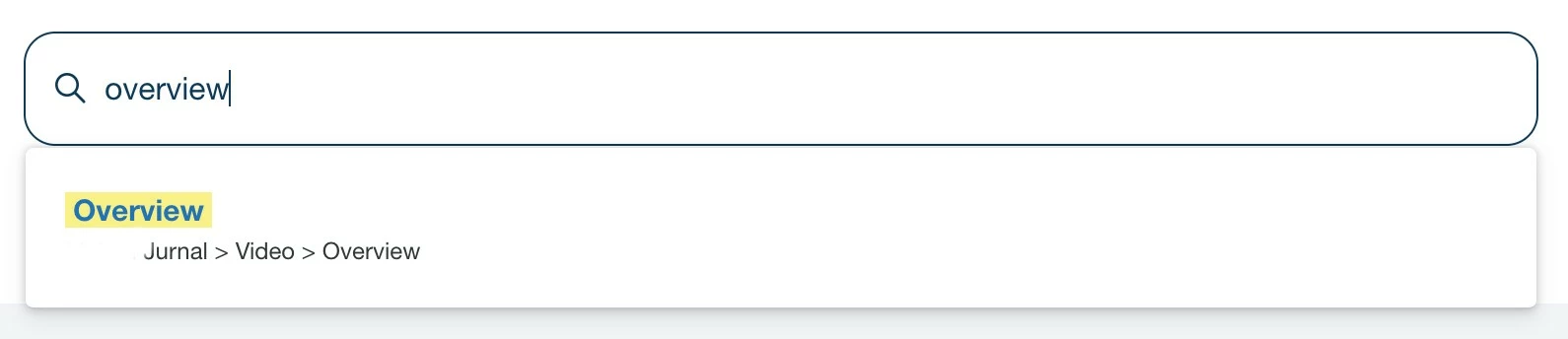
so those related to the video category, will not appear in search results.

Thank you!

2 replies

Jack23
  • September 28, 2022

If you are using jQuery you might have something like this:

  MutationObserver = window.MutationObserver || window.WebKitMutationObserver;
  let observer = new MutationObserver(function(mutations, observer) {
        for (const mutation of mutations) {
        if (mutation.target.nodeName === 'ZD-AUTOCOMPLETE') {
        for (let element of $('zd-autocomplete-breadcrumbs-multibrand')) {
              // If you want to change what category to hide just change "Video" to the category name
              if ($(element).html().includes('Video')) {
                  $(element).parent().hide()
              }
          }
        }
      }
  });

  observer.observe(document, {
    subtree: true,
    attributes: true
  });

This sets up a new mutation observer which will check when the DOM (the structure of the page) changes, it looks at those changes and checks to see if any of them are the autocomplete elements which get added when entering a value into the search box. 

Then we check to see if the HTML content of the breadcrumbs in these elements matches the string we are looking for (in your case "Video") if it matches then we simply just hide the parent container. 


Anis
  • Author
  • October 4, 2022

Hello Jack,

thank you for your help! I will try it.

I'm so confused because if I'm using manual search, I need to get one by one the categories that I want to show