Creating Tickets with Tickets API with attachments | Community
Skip to main content

Creating Tickets with Tickets API with attachments

  • March 10, 2022
  • 15 replies
  • 0 views

Chris46

Hey all, I'm trying to use the Tickets API to include attachments. Long story short, we're using Microsoft Power Apps forms that create SharePoint List Items, which then create the ticket in Zendesk via the API. I'm having an issue with 

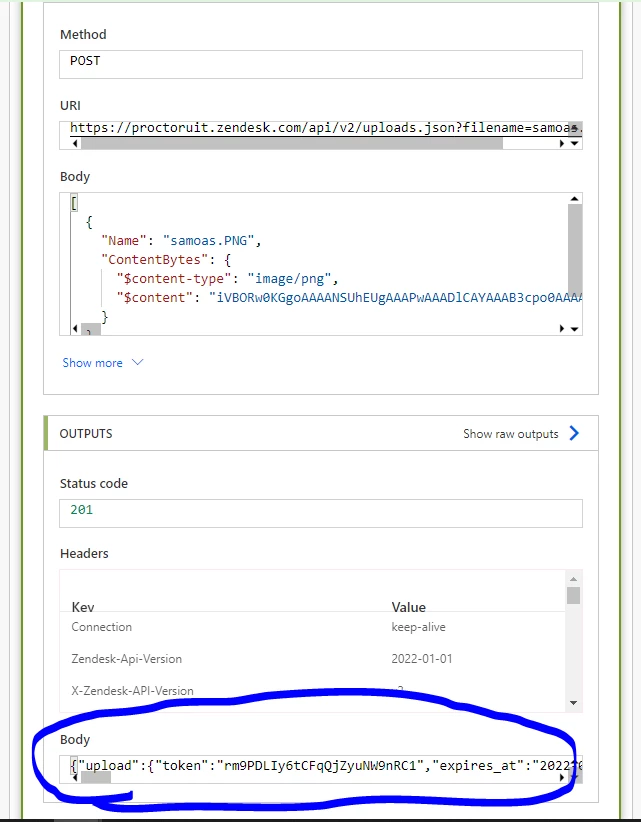
Initially, I'm calling the Uploads API and am successfully getting the token back. In the 'Uploads' image I included you can see that the content-type and content is getting passed in for the token. 

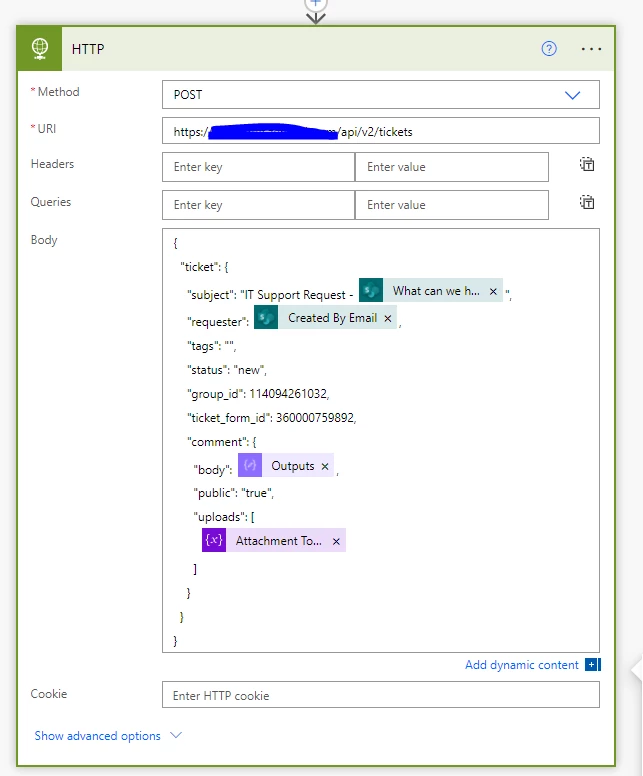
My final API call to the Tickets API looks as follows. When I go into Zendesk and view the ticket, I can see the filename as it should as an attachment, but when I click on the attachment to open it, I get "It appears that we don't support this file format". This particular attachment is an PNG, and we do support them.

{
  "ticket": {
    "subject": "IT Support Request - Name Change",
    "requester": "cgreen@meazurelearning.com",
    "tags": "",
    "status": "new",
    "group_id": 114094261032,
    "ticket_form_id": 360000759892,
    "comment": {
      "html_body": "Requestor: Chris Green\nEmail: cgreen@meazurelearning.com\n\nRequest Reason:\nName Change\n\nSummary: \nTesting Attachments\n\nDetailed Description:\nI'm testing attachments\n\nWhat office are you associated with? \nBHM - Hoover",
      "public": "true",
      "uploads": [
        "rm9PDLIy6tCFqQjZyuNW9nRC1"
      ]
    }
  }
}

Any thoughts? Thanks in Advance!


15 replies

Chris46
  • Author
  • March 10, 2022

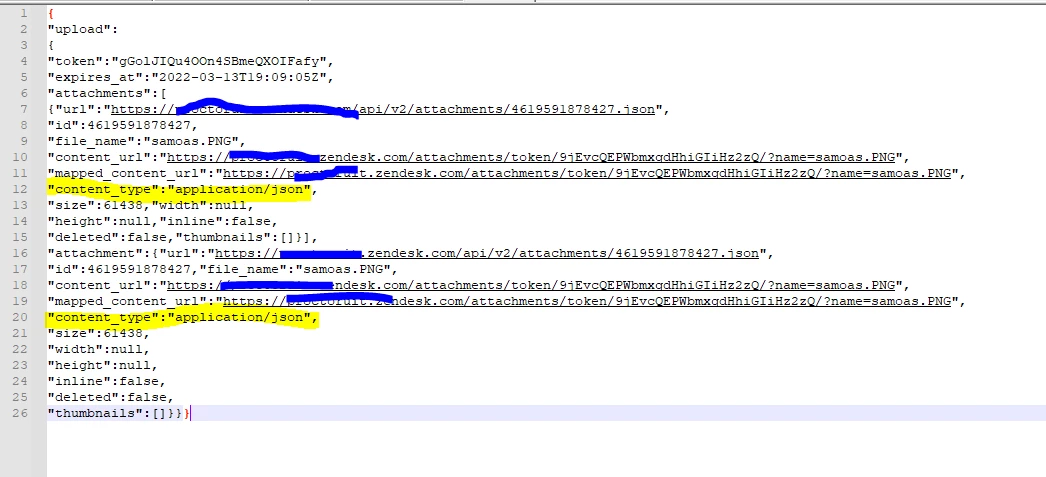
More on this....so what I'm seeing when when I do my POST to the Uploads API, I'm passing the Name and ContentBytes which show my file name and image/png file (you can see this in my 2nd screenshot above), however when I get my response back, it's showing my upload as a content type of "application/json", opposed to "image/png".


  • March 15, 2022
Hi Chris,
 
Are you by any chance linking to image hosted externally? I did some testing and I only seemed to see this issue come up when using an image hosted externally. When uploading from your local device or in this case sending the upload request pointing to the image file locally it returns the correct content-type. Also when creating the request and setting the content-type to application/binary instead, you'll be covering your bases regardless of the image file type.
 
Hope this helps!
 
Best,
 
Erica - Dev Support

Chris46
  • Author
  • March 15, 2022

Changing the content-type to application/binary seemed to help the issue with the file type, however, I'm still having the issue of Zendesk saying the file is not supported. I actually found a related article of a few others having the exact same issue with no apparent resolution - https://support.zendesk.com/hc/en-us/community/posts/4409515246234-API-Upload-File-?page=1#community_comment_4456058475418


Chris


  • March 16, 2022
Hey Chris,
 
Thanks for sharing the related post. That is actually quite helpful. Let me take a deeper look into this and see if I can get some more info and I'll get back to you.
 
Best,


Chris46
  • Author
  • April 6, 2022

Any updates on this? 


  • April 8, 2022
Hi Chris! 
 
Appreciate your patience and I truly apologize for the delay. I have looked into it and so far no issues seem to be triggered when using the appropriate content-type. Christopher (another member of our Developer Support team) did share a variation to this breakdown here. I definitely recommend giving his suggestion as shot as well. He also included additional documentation that will hopefully help you diagnose the error.
 
Please don't hesitate to let us know if you're still hitting any blockers!
 
Best,
 
Erica

Chris46
  • Author
  • April 19, 2022

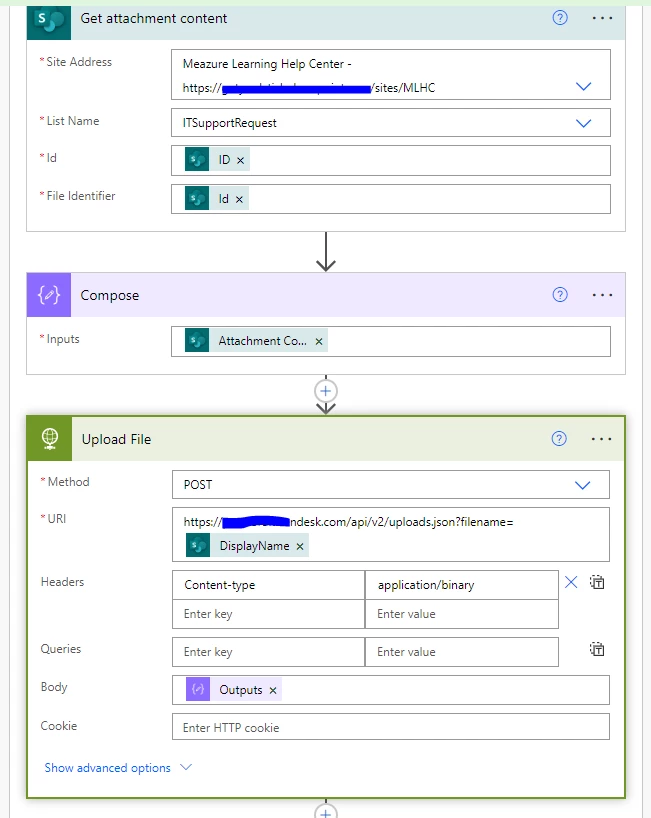
I was able to get this to work! I actually didn't need to convert my attachment content to Binary, so Power Automate must do that for me. I simply took the 'Attachment Content' and provided that as the body of my call to the 'Uploads' API. Previously, I was providing an array that consisted of the File Name and File Content. 


  • April 19, 2022
Hi Chris,
 
That's awesome! I'm glad you were able to resolve this.
 
Also, I really appreciate you following back up with your solution and providing that insight.
 
Best,
 
Erica

Gurinder
  • April 27, 2022

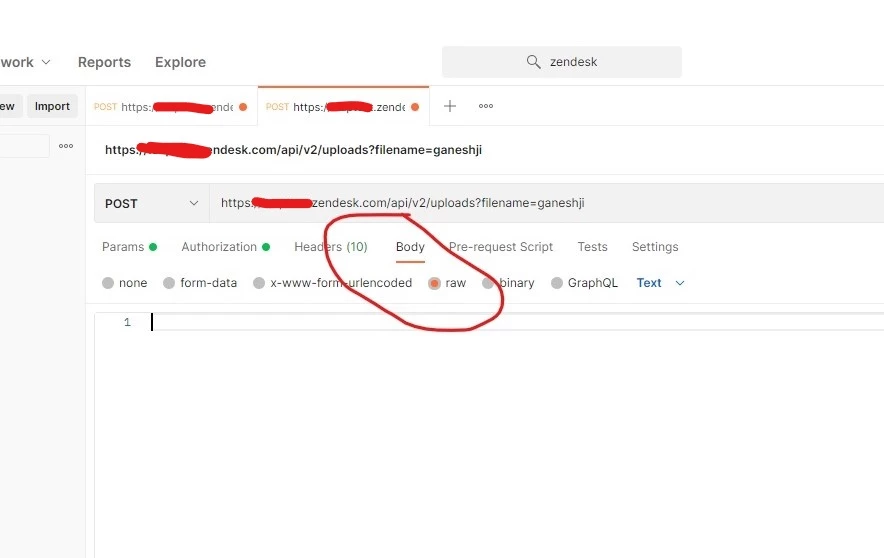
@chris46 can you please tell me how to do this is postman with json body.


Chris46
  • Author
  • April 27, 2022

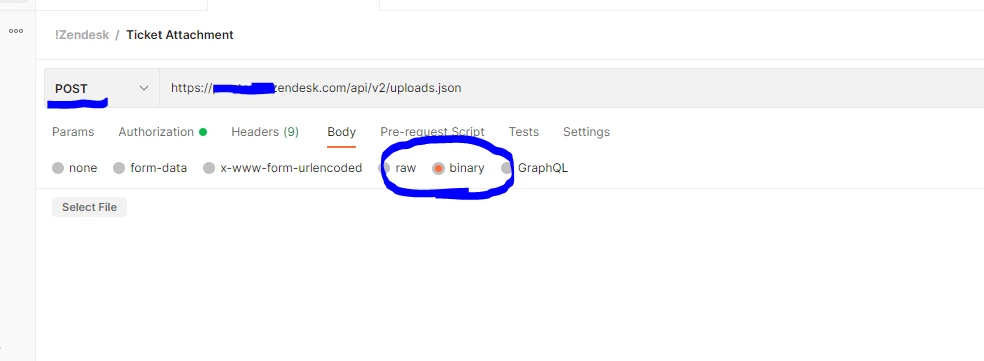
@gurinder - In Postman, all you do is select the 'Body' as "binary" and select your file. The response will return your token, which you can then use to add to your ticket. See below..... do you need to see the call to add the token within a ticket comment? 


Gurinder
  • April 27, 2022

@chris46 First of all thanks for your immediate response. Actually I want to send request in json format (in raw tab). I was already done with binary tab but i am not able to send request in json format.


Eric27
  • April 29, 2022
Hi Gurinder,

Attachments can only be created using binary. We don't allow them to be created from a json payload. We have a nice step by step guide that you can follow here.

Gurinder
  • May 3, 2022

@eric27 then how can we send binary using code.


Eric27
  • May 3, 2022
Hey Gurinder,

We provide a tutorial on how to do this in the link that I provided. Another option if python isn't your thing. Put the request in to postman, choosing the binary tab and adding the file. Then if you open up the "code" tab in the far right (</> icon) you'll be able to see a code snippet in a variety of different languages that you can use to make the request. 

Thanks!

Benessa
  • August 16, 2022

Hello @eric27, sorry for hijacking this thread, but I am currently stuck and I desperately need some help.

I am currently developing an app that has 2 fields, a file upload field that allows multiple files and a text area.

Here is the current status of the app:

  • I was able to create a private comment using the value inputted on the text area
  • I was able to get the token when I uploaded the files using the Upload API

The next goal is for all the files to be attached to the ticket. I am using this as my reference and on the examples, only 1 file is attached to the ticket comment.

Can you help to confirm if it is possible to attach multiple files/images to 1 ticket comment? If yes, can you point me in the right direction?

Thank you,