Change text switching language | Community
Skip to main content

Change text switching language

  • September 2, 2022
  • 4 replies
  • 0 views

Anis

Hello Everyone,

I want to ask, can I change the text in switching language with the icon?
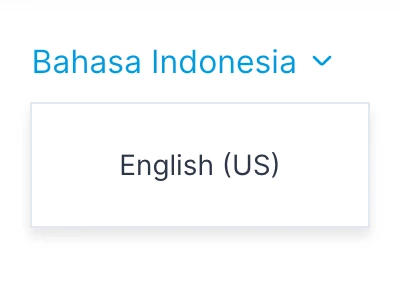
Thank you!

4 replies

Tipene
  • September 2, 2022
Hey Anis,
 
Sorry I'm not quite following what you're hoping to do. Would you mind going in to more detail about what you'd like to see?
 
Thanks!
 
Tipene

Anis
  • Author
  • September 3, 2022

hello @tipene

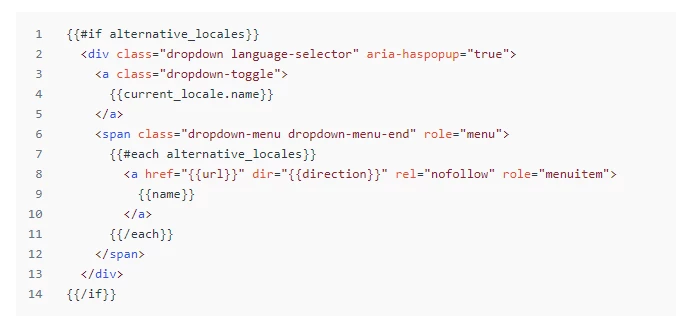
i have dropdown translate, but im following a template like

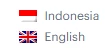
im confused how can i add other icon , like this picture in my switch language


Thank you!


Tipene
  • September 6, 2022
Hi Anis,
 
Thanks for clarifying that for me!
 
One way you could go about this is by using the #is helper to check the name of the dropdown item language, and display the name and flag based on the result. Here's an example of how that could look:
 
    {{#if alternative_locales}}
<div class="dropdown language-selector" aria-haspopup="true">
<a class="dropdown-toggle">
{{current_locale.name}}
</a>
<span class="dropdown-menu dropdown-menu-end" role="menu">
{{#each alternative_locales}}
<a href="{{url}}" dir="{{direction}}" rel="nofollow" role="menuitem">
{{#is name 'Bahasa Indonesia'}}
<div class="language-item">
<img src="{{asset 'id_flag.png'}}" alt="Indonesian Flag"/>
<p>Bahasa Indonesia</p>
</div>
{{/is}}
{{#is name 'English (US)'}}
<div class="language-item">
<img src="{{asset 'us_flag.png'}}" alt="US flag"/>
<p>English</p>
</div>
{{/is}}
</a>
{{/each}}
</span>
</div>
{{/if}}
 
You'll need to add the flags as assets in your help center and update the file path in the assets helper. You'll also need to add some custom CSS to the language-item class in order to have the flag image appearing similar to the screenshot above.
 
I hope this helps!
 
Tipene

Anis
  • Author
  • September 12, 2022

Hello sir @tipene

Thank you for your help! I will try it. 

It works for the selector. can I add a dynamic image here or not?

<a class="dropdown-toggle">{{current_locale.name}}</a>

so before the selector dropdown. I can see the flag and language text


Thankyou !