Applying macros in the create ticket POST request? | Community
Skip to main content

Applying macros in the create ticket POST request?

  • March 4, 2022
  • 9 replies
  • 0 views

It seems that with the API, macros can only be applied to existing tickets. I'm trying to set up a process where a ticket gets created with a macro already applied (the macro includes a comment template, which I would like to be the first comment of the ticket). This can be done manually through the Zendesk portal, but is there a way to do this through the API in the create ticket POST request?

Thanks for the help!

9 replies

Tipene
  • March 4, 2022
Hi Mohammad,
 
Thanks for reaching out!
 
To apply a macro to a new ticket, you will first need to call the GET /api/v2/macros/{macro_id}/apply endpoint which will return the changes the macro would make to a ticket. You'd then extract those changes and include them in the request to the POST /api/v2/tickets endpoint when creating the ticket. Here's a link to the docs which goes in to a bit more detail:
I hope this helps! Feel free to reach out with any questions.
 
Tipene

  • Author
  • March 4, 2022

Thank you for the quick and helpful response!


Rafael20
  • May 2, 2022

Additionally, we can include the Macro's ID in the ticket's macro_id field, so that it shows on the ticket audits.


M64
  • November 14, 2022

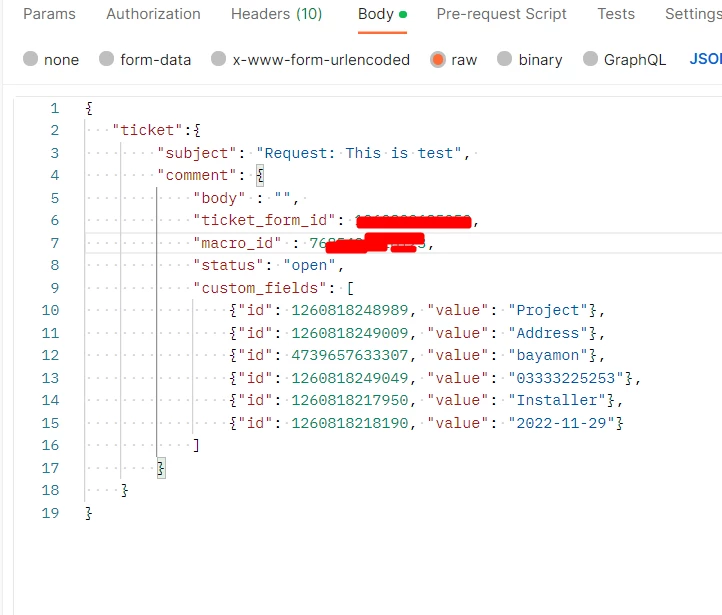
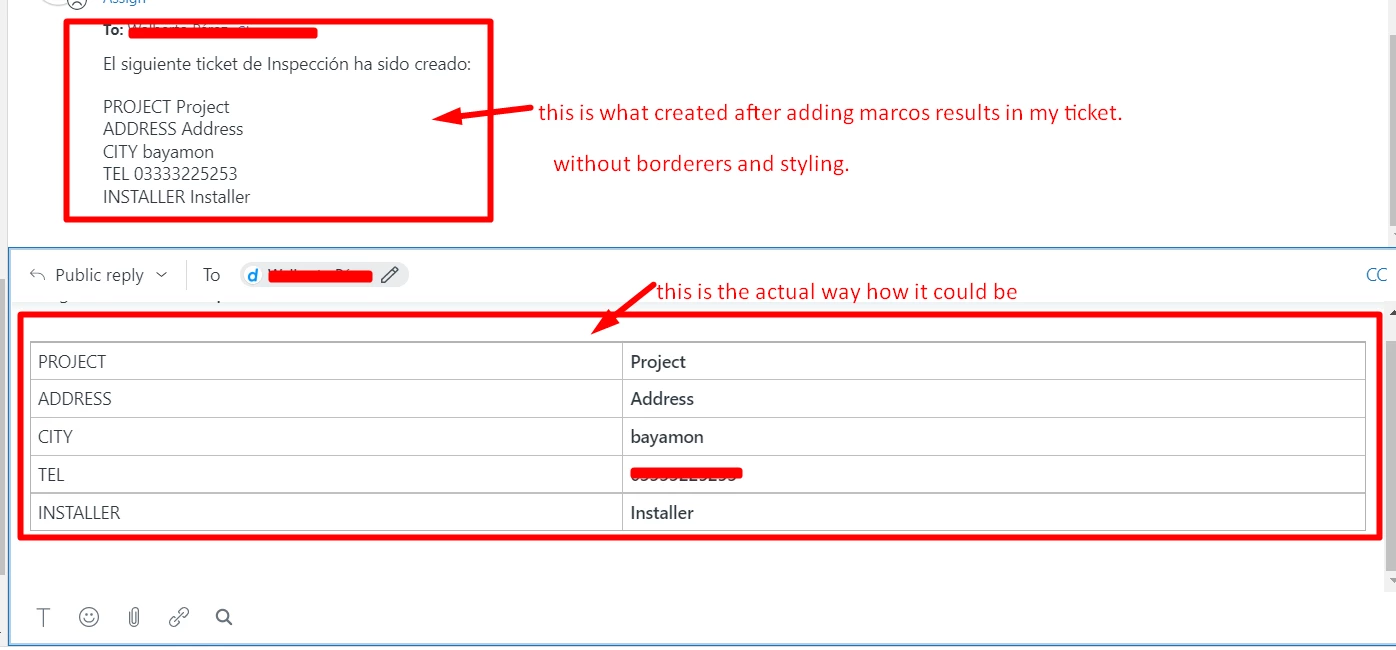
i have added marco (body) in my ticket it has created like this. @rafael20 im also adding marco id in ticket but its not including this. can you help me how can i include marcos in my ticket thanks.

@Mohammad Aarij @Tipene Hughes

POSTMAN 

ADMIN AREA OF ZENDESK


Hi Ibrahim,
 
To format the body of the ticket comment in your update ticket request, use the html_body property instead of the body property.  For reference, we have a breakdown of the different types of comment bodies in our developer docs.

Rafael20
  • November 18, 2022

@m64

Your ticket elements should be inside the ticket object, not the comment.
Something like the following:

{
  "ticket": {
    "subject": "Request: This is test",
    "comment": {
    "body": "This is test"
    },
    "ticket_form_id": 123456,
    "macro_id": 760000,
    "status": "open",
    "custom_fields": [
      { "id": 123456, "value": "foobar" },
      { "id": 654321, "value": "foobiz" },
      { "id": 986765, "value": 3.14159 }
    ]
  }
}

My personal preference for comments follows @christopher53's suggestion, as html_body allows prettier customization.


M64
  • November 18, 2022

Rafael Santos thank you dear im doing in same way now but its still not adding marco.

 
Christopher Kennedy i tried to pass html_body but it just added code what i sent will test it again. thanks to both of you giving your feedback.

  • November 12, 2024

@tipene and @rafael20 

We are trying to insert an attachment via trigger + webhook, which is not possible, but it is possible in the macros. We are trying to apply the macro via trigger+webhook as mentioned above, but we noticed that the attachments have a token + exiption which can only be used once per ticket.

How can we apply this type of macros via API?


{
    "result": {
        "ticket": {
            "fields": null,
            "collaborator_ids": [],
            "follower_ids": [],
            "comment": {
                "body": "<p>Macro Test Attachment </p>",
                "html_body": "<p>Macro Test Attachment</p>"
            },
            "upload": {
                "token": "BvGz0Z***************",
                "expires_at": "2024-11-15T14:18:52Z",
                "attachments": [
                    {
                        "url": "https://********.zendesk.com/api/v2/attachments/27735639529751.json",
                        "id": 27735639529751,
                        "file_name": "stepbystep.pdf",
                        "content_url": "https://********.zendesk.com/attachments/token/********************",
                        "mapped_content_url": "https://*******.zendesk.com/attachments/token/**************",
                        "content_type": "application/pdf",
                        "size": 375865,
                        "width": null,
                        "height": null,
                        "inline": false,
                        "deleted": false,

                        "thumbnails": []
                    }
                ]
            }
        }
    }
}


Rafael20
  • November 12, 2024

@ms49 The ticket attachment flow via API is described in this Developer documentation page: