White, hidden text string at the end of public reply to new ticket | Community
Skip to main content

White, hidden text string at the end of public reply to new ticket

  • March 23, 2023
  • 6 replies
  • 0 views

Kevin47

Hello,

When I create a public reply to a new ticket in Zendesk Support, an 11-character alphanumeric text string, with a dash after the 6th character, enclosed by brackets is appended to the end of the email in the requester's inbox. It doesn't appear in my Zendesk support ticket, only in the end user's email.

This text doesn't appear in Channels > Email, HTML template, but is inserted after the  {{content}} <div> tag, before the close of the <body> tag, within its own <span> tag. What is the purpose of this text?

View in requester's Gmail inbox:

View of the email, with cursor highlighting:

6 replies

  • March 27, 2023
Hi Kevin,

The 11-character alphanumeric text string you see at the bottom of your email is system generated and is being used for threading incoming email replies into existing tickets. This will allow for proper threading even in the event that the header information is stripped entirely.
 
It is written in white font by default so it would blend in with the email's background thus making it "invisible" to users to avoid any confusion.

I hope this answers your question. Thank you!
 

Kevin47
  • Author
  • March 27, 2023

Thank you!


  • February 12, 2024

Hi @gabriel32, i reopen that thread cause i want to use that string to pilot a email to a ticket.

I explaind better:
I have a kind of tiket where the users should answer with standard messages like, for example,  "Continue", "Stop" and "Need to check".

For this kind of ticket, i've added 3 links "mailto" in the body of the answer , but the answer create a new ticket and is not concatenate to the original ticket.
If i could use that "String" it should concatenate the original ticket, right?

Thanks


Paolo14
  • February 13, 2024
Hi Admin Zendesk,
 
If the "mailto" address does not contain the thread ID(11-character alphanumeric text string) or message ID, it will indeed create a new ticket. The threading logic from an email is based on RFC standards. All of the lines for In-Reply-To and References should contain unique values. If one of these lines uses a static message-ID or email address, Zendesk will thread incoming emails into the same ticket.
 
To answer the question, yes, you would need that string for the reply to thread in the original ticket and not create a new one.
 
Best,
Paolo | Technical Support Engineer | Zendesk

Josh72
  • January 31, 2025

We have a non-white email background and now this alphanumeric string is more obvious. Can we modify the color?


Rj22
  • June 28, 2025

Hi Josh <@josh72 >,

You can change the font color for the encoded_id from white to any color you prefer by customizing your email template. 

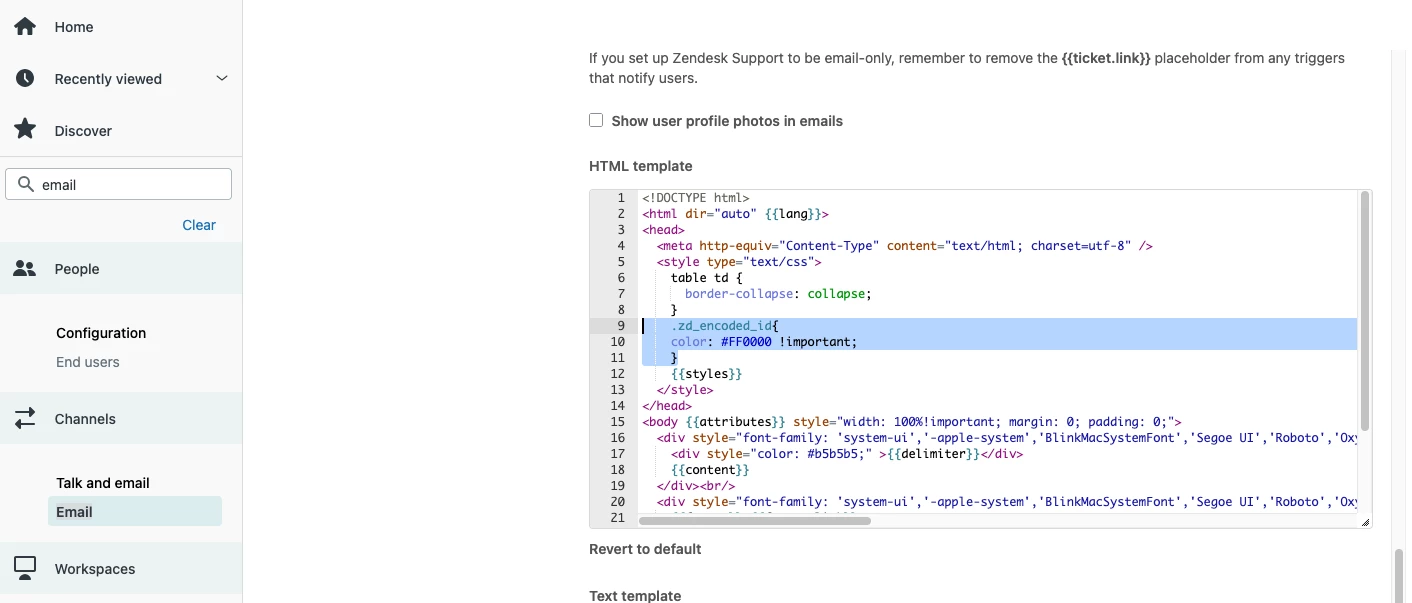
Please add this style inside the <style> tag in your email template:

.zd_encoded_id {  color: #FF0000 !important; }


Here’s how it should look:


The #FF0000 code sets the color to red, but you can change it to any color you prefer. Please make sure to keep the !important part so the style stays fixed and is applied correctly. Also, kindly don’t forget to click the “Save” button at the bottom right corner of the email settings to save your changes. Thank you!