Update Field for Customers | Community
Skip to main content

Update Field for Customers

  • April 30, 2021
  • 6 replies
  • 0 views

We want to give a field to our customer which they can update after the ticket has created.

This topic has been closed for replies.

6 replies

  • May 10, 2021

Hi Shahid! You can accomplish this by creating an end-user facing custom ticket field. When creating the ticket field, make sure to select the Editable for end users option in the Permissions section.


  • Author
  • May 10, 2021

But once the ticket is created the End user cannot edit any field. We want to give them a field which they can add/update after the ticket creation not before.


  • May 11, 2021

HI Shahid. I apologize but it isn't currently possible for end-users to update ticket fields after ticket creation. If you have a moment, please share your desired workflow in a Product Feedback post. Sorry about that!


  • Author
  • May 11, 2021


  • May 12, 2021

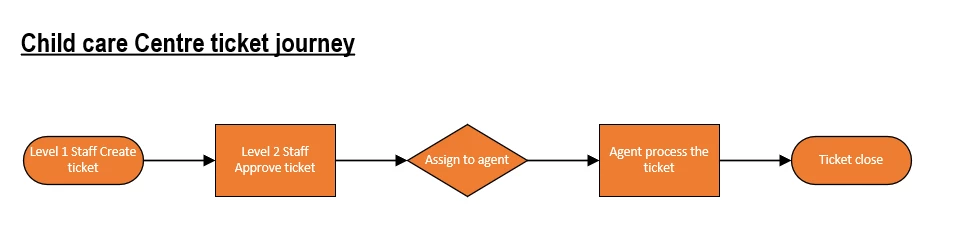
Hi Shahid! Thanks so much for that diagram of your workflow. If you have a moment, can you browse to Feedback on Support click New Post and add this diagram to a new post that very briefly explains your use case for wanting your end-users to be able to add or update ticket fields after ticket creation? Our Zendesk product managers regularly review the Product Feedback posts in that forum.


  • May 12, 2021

You also may want to consider using Zendesk Light Agents as part of your workflow. Light agents do have the ability to edit ticket properties for tickets they're requesters on after the ticket is created. You can read more about Light agent permissions in this Understanding and setting light agent permissions article.