Trigger an action based on ticket creation date | Community
Skip to main content

Trigger an action based on ticket creation date

  • February 15, 2024
  • 7 replies
  • 0 views

Abdelhameed

I want to create a trigger that track the ticket creation date so that if it's for example between 10 pm to 8 am it will assigned to certain group and viewed in certain group , how can we do that whether internally or by using Plugin from the market place ?!

7 replies

Jacob20
  • February 15, 2024

Hi @abdelhameed ๐Ÿ‘‹

You could use a combination of triggers and schedules to achieve that.

You'll need

  • A schedule that divides your workdays into scheduled and unscheduled times,
  • A trigger that sets this ๐Ÿ‘†initial schedule upon ticket creation,
  • A trigger that sets the Group you want the ticket to go to within scheduled hours, and
  • A trigger that sets the Group you want the ticket to go to outside of scheduled hours.
  • (Optional) you should have schedules for each of those groups as well and triggers that set them after the initial schedule has determined if creation is within or outside of scheduled hours.

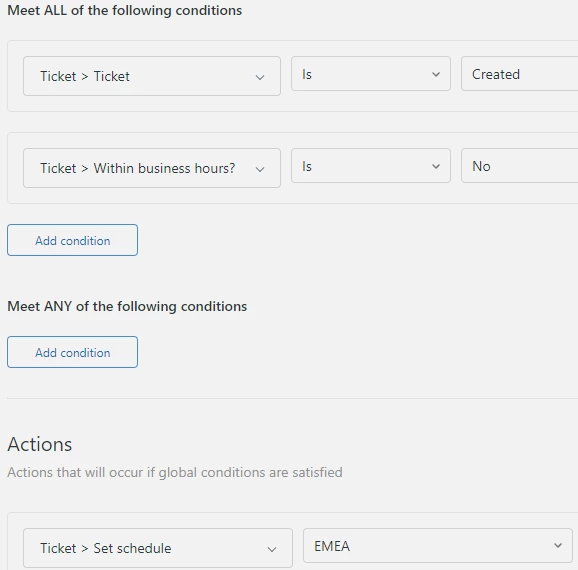
Here ๐Ÿ‘† the "Initial schedule" is set upon ticket creation, a trigger below checks if the ticket has been created outside of business hours and in this case sets the "EMEA" schedule - you could set the group in the same action, but I would opt for a separate trigger per action.

This is an example trigger to set the second schedule


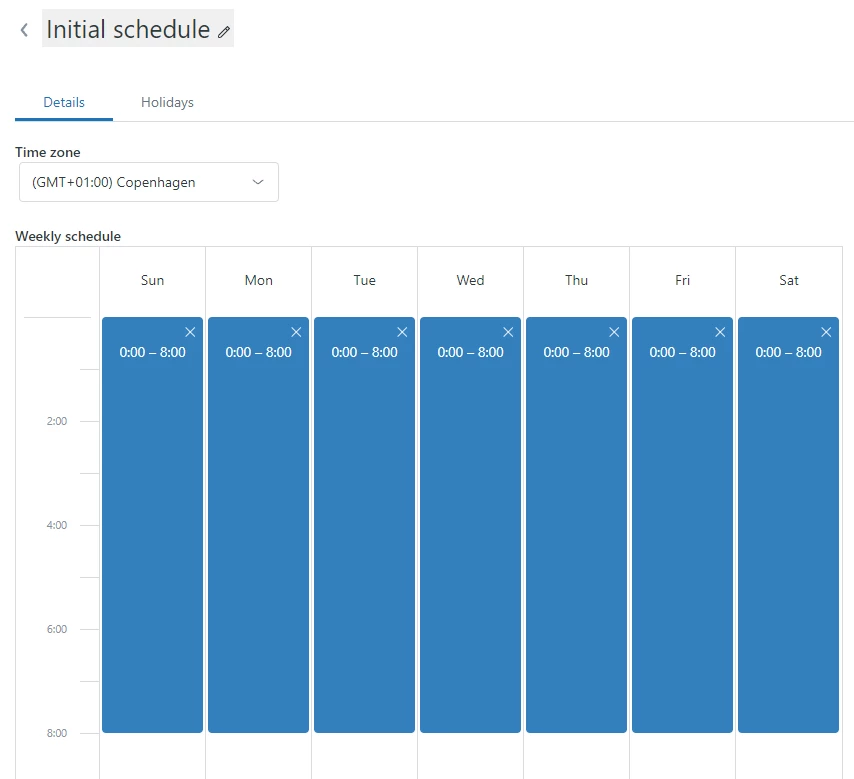
This is the initial schedule: 


If you have more than two time slots you need to route based on, then you could have multiple initial schedules that further refine the scheduled ours.

I hope this helps you out, please let me know if you have questions or need more details.


Brandon12
  • February 15, 2024

I second the workflow so accurately captured by @jacob20!


Stephan12
  • February 16, 2024

Hi @abdelhameed,

The above mentioned topics are great. In case you would like to have another option, please have in mind that automations are also a possible way to change the group of tickets. In fact the opening hours are the best way in order to organize the time based routing and I would also recommend to use a trigger.

Regards, 

Stephan


Abdelhameed
  • Author
  • February 18, 2024

Hello @stephan12 @brandon12 @jacob20 Thank you for your response , I have another question is it possible to do in Team Plan ? one way or another 


Brandon12
  • February 19, 2024

Hey @abdelhameed -

Unfortunately business schedules is only available in the Growth plan or higher.  Without this feature, Zendesk doesn't have an accurate way to capture time, without going through webhooks that grab system time and putting them into custom fields.... That being said, the easiest solution might be to just code into your auto-responder "Requests made after 8PM will be answered on the next business day."  Hopes this helps!

Brandon


Stephan12
  • February 19, 2024

Oh, Brandon already mentioned the availability. Especially the Enterprise Suite will offer you the possibility to add more plans you can work with.

Regards, Stephan


Abdelhameed
  • Author
  • February 25, 2024

Yes Thank you @brandon12 @stephan12