Text from Ticket Comments in Bulletpoints disappears when being copied to Side Conversations | Community
Skip to main content

Text from Ticket Comments in Bulletpoints disappears when being copied to Side Conversations

  • December 10, 2021
  • 6 replies
  • 0 views

Hi all,

We have noticed the problem that if you copy text from a ticket comment into a side-conversation, any text that is listed in a bulletpoint in the ticket comment does not get copied into the side-conversation. It just isn't there.

It's strange as both the ticket comment and side-conversation support text formatting with bulletpoints, but seemingly there is a formatting discrepancy between the two bulletpoint implementations.

Do you have any information regarding this for us?

Thank you in advance.
Cedric

6 replies

Jacob20
  • December 10, 2021

Hi Cedric,

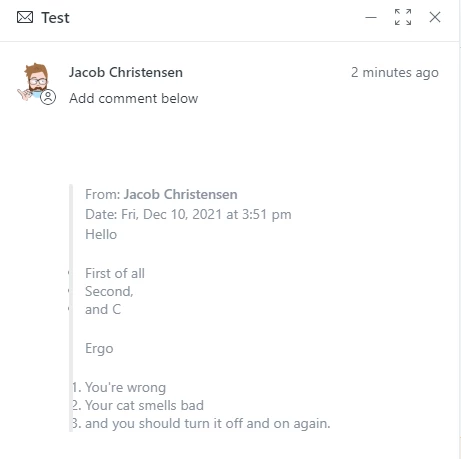
I just did a test, and I see what you mean. However, the formatting is there and is being sent along, and most likely also received that way on the other end.

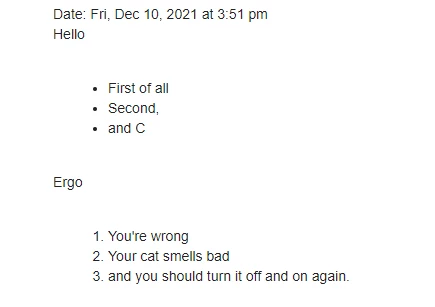
Email as seen from the receivers end:


In the agent interface, it looks like bullets are being obscured slightly by the vertical gray line, but the formatting is there.

I hope this helps.


  • Author
  • December 10, 2021

Hi Jacob,

Thank you so much for your quick answer. I'm not sure, whether your tests actually reflect our problem. The odd thing is, if I write a ticket comment from scratch with bullet points and copy them to the side-conversations, it works fine. However, if I copy text from Word that includes a bullet point into a ticket comment and from there into a side-conversation, the bullet point text gets removed.

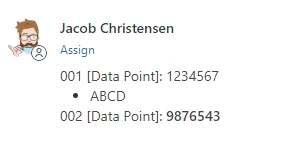
I have added an exemplary test case below and hope you can reproduce. Otherwise, I have to question my sanity. Could you copy the text below into a side conversation and see if the ABCD text gets displayed? It should work in a regular ticket comment.

Best,
Cedric


001 [Data Point]: 1234567

  • ABCD

002 [Data Point]: 9876543


Jacob20
  • December 10, 2021

Hi Cedric,

I couldn't reproduce the issue you mention, but I know from other systems that Word document formatting can be problematic.

Pasting your snippet in a ticket comment works as expected for me.


  • Author
  • December 13, 2021

Hi Jacob,

Thank you for giving this another test round. I was wondering, if it also works in side conversations for you or 'just' the ticket comments? Because on our end the ticket comments are fine as well. That's the odd part.

Would be wonderful if you could give this one last test round, so I have closure whether it's on our end or whether Zendesk handles the formatting differently in side-conversations and ticket comments.

Warm regards
Cedric


  • Author
  • January 10, 2022

Hi there,

I was wondering if there is an update in this matter?
Have you gotten around to check whether the text snippet works in side conversations as well or whether it's 'just' in regular ticket comments?

Thank you in advance.

Warm regards,
Cedric


Sabra
  • January 19, 2022

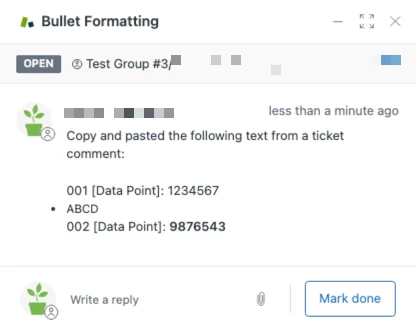
Hey Cedric! I copy and pasted the text snippet you provided into a ticket comment. I then copy and pasted the snippet from the ticket comment into a side conversation. I saw the same behavior as Jacob -- the bullets were obscured to the left -- but the text was still there. 

I got the same result when copy and pasting the text snippet from your comment into a side conversation.