Text before ticket form fields? | Community
Skip to main content

Text before ticket form fields?

  • January 5, 2021
  • 9 replies
  • 0 views

I've searched for this and found some similar threads, but I can't quite find what I'm looking for.

We have a submit a request form for customers who can't find the answer to their questions. At the moment it's just a form of fields without any introduction text - which would be very handy to set the scene of what our support function can/can't help with.

Is there a way of adding some wording/links below the "Submit a request" header, and before the form fields?

Thanks

9 replies

Kyle25
  • January 7, 2021

Hi Rich,

If I understand your request, there is absolutely a way to do this. You would have to modify the code, however. On my theme, I have renamed the "Submit a request" to  "Submit a Ticket" but you can have it named whatever. 

To Add Text:

  1. Open the Guide section.
  2. Click the eye icon (for Customise Design).
  3. Click Customize on the theme you want to change.
  4. Click Edit Code at the bottom-right.
  5. Open the new_request_page.hbs section.

Your current code might look something like this:

<h1 class="page-header">
Submit a Ticket
{{#if follow_up}}
<span class="follow-up-hint">
{{follow_up}}
</span>
{{/if}}
</h1>
<br>
<div class="form">
{{request_form}}
</div>


You would just need to add text in the desired area like this:

<h1 class="page-header">
Submit a Ticket
{{#if follow_up}}
<span class="follow-up-hint">
{{follow_up}}
</span>
{{/if}}
</h1>
<br>
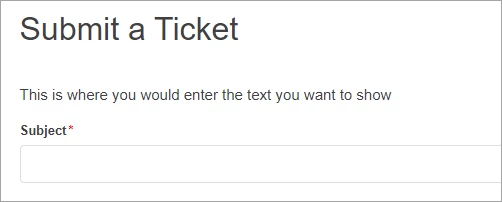
<p>This is where you would enter the text you want to show</p>
<div class="form">
{{request_form}}
</div>


Feel free to just copy and paste this or use it as a reference but it should give you what you are looking for. I used <p> but you can use any type of text if you want different sizes. 

Hope this helps! 


Kyle25
  • January 7, 2021

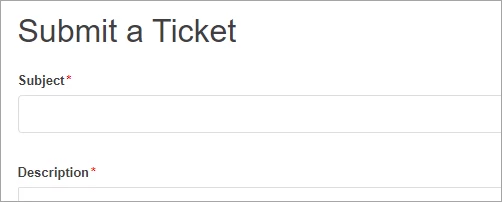
This is what it looks like with the first bit of code:


And this is what it looks like with the second bit of code:


  • Author
  • January 7, 2021

Thanks so much kyle - this is exactly what I've been looking for!


Kyle25
  • January 7, 2021

Perfect! Glad I could help! 


Anastasia11

Hi guys,


Could anyone advise how we can do this for only one/specific form? 


Thanks,

Anastasia


  • July 11, 2022

Hi @anastasia11

Did you ever find a solution for this? I have the exact same requirement.

Thanks,

Moz


Anastasia11

Hi Moz,

No, we didn't found any proper solution for this yet and this is the reason why we have changed our approach in submit a request forms. I think that you can get help from 3rd party recourses with this (check "Lotus themes" for example i'm sure they can do this for you).

Regards,

Anastasia


Samantha23

@kyle25 – this is so helpful!  Is there a way to add a condition to display this code specific to the ticket form ID? This would give the ability for different introductory guide text to be shared specific to the form being completed in the help center.


Kyle25
  • July 16, 2025

@anastasia11 @morris12 @Sam


I see a few comments about doing this for specific forms. 


Can you make conditions and changes for specific/different forms? I'd imagine the answer is yes. I recently started playing around with the same goal for my side, but had to put it on hold and haven't been able to get back to messing around with it. The main issue is the form structure is hidden within the “{{request_form}}” part. You can explode it to be the actual code, but I wasn't able to get it to function the exact same. If I ever get to play around more and can find an answer, I'll update this thread, but the idea is, instead of using {{request_form}}, you would use something like:

<div class="form">
<form id="new_request" class="request-form" data-form="" data-form-type="request" action="/hc/en-us/requests" accept-charset="UTF-8" method="post"><input name="utf8" type="hidden" value="✓" autocomplete="off"><input type="hidden" name="authenticity_token" value="[hidden]" data-hc-status="ready">

<div class="form-field select optional request_ticket_form_id"><label for="request_issue_type_select">Please choose a request type below</label>
<a class="nesty-input" tabindex="0" aria-haspopup="true" aria-expanded="false" aria-controls="_12sk1kg8d" aria-label="Please choose a request type below" style="max-width: 100%;">Technical Support</a><select name="request[ticket_form_id]" id="request_issue_type_select" aria-label="Please choose a request type below" autofocus="autofocus" style="display: none;">

<option data-url="https://[your url]/hc/en-us/requests/new?ticket_form_id=1260813112410" selected="selected" value="1260813112410">Technical Support</option></select></div>

<div class="form-field string required request_anonymous_requester_email"><label for="request_anonymous_requester_email">Your email address</label>
<input type="text" name="request[anonymous_requester_email]" id="request_anonymous_requester_email" aria-required="true">
</div>

<script type="text/html" id="upload-template">
<li class="upload-item" data-upload-item>
 <a class="upload-link" target="_blank" data-upload-link></a>
 <p class="upload-path" data-upload-path></p>
 <p class="upload-path" data-upload-size></p>
 <p data-upload-issue class="notification notification-alert notification-inline" aria-hidden="true"></p>
 <span class="upload-remove" data-upload-remove></span>
 <div class="upload-progress" data-upload-progress></div>
 <input type="hidden">
</li>
</script>
</div>
<footer><input type="submit" name="commit" value="Submit"></footer>
</form>
</div>


This looks a lot more intimidating than it is. The sections broken down are:

This is just to get things started with the form:
<div class="form">
<form id="new_request" class="request-form" data-form="" data-form-type="request" action="/hc/en-us/requests" accept-charset="UTF-8" method="post"><input name="utf8" type="hidden" value="✓" autocomplete="off"><input type="hidden" name="authenticity_token" value="[hidden]" data-hc-status="ready">

This is the drop-down to select the form:
<div class="form-field select optional request_ticket_form_id"><label for="request_issue_type_select">Please choose a request type below</label>
<a class="nesty-input" tabindex="0" aria-haspopup="true" aria-expanded="false" aria-controls="_12sk1kg8d" aria-label="Please choose a request type below" style="max-width: 100%;">Technical Support</a><select name="request[ticket_form_id]" id="request_issue_type_select" aria-label="Please choose a request type below" autofocus="autofocus" style="display: none;">

This is the form you select (where you'll grab the ID):
<option data-url="https://[your url]/hc/en-us/requests/new?ticket_form_id=1260813112410" selected="selected" value="1260813112410">Technical Support</option></select></div>


This is the field where it's asking for information, since this is just an example, I removed all others, only asking for email address, but the others would follow the same idea:
<div class="form-field string required request_anonymous_requester_email"><label for="request_anonymous_requester_email">Your email address</label>
<input type="text" name="request[anonymous_requester_email]" id="request_anonymous_requester_email" aria-required="true">
</div>


I don't know exactly what this part does, but it's part of the “makes it work” code, so best to include it:
<script type="text/html" id="upload-template">
<li class="upload-item" data-upload-item>
 <a class="upload-link" target="_blank" data-upload-link></a>
 <p class="upload-path" data-upload-path></p>
 <p class="upload-path" data-upload-size></p>
 <p data-upload-issue class="notification notification-alert notification-inline" aria-hidden="true"></p>
 <span class="upload-remove" data-upload-remove></span>
 <div class="upload-progress" data-upload-progress></div>
 <input type="hidden">
</li>
</script>
</div>


And finally, this is the Submit button:
<footer><input type="submit" name="commit" value="Submit"></footer>
</form>
</div>


In theory, you should be able to do some kind of:

{{if}} ticket_form_id=1260813112410

(enter the code you want as the ‘condition’)


With it entered like this instead of just the “{{request_form}}”, it opens up a lot more flexibility to modify things how you want them. 


I know this isn't an answer, but hopefully it helps in any way.