Setting Agent Status in Support | Community
Skip to main content

Setting Agent Status in Support

  • February 13, 2024
  • 5 replies
  • 0 views

We would like to have a group of Email - Support only agents. They will not interact with customers via phone nor chat. 

We have not identified a way to for these agents to select/change a status as we do not wish to use the phone/chat status feature. 

How do email-only agents login and toggle statuses?


5 replies

Stephan12
  • February 14, 2024

Hi Dee, 

I think you have a couple of possibilities. 

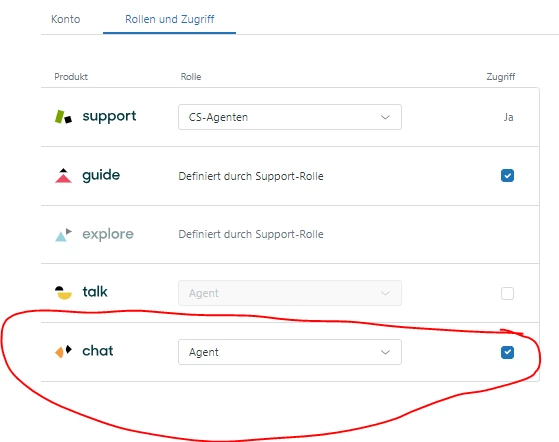
1. You can limit the agents role to have only access to mails (see below picture).


2. Only the agents who are allowed to use chat can set their status on "online".

3. You can use trigger & skills in order to settle things. You can add internal skills like "Chat" or "Mail" in order to manage the channels and the incoming chat comunications f.e..

Regards,

Stephan


Brett13
  • Community Manager
  • February 14, 2024

Thanks for jumping to help out here @stephan12!


  • Author
  • February 14, 2024

Thanks Stephan. We'll let you know how that works for us.


Steve25
  • February 14, 2024

Hi Dee,

What we do for our email only position is to create an agent status that has email as online and phone+messaging/chat as offline. Then you can toggle between that and the default away status. 

Best,


  • Author
  • February 14, 2024

Interesting. That would work also. TY Steve!