
Hi - we have noticed that when a user “reacts” to an email notification it updates the ticket. This adds an unnecessary comment to a ticket, adds to comment reporting counts and if a ticket has been set to solved or pending it re-opens the ticket. The last two are concerning as it adversely impacts reporting (reporting of additional invalid comments and add to ticket resolution time respectively). Is there a way to ignore email reactions?
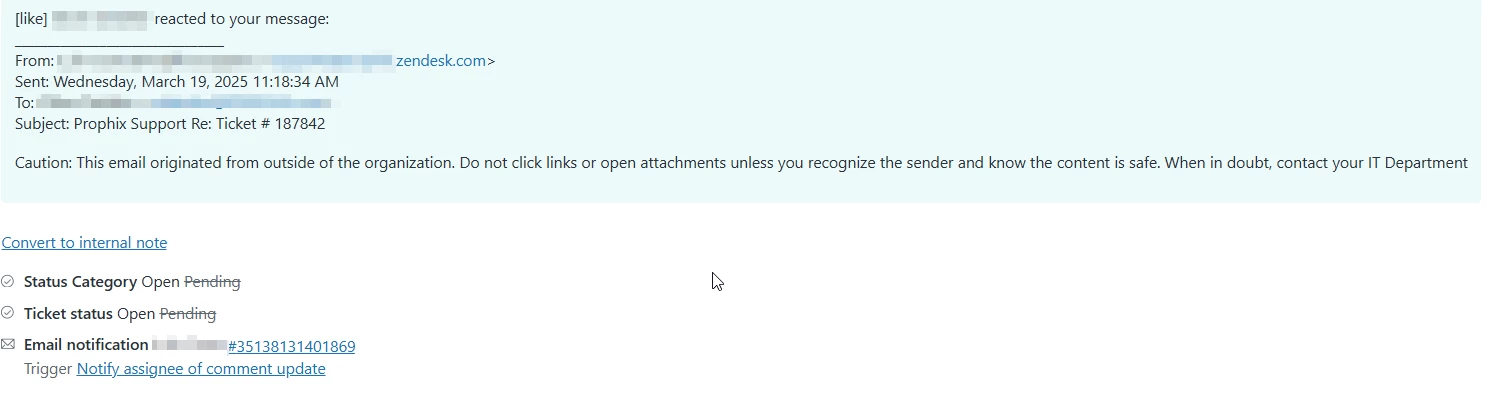


Thank you for bringing this up — this is a great observation, and I can understand how the automatic ticket update triggered by email reactions could affect reporting accuracy and resolution metrics.
At this time, Zendesk doesn’t have a native setting to automatically ignore or filter out reaction-based updates that come through email notifications (for example, when recipients “like” or “react” to a message in certain mail clients). These reactions are processed as standard inbound email replies, which is why they appear as new comments and can re-open tickets.
That said, there are a few possible workarounds you can consider:
-
Use reporting filters in Explore to exclude these comments from resolution metrics by ignoring updates tagged with your reaction filter or automation tag.
-
Coordinate upstream email handling with your mail system admin — some organizations route inbound replies through filters that can suppress system-generated responses before they reach Zendesk.
Our product team is aware that these types of reaction events can introduce noise into workflows, and your feedback helps strengthen the case for more refined handling in future updates.Thank you again for raising this! I'd log this thread as a product feedback note so the team can review it further.