
Internal notes do not work - always shown as public as well | Community
Skip to main content

Internal notes do not work - always shown as public as well

  • February 12, 2019
  • 7 replies
  • 0 views

I would like to present Zendesk tomorrow to our call center, the issue is therefore quite urgent:

The content of my public reply and the internal note are always the same. Whenever I change the text in the internal note it also gets transmitted to my public reply. I don't want that. I want to write a public reply and have a separate internal note that is not sent to the customer.

Here's a video of the problem:
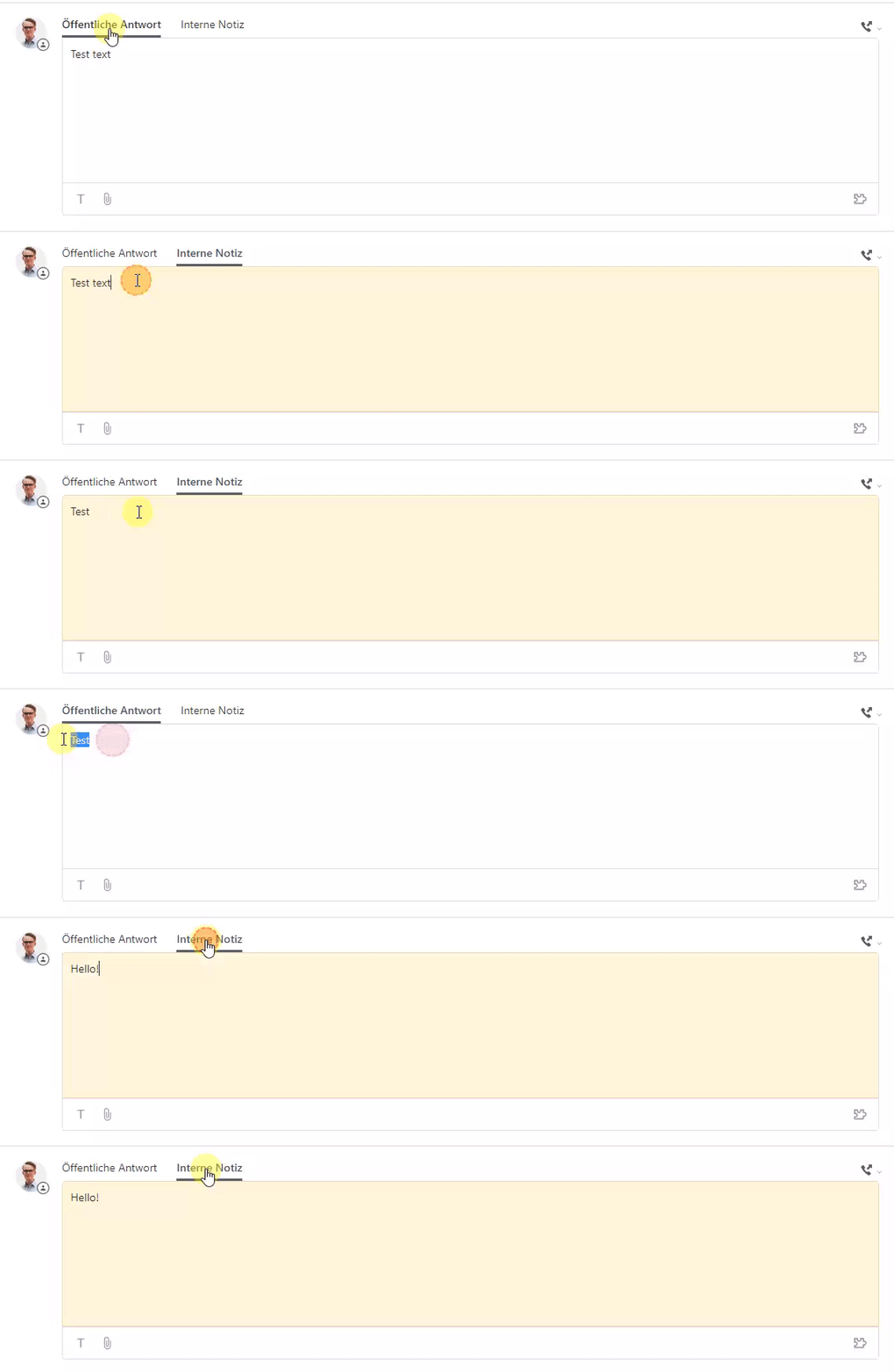


Edit: I checked out this post: https://support.zendesk.com/hc/en-us/community/posts/360004400468-Question-about-how-to-use-Internal-Notes-on-Starter-plan - The same question as mine, but the answer doesn't solve my problem. I tried different E-Mails and submitted the tickets with internal notes. The internal notes are always included in the public reply...


This topic has been closed for replies.

7 replies

Dan28
  • February 12, 2019

Hi Nik, 

This is working as intended.  The buttons at the top are toggles to allow you to switch the type of comment you are making right now.  You can only submit either a public or internal note when you click submit, not both.


EDIT: I did not see your edit, the answer I provided above is the same as I provided on the link you added.  If you can show the Ticket Events where you are seeing this behavior, it may help us see if there is anything else going on.  Also, are you doing any other steps when you are submitting? Some macros or apps can change the type of comment from private to public so it's possible something else could be going on and submitting publicly instead of privately. 


  • Author
  • February 12, 2019

Ah, I understood now. I actually have to submit an internal note. The UX is a bit confusing here from my point of view, especially because I would like to see all the internal notes at a glance and not scroll down the entire history.

Thank you very much for your answer! Topic solved.


Dan28
  • February 12, 2019

I'm glad to hear that worked. 

You can click on the Internal option just below the comment box to focus on Internal notes as well. Sometimes the context of seeing Public and Internal is important, so this will give you some options. 


  • February 12, 2019

There is also a private note ticket sidebar app that allows you to make a private note and public comment without refreshing the page, but you'd need a higher plan for that I think.
You still have to save the comment.
We also have an app coming that can trigger a pop up at ticket solving that prompts for a private note.


  • July 30, 2019

Hi Andrew, 

what is the name of the sidebar app you mentioned in the previous comment? I'm trying to find a way to be able to make a public and a private note in the same time (without refreshing). 

Thanks in advance. 


  • July 31, 2019

HI Lea,

I think the App you're talking about is this one.

https://www.zendesk.com/apps/support/private-comments/


Chris


  • July 31, 2019

Hello Lea, the one Chris links is the one I had in mind.