How to restrict ticket field to specific group | Community
Skip to main content

How to restrict ticket field to specific group

  • April 4, 2022
  • 6 replies
  • 0 views

Vamshi11

I want to restrict a ticket field updation to sepcific group? 

6 replies

  • April 5, 2022

Hi @vamshi11 - Are you referring to restricting what group of users can update specific ticket fields on a ticket?

If so, the Ticket Field Manager app should help solve for this. You can install it here (https://www.zendesk.com/marketplace/apps/support/223753/ticket-field-manager/) or learn more about it here (https://support.zendesk.com/hc/en-us/articles/4408893441818-Installing-and-using-the-Ticket-Field-Manager-app).

You can also do a few other things like hiding specific fields for certain groups as well.


Ally12
  • October 3, 2022

How can I hide specific fields for certain groups? I'm not seeing a way and I'd like to have a couple fields that are for administrators only. 


  • October 3, 2022

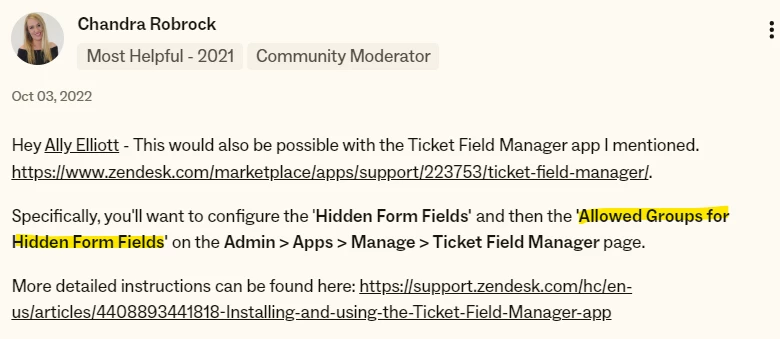
Hey @ally12 - This would also be possible with the Ticket Field Manager app I mentioned. https://www.zendesk.com/marketplace/apps/support/223753/ticket-field-manager/.

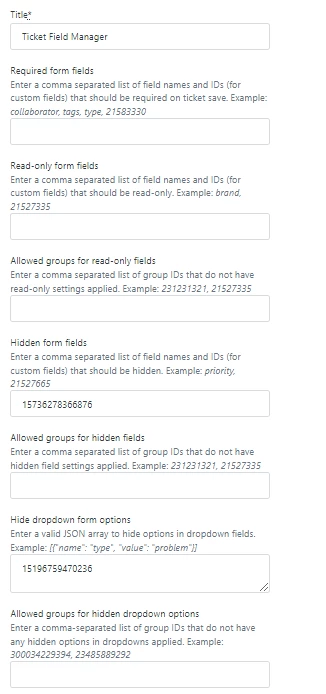
Specifically, you'll want to configure the 'Hidden Form Fields' and then the 'Allowed Groups for Hidden Form Fields' on the Admin > Apps > Manage > Ticket Field Manager page. 

More detailed instructions can be found here: https://support.zendesk.com/hc/en-us/articles/4408893441818-Installing-and-using-the-Ticket-Field-Manager-app


Ally12
  • October 3, 2022

I didn't realize you were referring to the app. Thanks so much! 


Sarah96
  • March 27, 2023

Pretty disappointed in the "ticket field manager" apps. They don't actually work. I'll see the field still there after enabling restriction and then it goes away after a few seconds. Not necessarily the best solution.


  • September 5, 2024

Hello, I want to create a field only avaialble to one certain group, I tried to follow your instrucionts BUT the app does not have the option you describe, please advise