How to remove the "External" from the subject | Community
Skip to main content

How to remove the "External" from the subject

  • February 23, 2024
  • 8 replies
  • 0 views

Hello everyone,

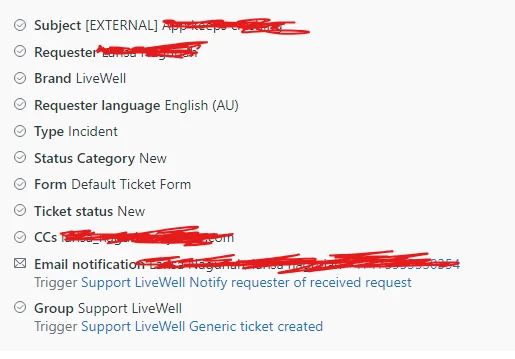
When users send e-mail to us outside our aplication, Zendesk add an "External" word in the subject, and this is blocking us to configure some triggers, because all "outside" e-mails that arrive with the "External". Zendesk recognize that the user's language is English, please, see below and example


Could someone help us to make Zendesk do not this anymore ?

8 replies

Heather13
  • February 23, 2024

Hi @danilo11

I have a feeling this is actually in your IT's email configuration. This doesn't look like a Zendesk thing.


  • Author
  • February 23, 2024

Hi Heather,

Thanks for this feedback, this situation is very strange, because since we implemented Zendesk that we face this situation

If the user use the "Get Help" section inside our app, Zendesk receives the message with our standard subjects

But, if the user contact us by an external e-mail i.e. personal address, Zendesk turn on this "External" tag

I will try to reach out out IT, to understand if they done something the past about this


Jacob20
  • February 23, 2024

Hi @danilo11 ðŸ‘‹

If you look at the first ticket event on one of those tickets, you should see any change to the subject that is being made. 

It is possible that this is not something a Zendesk trigger is doing, perhaps your IT setup does this for all inbound emails coming from outside your organization?


Jacob20
  • February 23, 2024

Note to self: Refresh page before adding a reply 😊 


Brett13
  • Community Manager
  • February 23, 2024

Thanks for jumping in to help here @jacob20 and @heather13!


  • Author
  • February 23, 2024

Thank you Jacob, for this guidance

I looked here, and the Zendesk recognizes as EXTERNAL since the beginning

We are trying to understand why this is happening, and how to change it, so we would be able to configure our triggers and automations better, setting a standard flow

This is what I received when I clicked on ticket events


Jacob20
  • February 28, 2024

Danilo.

It just occurred to me if all you want to accomplish is to prevent the "external" text from going out to the requester, you can fix that in the notification trigger. By default, it may use the ticket subject in the email notification, but it doesn't have to, you can insert another text and or placeholders.


  • February 28, 2024

Danilo, 

@jacob20 is correct.  You can resolve this in the notification trigger.  Text or another placeholder get this taken care of for you