How To Change The "From" Address For The Zendesk Support Email? | Community
Skip to main content

How To Change The "From" Address For The Zendesk Support Email?

  • October 25, 2021
  • 5 replies
  • 0 views

Dane11

I've configured the Zendesk support address to be support@example.zendesk.com (replace "example.zendesekcom" with the organization's actual Zendesk domain name) in the email channel settings.  However, I can't seem to edit the information in the "What Customers Will See In Their Inbox" section.  So, instead of emails from Zendesk appearing to come from "support@example.zendesk.com", they come from my personal work address, JohnDoe@example.com.  I've tried making a new support address, but it auto-populates that incorrect information and doesn't let me change it.

How can I change the "From" address to the Zendesk support address, instead of my personal email address?

Thanks.

5 replies

  • October 26, 2021

Hi @dane11,

Did you already set up your support email address in Zendesk? If not, this Zendesk article will explain to you the steps. 

You mentioned you were using your personal work address. I assume this was an example, as I would advise strongly against using your personal work address for support. 

Hope this helps.


Dane11
  • Author
  • October 26, 2021

Hello, and thanks for the reply.

Yes, I have configured the support email, and no, I definitely do not want to use my personal work address.  The problem is that Zendesk auto-populates my personal work address, and I can't change it.


Jenmark
  • October 27, 2021
Hi Dane,

I've created a separate ticket for your concern and kindly check the email I've sent, in gathering some details to further assist you with this. Here's the separate ticket ID: 9700255, for your reference.


Best,

Customer Advocacy Team

Katina
  • August 9, 2023

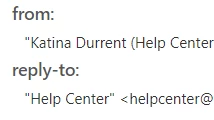
I also need my name removed from the From email. Users are constantly thinking I am working on their ticket, and I am not.


  • August 10, 2023

Hi @katina,

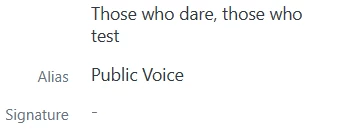
In your profile you can add an alias, so your profile name will not be displayed when you are in contact with end users (see screenshot below):


Also, in Admin > Channels > Email you can unselect 'Personalised email replies' (see screenshot below):


Hope this helps!