
How do I turn off reply-all as a default? | Community
Skip to main content

How do I turn off reply-all as a default?

  • October 4, 2023
  • 3 replies
  • 0 views

Amanda19

Currently, if someone sends a support request to our email address, anyone they've cc'd on the request automatically receives notice that a ticket has been created. I'd strongly prefer to reply to the sender, alone, with that information.

Also, if you reply to an individual sender on any one ticket, by default Zendesk CC's everyone in a reply-all. I'd really like to default to replying to the sender.

Is this something we can fix? I looked around in our rules and I don't see a setting that looks like it would cover this.

3 replies

Amie11
  • October 5, 2023

Hey @amanda19

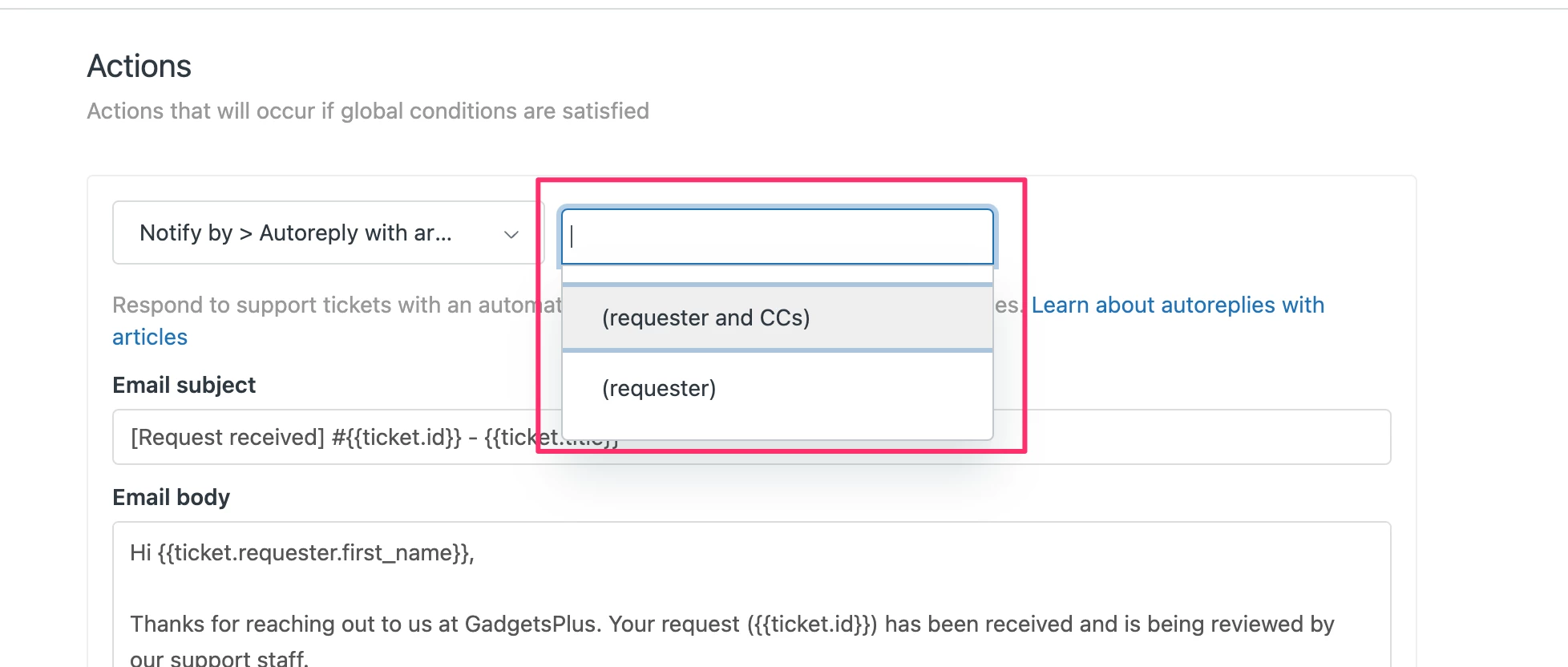
You certainly can update this inside the triggers that send out email notifications to the ticket requesters.

Inside the trigger, you can change the drop-down in the action from "requester & CC's" to "requester".


Here's also the guide on Managing Triggers. 

Hopefully this helps. :)


  • January 24, 2025

By default, a ticket sends a "reply to all." Is there an option to choose just "reply" instead? I couldn't find it exactly.


Francis14
  • January 25, 2025
Hello Samet!
 
I’m excited to let you know that I’ve created a ticket to dive deeper into this for you! Keep an eye on your inbox for an email with more details coming your way.