
Context Panel keeps Bringing Apps Up Instead of Customer Information | Community
Skip to main content

Context Panel keeps Bringing Apps Up Instead of Customer Information

  • November 21, 2023
  • 7 replies
  • 0 views

Victor19

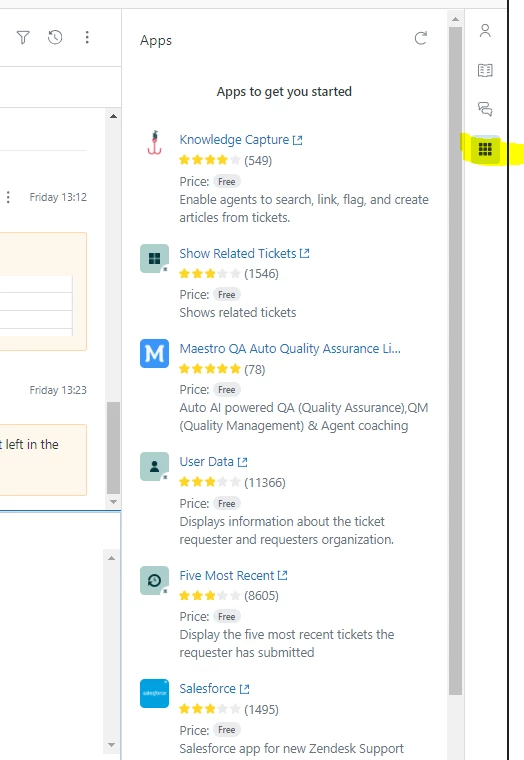
I clicked the apps portion of the context panel once to check the features.  Now every ZD ticket I open automatically opens the apps portion vs the customer information.  

Is there a way to default that back to Customer Information when opening a ticket?
7 replies

  • November 22, 2023
Hi Victor,

In order for the customer context panel to always show by default whenever you open a ticket, you have to make sure that it is the last panel opened on that section before closing your ticket tabs. That section on the right automatically opens the last panel opened before you closed the last ticket tab opened in your Zendesk. It kind of retains that certain memory and pulls it up automatically on your next session for the next ticket.
 
I hope that answers your question. Thank you!
 

Danielle21
  • November 22, 2023

Hi Gabriel, 

Thanks for the response to Victor's question, but my experience is that it is not working that way. My team doesn't use the apps panel for anything, so we are switching back to the Customer Information panel on every ticket, and that is what is showing when we submit them. And yet we continue to have the same problem that Vicor reported.


  • November 28, 2023
Hi Danielle,
 
We've been replicating this on our end, and the behavior that we're seeing is that it automatically opens the last panel opened before we close the tab or after we submit the ticket. 
 
Have you tried clearing your browser cache and cookies or try using an incognito browser If that will help? Thank you!
 

Victor19
  • Author
  • November 28, 2023

Hey Gabriel, 

As Danielle described that has not cleared the issue for me either.  I am constantly making sure I close all of my tickets under the customer information tab and still I have have tickets opening with the apps tabs being opened again and again. 


  • November 28, 2023
Hi Victor,
 
Could we ask if this is persistent after clearing your browser's cache or using an incognito browser? And did you notice if this is happening for a specific ticket channel? Thank you.


David218
  • July 9, 2025

Hi, 


I am also having the same issues and to add more light to it, it's when you start a new ticket, this then that automatically brings up the apps panel and then this remains as the area you see, instead of the customer context box when dealing with existing tickets. I also want to make it so the customer context box is the primary box as I don't use apps. 


  • September 5, 2025
Hello David,
 
Thanks for raising you feedback here. tried this as well on my test environment, and the behavior is that the right-hand section persistently stores the state of the last panel accessed prior to closing the previous ticket tab in Zendesk. Upon initiating a new session or opening a subsequent ticket, this stored state is retrieved and the corresponding panel is automatically rendered