Conditional Ticket Fields - can't setup | Community
Skip to main content

Conditional Ticket Fields - can't setup

  • June 10, 2021
  • 6 replies
  • 0 views

Mona11

I'm trying to set up conditional ticket fields so that my views have fields that are specific to the view. I don't see the three dots mentioned in the how-to. I have the professional plan, I am also the owner

6 replies

Sydney12
  • June 10, 2021

Hey Mona! I believe you have to be on "Ticket Forms" to set conditional fields. You will want to make sure the fields are added to the form you are editing.


Mona11
  • Author
  • June 10, 2021

Hi Sydney!

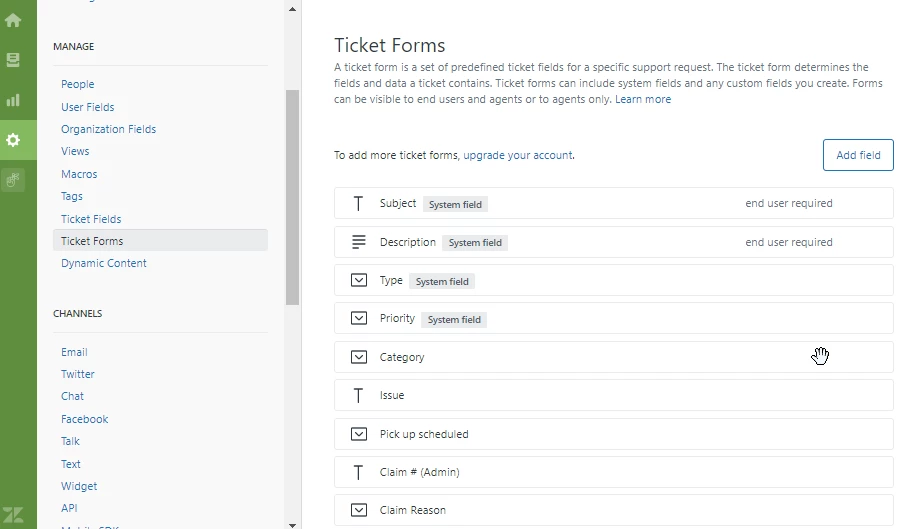
Thanks for your quick response - when I go to the Ticket Forms section I don't see the 3 dots to set the conditional fields, please see screenshot below:


Lou11
  • June 10, 2021

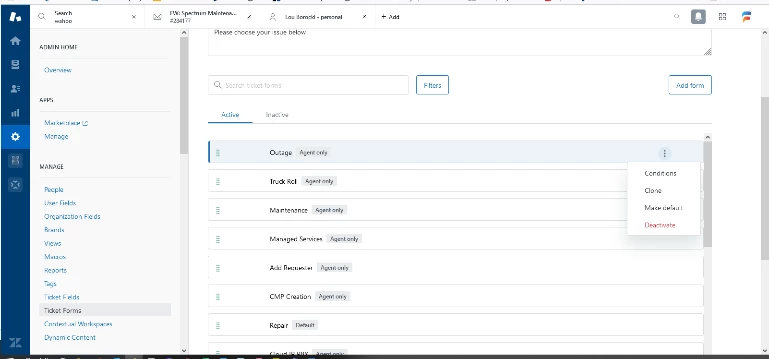
You don't see this?


  • June 11, 2021

@Mona Sohal I have a feeling you might not be able to implement conditional fields based on the "To add more ticket forms, upgrade your account" message displayed in your screenshot.

If you're on a Zendesk Suite Professional plan which was rolled out earlier this year, you should have access to create multiple ticket forms as well as implement conditional fields.

However, if you are on a legacy Zendesk Professional plan, these two features wouldn't be included on that plan unless you had purchased the Productivity Pack add-on.


  • February 6, 2023

I am having the same issue. Our subscription does say we have the Suite Professional Plan as well. Basically, when I click forms, there are no 3 dots to set conditions. 


Hey Phil,

I created a ticket on your behalf so I can look into the issue more. Kindly check your email for updates. Thanks!