Automate Ticket based on customer update | Community
Skip to main content

Automate Ticket based on customer update

  • March 1, 2024
  • 7 replies
  • 0 views

Kylene11

Looking for a way to make a ticket bold when a customer provides an update. Is there a way to do this?

7 replies

Shawna11
  • Community Manager
  • March 1, 2024
Hey Kylene, moving this to Q&A for better visibility! Thank you for engaging in our Community!

Daniel16
  • March 4, 2024

Hey @kylene11 when you say you are looking for a way to make a ticket bold are you looking to make the font bold or highlight to an agent that a customer has responded, and if so on which channels?


Kylene11
  • Author
  • March 4, 2024

Yes. I want the font to be bold. Either the subject line or the agent. I know this would be some type of trigger, just not sure how to set that up. I want the ticket to appear bold from any of our Standard Field Views.


Brandon12
  • March 4, 2024

While I'm not if this is possible presently - you might be able to take advantage of Custom Ticket Statuses to achieve a similar result.


Stephan12
  • March 5, 2024

Hi Kylene,

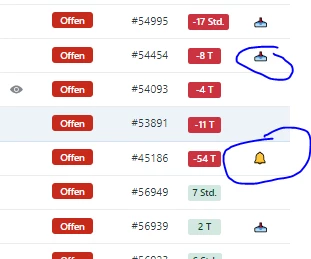
have you ever tried to build up follow up marking and triggers? We are also differing the internal and external messages:

Regards, 

Stephan


Daniel16
  • March 5, 2024

Hey Kylene, as mentioned above I don't believe this is possible within Zendesk to change the font style based on a response.

You could use triggers to change a ticket status when a customer responds. This would highlight to your agents that a ticket needed their attention. You could also use custom ticket statuses if you wanted to provide more information to agents. 


Roger11
  • March 6, 2024
Olá.
 
Acredito que a maneira mais comum é alterar o status, que agora voltaria como "aberto", e incluir ícones em uma coluna.