How do I provide feedback for the WFM Creating Combined Workstreams? | Community
Skip to main content

How do I provide feedback for the WFM Creating Combined Workstreams?

  • March 14, 2024
  • 4 replies
  • 0 views

Diana14

Join Our Community Forum for WFM Creating Combined Workstreams EAP Feedback

We’re excited about our community forum, a hub for engaging discussions and valuable feedback. We encourage you to join in, follow the latest topics, share your insights, or pose questions. When there’s buzz around a specific topic, especially related to the new WFM Creating Combined Workstreams Early Access Program (EAP), we’ll highlight it to gather diverse perspectives. Your thoughts and questions are welcome anytime, helping us shape this EAP together.

How to Provide Impactful Feedback

Your input is crucial, covering the good, the concerns, and suggestions for improvement. To foster a forum brimming with productive dialogue, we need a sprinkle of effort from everyone involved. Just leave a comment below.

Make your feedback impactful by considering these steps:

  • If something about the WFM Creating Combined Workstreams doesn't sit right with you or you see room for enhancement, take a note. Reflect a little before sharing.
  • Aim for clarity in your feedback. Explain what you like or dislike and how things might be fine-tuned.
  • Patience is appreciated as we respond to queries and comments.
  • Civility is our cornerstone—avoid sarcasm, disrespect, and offensive language. We're here to ensure discussions stay respectful.

Our goal is to make this forum the ideal place for all customers to share and discuss feedback specifically on the WFM Creating Combined Workstreams EAP. We’re looking for a mix of formal insight and casual exchange to create a welcoming and productive environment.

 

4 replies

Aaron11
  • August 29, 2024

Hello!

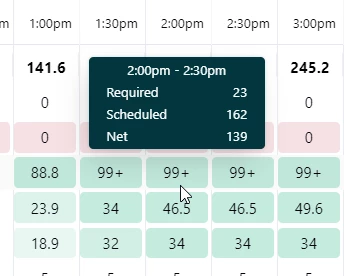
It looks like the combined workstreams is doing something funny to the calculations in the Workstream staffing panel in the Auto-schedule when comparing the forecasted hours to scheduled staffing. For example, for this particular day, this particular workstream is calling for 23 agents at 2pm. Most of this is being covered by agents in a combined workstream. 

The staffing panel is telling me that I have 162 agents scheduled, but I only have 50 employees at this location.


Any idea what's going on with those calculations? It only started doing this after I combined the workstreams, so it's almost like it's multiplying the scheduled hours by something. 


  • November 10, 2025

Good morning, the EAP sign up page link for Feature Limitations is broken.

Can this please be updated? Thank you!


  • November 10, 2025

The concept of combined workstreams is great and makes sense for managing agents with multiple skills. However, I’ve noticed an issue with how scheduling works.


When an agent is added to both Web Tickets and Messaging, they aren’t consistently placed in the combined workstream. Instead, they sometimes get scheduled in Web Tickets, sometimes in Messaging, and other times in the combined stream.


Ideally, if an agent is part of a combined workstream, they should be scheduled there for the whole timeblock, instead of just sometimes. That way, they’re available across all assigned channels at the same time, which matches how omnichannel support actually operates within our environment.


It would also simplify scheduling and give a more accurate view of real-time availability across all channels.


  • December 4, 2025


Hello all,
 

The combined workstream has been great when it comes to scheduling but we are running into some questions around if/how things are reflected in the schedule staffing section.

Does this take into account when an agent is able to handle several workstreams? If they are covering for example phone/tickets/chat, will the system show that they are covering those and we would only need 1 person or does it calculate that as needing 3, one for each channel?

Are they assumed to be 1 of the scheduled staff for each workstream or would they only be a partial person if they are covering several? If its picking up as a partial person, how does the system figure out how to share that across the channels?
 

Example of our Scheduled staffing below 

Any clarification is appreciated.