
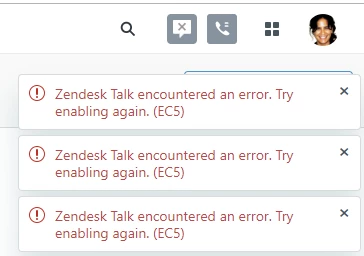
I constantly get error messages at the top-right corner of my screen saying: "Zendesk Talk encountered an error. Try enabling again. (EC5)"
If one error pops up I can usually close it out. But, sometimes four of the messages will pop up and closing one just re-opens a new error with the same message. Only way to clear the errors is to close the webpage and load a new one. Very annoying. Especially since I do not even use Zendesk Talk. Is there any way to stop these errors, and\or turn off Zendesk Talk all together?


Hi Neil and Tia -
EC# errors are often caused by your network or router configuration. They represent an issue with Zendesk Talk not having an adequate network connection. This can occur anywhere along with the network, but often they are the result of local network limitations, or from a computer that does not meet the minimum requirements to make the connection.
For troubleshooting steps for this error, see Zendesk Talk Troubleshooting Tips