What is the Unify Assignment and Capacity for Messaging beta about? | Community
Skip to main content

What is the Unify Assignment and Capacity for Messaging beta about?

  • March 2, 2023
  • 3 replies
  • 0 views

This EAP aims to simplify new work assignment and capacity management for messaging conversations. 

Queues and Assignment

All Active and Inactive messaging conversations will remain in a queue and assigned to the agents via Accept. The queue will be ordered based on priority and time of ticket creation. 

Capacity

Capacity will be maximum number of Open messaging conversations assigned to the agent. 

Capacity will be released when 

  • the ticket status changes to Pending, On-hold, Solved or Closed
  • Ticket is assigned to another group or agent

Capacity will be consumed when - 

  • Assigned Ticket status changes to Open
  • Agent picks up new tickets from the queue and Ticket status is New or Open. 

If the agent is at maximum capacity, these tickets will still be assigned- 

  • Messaging ticket is directly assigned to the agent
  • Assigned messaging ticket re-opens

Limitations 

Real-time reporting in Explore for messaging will be affected. Conversations in the Queue , Assigned Conversations and Agent's drill-down will only include Active Conversations ie conversations with an end-user response in the last 10 minutes. 

3 replies

  • March 31, 2023

Hi @prakruti

Following our previous feedback, we continue to see inactive message tickets been assigned beyond the capacity seted.

Can you check again please?

Regards,

Gustavo


Jason15
  • April 28, 2023

Hello Prakruti,

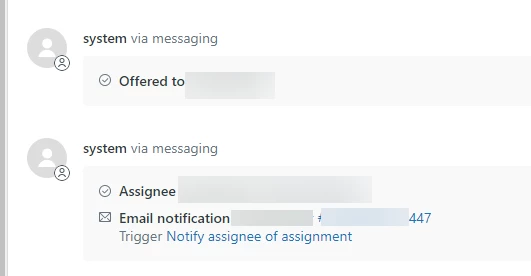
We are still seeing messaging tickets getting auto-assigned to agents.

What conditions would trigger this? We have tried to identify the issue by testing:

  1. Default online status vs. new custom status. Thinking staff are choosing the wrong status. Mixed results but mainly with an old pending ticket. 
  2. Both new tickets and tickets have some actions. Mixed results but mainly with an old pending ticket. 
  3. Looking at the tickets that were auto-assigned I do not see anything that sticks out as being different than the others. Why are some getting auto-assigned and others are not? 

Thanks, 

Jason


  • Author
  • May 2, 2023

Hi Gustavo, Apologies - I was out of the office. I saw that the issue has been addressed by adding your production / live account to the EAP. 

Hi Jason -

I will reach out to you for specific examples. 

Overall, agents need to be Online or in custom status extended from Online state.

Email tickets will still be auto-assigned to the agents. The impact of this EAP is limited to the messaging tickets. 

Pre-EAP,  New and Open Unassigned Messaging tickets created out of business hours or with last message older than 10 minutes were be auto-assigned to the agents.

Post activation, all New and Open Unassigned Messaging tickets will be assigned to the agents via Accept button. 

All tickets will be auto-assigned in the following cases- 

  • Tickets transferred to a particular agent by updating the assignee
  • Triggers assigning tickets directly to the agent or if the agent is only member in the group