What is the New Article Editor and how do I use it? | Community
Skip to main content

What is the New Article Editor and how do I use it?

  • July 17, 2024
  • 14 replies
  • 0 views

Patrycja12

We are excited to introduce the new article editor for Guide, currently available through our Early Access Program (EAP). This new editor includes several enhancements aimed at making your content creation process more efficient and engaging.
 

Key Features of the New Editor:

  • New Editing Tools: Includes text-wrapping around images, a new table editor, and drag-and-drop functionality for content elements.
  • Source Code Improvements: Cleaner code when using content blocks, with the ability to view the article source code above and below the content block.
  • Article Components: Insert HTML blocks, horizontal lines, and AI-powered article summaries into your articles. 


These improvements are based on user feedback and are designed to provide a more robust and efficient editing experience. For more detailed information, see Using the new article editor with generative AI article summaries (EAP).

EAP limitations 

This is an Early Access Program, and we expect that there may be some bugs in the system. Additionally, we want to remind you that all EAPs have the following product limitations:

  • Participation in an EAP is not covered under your Business Associate Agreement (BAA) with Zendesk, so you cannot pass Protected Health Information (PHI) through these features.
  • Features might work slower than expected.
  • Features might be unavailable from time to time.
  • Features might be discontinued or significantly changed during and after the EAP. 

We'd appreciate any feedback and reproduction steps if you run into unexpected issues.

Who can sign up for the EAP?

This EAP is open to all Zendesk customers, but please note that individual editor features may have constraints depending on your Zendesk plan. For example, content blocks are only available to Enterprise customers. Additionally, all customers who sign up to EAP will get access to Advanced AI add-on to enjoy the added benefit of AI-powered summary generation.


How do I get started with the EAP?


First, sign up!  We’ll plan to activate the EAP on your account by the end of July. Once you get confirmation that you've been enrolled in the EAP, you'll have the ability to use new editor capabilities without any additional action from your side 
 

14 replies

  • November 27, 2024

Hello. I was under the impression that Markdown would be supported in this new editor. Is that not correct?


Patrycja12
  • Author
  • November 28, 2024

Hi @søren13, yes, we have support

Formatting text with Markdown

Markdown is a simple markup language you can use to easily add formatting to plain text. The new article editor now supports the following Markdown commands:

  • Bold – Type **text** or __text__,
  • Italic – Type *text* or _text_,
  • Code – Type `text`,
  • Bulleted list – Start a line with * or - followed by a space.
  • Numbered list – Start a line with 1. or 1) followed by a space.
  • Headings – Start a line with # or ## or ### followed by a space to create a heading 1, heading 2, or heading 3 (up to heading 6 if options defines more headings).
  • Block quote – Start a line with > followed by a space.
  • Code block – Start a line with ```.
  • Horizontal line – Start a line with ---

Rob61
  • January 14, 2025

Hello,


I'm having some issues leveraging the EAP version of the Guide, specifically the markdown features. Outside of enabling “generative” AI for agents, do I need to have a certain base plan for my account?


Rob61
  • January 22, 2025

Any chance I could get some assistance from someone on the EAP team? I've gone through normal support channels, and they've indicated that they don't support EAP products.


Patrycja12
  • Author
  • January 23, 2025

@rob61 Hi Rob, of course, I updated your suport ticket

Best, 
Pati 


  • April 2, 2025

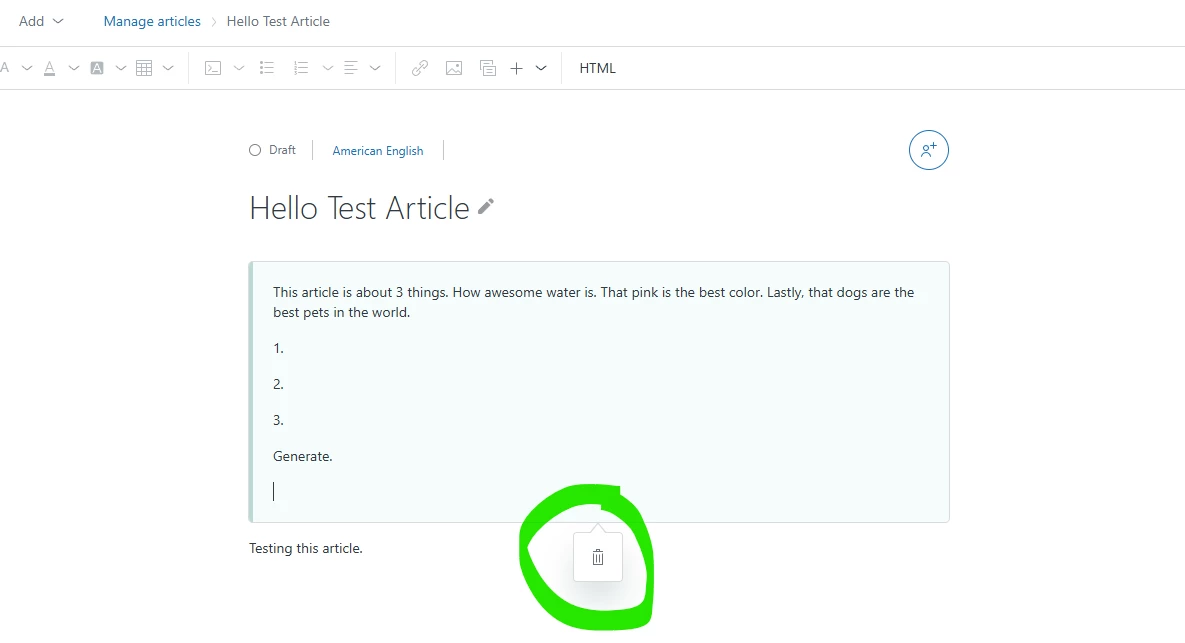
Hello, is this the right spot to leave feedback? We have this EAP currently. We do not have the CoPilot add-on. Are we still able to use the “summarize” feature. It's not showing up when I'm editing. Only the delete button shows up for me. Thanks!


María32
  • April 3, 2025

Hi there!

So far the feature seems amazing.

I've been testing it with untranslated articles, but how can I use it for existing translations? Do I need to deactivate them and translate again with the tool?


  • April 9, 2025

Hello. Just wanted to provide some feedback about the colors you can select for wording. Love the highlighting option. It would be great if there were additional colors to select for the text though. 


Patrycja12
  • Author
  • April 10, 2025

@maría32 thank you for your feedback. I would like to clarify your question, do you refer to the capability: AI translation for articles? Could you please provide more detail what do you want to achieve?

Thank you


  • April 10, 2025

Hi Patrycja. I actually ended up figuring this one out. Thank you for reaching out! 


María32
  • April 10, 2025

Hi @patrycja12 

Yes, it's about the ai translation tool. The feature doesn't seem to be available for articles with an existing translation. My goal is to re-translate some articles that have been edited and didn't get translated after that edition.

Do you reckon that we should delete the existent translation and start with the AI from scratch?


Abby12
  • April 22, 2025

Hi @patrycja12 ,

I've been using the Article Editor EAP for a few months and I'm liking the features so far. However, lately the features are available on some articles but not others. Is there a bug or has the EAP expired on our account? 


Patrycja12
  • Author
  • April 23, 2025

@maría32 if you want to retranslate existing article: 

- open an existing article 
- go to the top navigation and choose: translate from default language 


Patrycja12
  • Author
  • April 23, 2025

@abby12 It was a temporary bug, we fixed it and it should work properly.