
A service level agreement, or SLA, is a policy you define that specifies and measures the response times that your support team aims to deliver to your customers.
With this EAP, we are rolling out support for First Reply Time and Next Reply SLAs for social and web/mobile messaging. For instance, you set a First Reply Time SLA policy to respond to urgent tickets in 2 minutes or ensure subsequent replies to your customers within 3 minutes of their response.
Setup
You can setup policies for messaging channels by following the steps outlined in this HC article.
For this EAP, it is recommend to setup SLA policies with Condition - Channel is Messaging or WhatsApp etc.
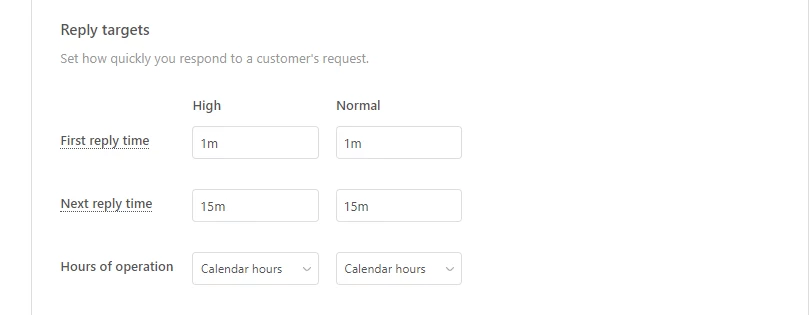
First reply time
First reply time is the time between ticket creation and the first reply from an agent. Use this metric to specify how much time it should take your agents to get back to your customers.
The first reply time target starts on ticket creation ie when the bot hands over conversation to the agent the ticket and stops once an agent makes a reply to the customer.
Next reply time
Next reply time is the time between the oldest unanswered customer message and the next reply from an agent.
SLAs on Views and Tickets for Agents
Agent can view the SLA target status in the SLA in Views and on the ticket. Learn more about SLAs on Views and Tickets.
The color of the SLA badge tells you how much time is left before the SLA is breached:
- Green: Greater than 15 minutes
- Amber: Fewer than 15 minutes
- Red: 0 minutes (the SLA has been breached)
If a ticket does not have an SLA policy applied or if all of the targets on that ticket are closed, the SLA value will be blank for that ticket.
Reporting
You can setup reporting for SLA adherence and breach by following this recipe.
Limitations of the EAP
- SLA Event Track app is not supported.
- FRT and NRT SLAs will not be accurate for accounts with Transcript visibility set to Public .


Hello Bénédicte,
Regarding your feedback about the NRT / FRT EAP
What you’re observing is not accurate indeed but linked to the documented lumitations of this EAP:
in this doc, you can see that there are limitations of the EAP
Limitations of the EAP
- SLA Event Track app is not supported.
FRT and NRT SLAs will not be accurate for accountswith Transcript visibility set to Public.After double checking, your instance has Transcript visibility set to Public
Are you then able to set Transcript visibility “Private” and run another set of tests for this EAP?
Thanks in advance
Yann.