What is the Estimated wait time via Messaging Triggers EAP? | Community
Skip to main content

What is the Estimated wait time via Messaging Triggers EAP?

  • June 26, 2024
  • 19 replies
  • 0 views

Managing expectations on wait time i.e. the amount of time it will take to connect customers to the agent is critical for a good customer experience. 

As part of this EAP, an admin can setup Messaging Triggers to share estimated wait time with customers, once the messaging ticket is added to the queue. The wait time is estimated based on the messaging tickets position in the queue. They can also setup triggers to send a message once the messaging ticket is assigned to an agent. 

Eligibility

This EAP is available only to accounts with 

The channels supported are web and mobile messaging channels. 


How can you setup ? 

Triggers to communicate wait time when ticket is added to the queue

  • In Admin Center, click Objects and rules in the sidebar, then select Business rules > Messaging triggers
  • Click Create trigger.
  • Enter a name and brief description for your trigger. 
  • Click Activate this trigger.
  • Customize the trigger as follows:
    • Run trigger: When a conversation is added to the queue
    • Conditions: Match ALL of the following conditions
      • Initial routing | is | True
      • Group status | <group name> | Online
    • Actions
      • Send message to customer | Responder | [message text, such as "Your estimated wait time is @wait_time_min-@wait_time_max mins"]
  • Click Create.


Triggers to communicate when ticket is assigned to an agent

  • In Admin Center, click Objects and rules in the sidebar, then select Business rules > Messaging triggers
  • Click Create trigger.
  • Enter a name and brief description for your trigger. 
  • Click Activate this trigger.
  • Customize the trigger as follows:
    • Run trigger: When a conversation is assigned from a queue
    • Conditions: Match ALL of the following conditions
      • Group status | <group name> | Online
    • Actions
      • Send message to customer | Responder | [message text, such as "An agent will be with you shortly"]
  • Click Create.

Brief description of the new events, conditions and placeholders added

Event - when conversation is added to the queue

This event captures the point at which the messaging ticket is added to the queue. The messaging ticket may have been added to the queue on bot handover or when the messaging ticket is transferred from one group to another. 

Event - when conversation is assigned from a queue

This event captures the point at which the messaging ticket is assigned to an agent. It only consider cases when the messaging ticket has been picked from the queue via Accept. The event does not get triggered on agent to agent assignment or self-assignment of the ticket from the Views. 

Condition - initial routing

This condition will help differentiate between adding messaging tickets to the queue for the first time ie when ticket status category is New v/s when messaging tickets are transferred from one group to another.  

The initial_routing will be true , if the messaging ticket is added to the queue for the first time, and false in case of transfer/escalation. 

Placeholders - @wait_time_min and @wait_time_max

These placeholders will return the minimum and the maximum estimated time. The value will always be in minutes. The message text should include mins - "Your estimated wait time is @wait_time_min-@wait_time_max mins". 

Estimation requires data. The wait time will be available only for groups with at least 1 ticket routed in last 7 days.

Best practices

  • It is recommended to start off with a single group and then expand it other groups. 

Limitations

  • Please note that the wait time is an estimation. This is why communicating an interval is important. 
  • The estimation is based on a combination of queue position and historical data. The estimated wait time may not be accurate during ticket surge situation. 
  • Estimation requires data. The wait time will be available only for groups with at least 1 ticket routed in last 7 days. 


19 replies

Andrew31
  • June 28, 2024

Just signed up for the EAP and excited to test it. Do we know how the wait time is calculated (eg is it an average off of a specific calculated metric)?


Jahn11
  • July 1, 2024

This is a pretty exciting feature which will definitely help us in setting expectation to the customers on how long they need to wait in the queue.

Signed up already and excited to test this.


  • July 3, 2024

Signed up to the EAP and looking forward to this, though I do second Andrew's query on how this is calculated and what it takes into account. E.g. does it take time of day into account etc? 


  • Author
  • July 3, 2024

Thrilled to see the excitement. 


Wait time is estimated based on prior wait time for that queue/group and the end-user's queue position. The time window considered is a couple of hours. It is not taking an average of the entire day. It will adjust to the traffic patterns for the current shift. 


My recommendation would be to pilot it for one group of agents or segment of customers first. 


João22
  • July 10, 2024

I found the issue regarding the estimated time for service very interesting. However, I would like to know if it is possible to provide an interaction informing the customer's position in the queue, for example: whether they are first, second, or last to be served. I believe these tools would greatly enhance our customers' experience. I look forward to your response and thank you in advance!


  • July 16, 2024

Hi @joão22 

At the moment that's not possible yet. I advise you to provide your feedback on our community where our Developers and product managers can see. 

Specific examples, details about impact, and how you currently handle things are helpful for our product teams to understand the full scope of the need when working on solutions. You may also want to review the Product feedback guidelines and how to write an effective feedback post.


  • July 18, 2024

Hello I want to EAP for this. Could you send me?


  • July 24, 2024

Hello @prakruti could you share with me calculation formula? I want to see calculation method. 


Jahn11
  • August 5, 2024

Hi Prakruti Hindia - I am also interested with the formula/calculation on how we derived with the min and max wait time.
 

Did some testing but the estimated wait time is always the same no matter how many customers are waiting on the queue. 


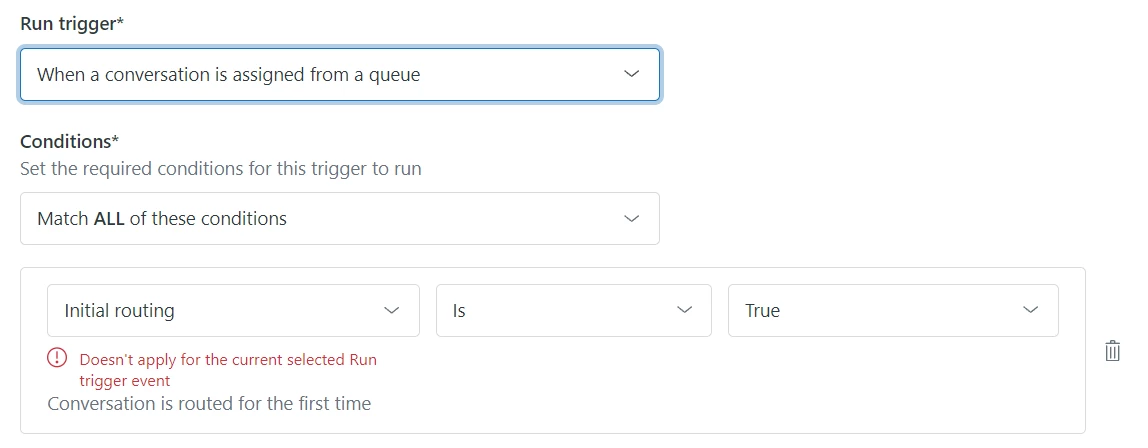
Also, with the condition “Initial routing” looks like it's not applicable for the Run Trigger event “When a conversation is assigned from a queue” which is contradicting to this Triggers to communicate when ticket is assigned to an agent


  • Author
  • August 6, 2024

However, I would like to know if it is possible to provide an interaction informing the customer's position in the queue, for example: whether they are first, second, or last to be served. 

Thanks for the feedback. Queue position would be useful when it gets updated frequently. We are planning to support queue position in the future, where it gets updated frequently showing a sign of progress. This is on the roadmap. 


Did some testing but the estimated wait time is always the same no matter how many customers are waiting on the queue

Can you please respond on the email I sent confirming the sign up? I will need your subdomain to investigate this further. Thanks. 


  • Author
  • August 6, 2024

Also, with the condition “Initial routing” looks like it's not applicable for the Run Trigger event “When a conversation is assigned from a queue” which is contradicting to this Triggers to communicate when ticket is assigned to an agent

Thanks for calling it out. That is my bad. Once the conversation is assigned to an agent, you can use the group condition to send the message saying ‘an agent will be with your shortly’ to the end-user.


  • Author
  • August 6, 2024

For everyone requesting the formula, we use average time to assignment for the queue and queue position for the last 2 hours.  We are also normalising the unexpected peak / troughs to remove anomalies. 


Let me know if we have more questions. I understand this is not a formula, rather a model for estimation. 


Jahn11
  • August 6, 2024

Hi Prakruti Hindia - sent the domain via email. Thanks! 

With the wait time estimation, follow up question please - how accurate the estimate is?


Andrew31
  • August 6, 2024

thank you Prakruti!


Amie11
  • August 12, 2024

hey @prakruti 


Do you have any screenshots available showing us what the end-user experience looks like with this new feature? It's hard to envision just from reading all this text etc. what it looks like to the end-user. 


Best,


Amie


Jahn11
  • August 13, 2024

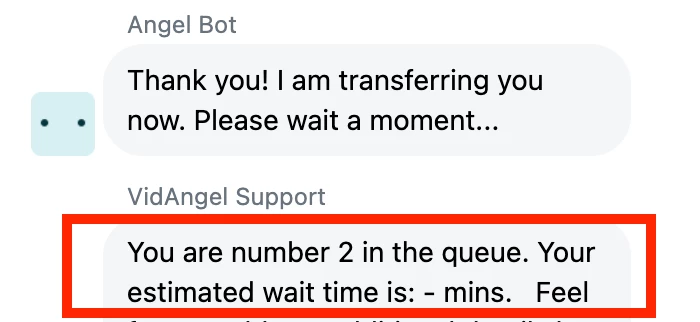
Hey @amie11 - this is how it will looks like from the end user.


Jen18
  • August 14, 2024

Question: I implemented this as a test into our “Queue Size” triggers we created. Normally we would say 1-3 minutes if they are number 2 in the queue. I added @wait_time_min-@wait_time_max mins in place of “1-3 minutes”. 

However, when I ran the test it says “ - mins”. I'm guessing this is because we answer chats pretty quick, under 1 mins OR was there a mistake on my end?

I'm wondering if there is a way to have it default to “ 0 mins “ OR “less than 1 mins” if it is less than 1 min? Leaving it as ” - " makes it look like there is an error, like it didn't work and would be confusing to the customer.

I was going to ask if this works in seconds, but if we get a queue built up then minutes would make more sense.  Thanks! - Jen


  • Author
  • August 22, 2024

Hi Jen,


Can you check if the event used in messaging triggers is ‘When conversation is added to the queue’?


  • Author
  • September 19, 2024

Hi everyone, 


Thank you for participating in this early access program and for sharing your feedback. We will be closing out this community since the feature is now generally available. Please continue to share your feedback on the product - Chat and Messaging community