

For a long time, we have been hearing that our customers want a better way to create, manage, and update content that lives across multiple articles or help centers.
We’ve been working on Content Blocks, a feature of Guide Enterprise that allows you to do just that. With this functionality you’ll be able to capture things like common troubleshooting steps, rules & regulations, disclaimers etc. as a content block, and then insert into multiple articles and across multiple help centers.
Content Blocks is currently in a closed EAP, and will be made broadly available as an open EAP for Guide Enterprise customers in July 2020.
Content Blocks EAP functionality
-
Creating a Content Block - You can create a content block from a single unit of content (for example, a paragraph, a section heading, a code block, a bulleted list) or choose multiple consecutive sections of content in an article, or all the text in an entire article. You can use one or many content blocks within an article, alongside regular text.
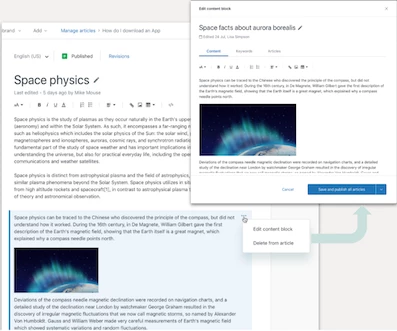
- Inserting Content Block into an article - You can insert a reusable content into your article by clicking the + icon which appears in the margin of the body of the article and choosing the right block from the list of available content blocks.
- Managing Content Block Blocks - Content blocks are centrally managed. That means that you can edit a content block by selecting Edit from the block’s menu. Once your changes are saved they will be automatically populated in all the articles that are reusing this block. If you want to edit a single instance of a content block you can choose the Unlink option which transforms it to a regular text. Once unlinked, edits to the block will not update other articles.
- Permissions - Agents & Managers have access to create and edit all content blocks
- Translations - Content blocks can be created for any locale you support and used in translations and articles in any locale. There is not currently an ability to create an associated translation of a content block in another locale. But you can create another block in any supported locale. For example, if you create an en-us block, you can place that block into an en-gb, en-ca, fr or any other translation you like. If you want to create a French translation of that block, just create a new fr block and place it where you like.
- Existing translations workflows - If you use an API based integration for translations, this should still work but updates from the translation service would overwrite any blocks you may have edited and placed in the translation. For example, if I create an `en-us` article that uses blocks and the translation service picks this up over the API and sends back a translation, everything should be just fine. In the meantime, if you update a German translation to include a block and the translation service updates that translation afterward, the block won't be preserved.
EAP limitations
Today we only support rich text in content blocks, but we are working to quickly add images as part of content blocks as well. We are also aware that there are a number of other limitations today with how content blocks work and we're looking for your feedback on how best to solve some of them.
How do I get started with the EAP?
First, sign up! :-) We’ll plan to activate the EAP on your account by early July.
Once you get confirmation that you've been enrolled in the EAP, you'll have the ability to upgrade articles to be able to use blocks. Click the upgrade article button and you will be taken to a new experience where you'll have an ability to create, edit, and insert blocks into the article. You'll be able to upgrade articles one at a time.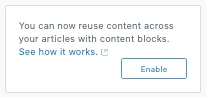
Who can sign up for the EAP?
This EAP is available to all Guide Enterprise customers. If you’re not currently on Guide Enterprise but would like to participate, reach out to your account manager for an exception.
We would love your feedback!
This is an Early Access Program and we expect that there may be some bugs in the system. We'd appreciate any feedback and reproduction steps if you run into unexpected issues.
If you have any thoughts, wishes, dreams or any other Content Blocks related feedback please leave it in this discussion topic dedicated to the EAP. We are looking forward to it!

