

Welcome to your Agent Home
Agent home is the new one-stop shop for the agent’s workflow. Replacing the Dashboard that appears upon login, and containing all work relevant to the agent, Agent Home provides a single place to plan and meet your goals for the day. In Agent Home, your tickets, messaging conversations, and more are organized into a single work list, freeing you from clicking through views to prioritize your work.
Why are we building Agent Home?
Agent Home gives us the opportunity to address a number of challenges in the agent experience:
- Views don’t refresh in real time.
- Agents have to prioritize between a number of Views throughout my day in order to deliver on my service levels / KPIs.
- With the introduction of live channels, agents now accept work in two places - the Conversations button and Views.
- Live conversations are updated in multiple places: Tabs, Views, and the Notifier app.
- As an agent, I need to follow up or check in on tickets so I can support my partners, but there’s no single place to view tickets I’m CC’d on, tickets I’m following, and Side Conversations I’ve started and need to follow up on.
Agent Home solves these problems through a unified, realtime interface for all your work:
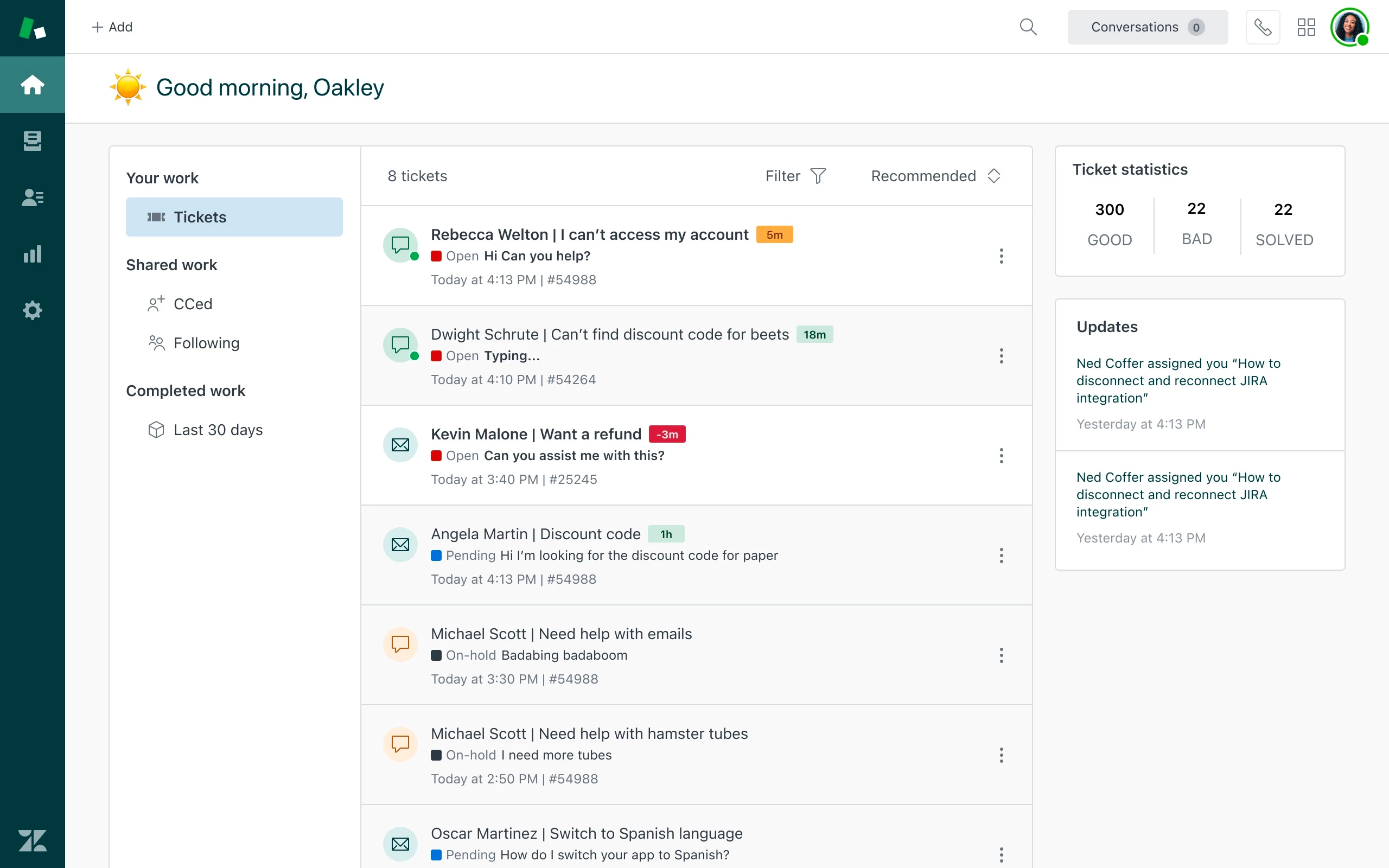
When paired with omnichannel routing, prioritization and ticket assignment are handled on the agent’s behalf, reducing the effort around decision-making for workload management. Page updates are made in realtime, which means agents can stay on top of work without refreshing pages and views.
How does it work?
Agent Home displays all tickets assigned to you, in all statuses. Work lists along the left side let you sort between different types of work - tickets, CC’s, tickets you’re following, and more in the future. Because it works with Omnichannel Routing, this list will automatically be populated with work you should complete - no more clicking through Views!
In your list of tickets, Filters allow you to drill down to the status or channel you wish to serve - or you can view all tickets in our recommended sort order for effective prioritization.
In the future, updates will appear in real time. When a ticket is assigned to you, it will appear immediately, and when it’s solved, the ticket will be removed from the list (look for realtime experiences later this summer).
As soon as we can support Messaging conversations, those will also appear in realtime. Customer statuses will be depicted through the avatar on the left of the work list, and realtime updates will show you the customer’s latest comment and even a preview of whether they’re currently typing.
Think of Agent Home like your agent inbox, the only place you need to look to complete your work for the day.
What are the limitations of Agent Home?
This beta is the first iteration of Agent Home. Since we’re in the very early phase, there are a few limitations to keep in mind:
- Tickets that were assigned to you before June 1 will not appear in Agent Home. You can make them appear by changing the assignee on the ticket, and changing it back to yourself.
- Some ticket updates before June 6 2023 may have an incorrect or missing timestamp in the work list (this only affects the work list, and not the underlying ticket). These timestamps will be corrected when the ticket is updated.
- Tickets the agent was CC’d on or Followed before June will not appear in the CC’s or Following list. New tickets will appear as the agent is CC’d or Follows the ticket.
- Limited sorting options
- Limited filtering options
- The display of some tickets may be duplicated. Refreshing may resolve this issue
- Real-time updates aren’t implemented yet. Agents need to refresh the page to see the latest updates.
- Some tickets may not show the correct channel icon.
- Some ticket updates may not display correctly.
- Chat conversations and Talk tickets are not supported.
- Agent Home is not yet localized, and is available for testing in English only.
Keep in mind, because this feature is still in beta, it may encounter unplanned interruptions and tickets may not appear as expected. Please report all such instances to us through the community (and feel free to nudge me at my email, which you received during email onboarding).
What do you plan to do next?
After we release Agent Home to general availability, we hope to continue improving agent efficiency by:
- Introducing compatibility with Zendesk Talk and creating parity with the larger Zendesk channel mix
- Integrating with Side Conversations
- Introducing quick actions
- Making the agent’s workflow and performance requirements easier to understand
- And more!
We depend on your feedback to do that in a way that meets your business’ needs. Thank you for participating in the Agent Home beta!