
What are Categories in Views? | Community
Skip to main content

What are Categories in Views?

  • May 22, 2024
  • 13 replies
  • 0 views


What is Categories in Views EAP?

The "Categories in Views" Early Access Program (EAP) empowers users to structure their views with a hierarchy of folders and sub folders, leading to a more organised and agile ticket management experience.
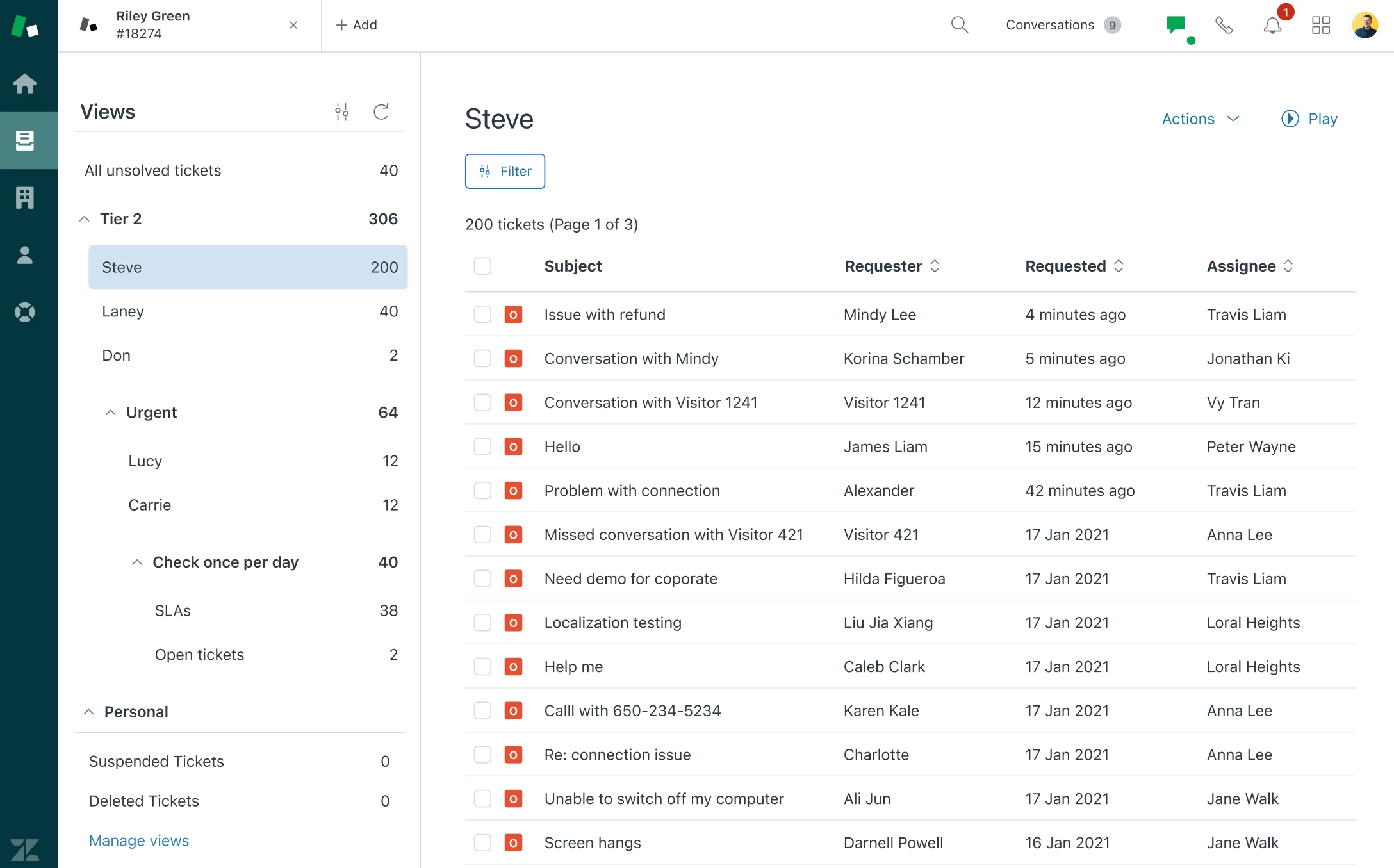


Introducing Categories

Creating categories is a breeze. Simply update your view titles to reflect the desired hierarchy. For instance, titling a view "Support::Tier 1::All Tickets" will align it under the 'Support' folder, within a 'Tier 1' subfolder, displaying the view as 'All Tickets'. It's an intuitive way to keep your support environment neatly sorted and easily navigable.
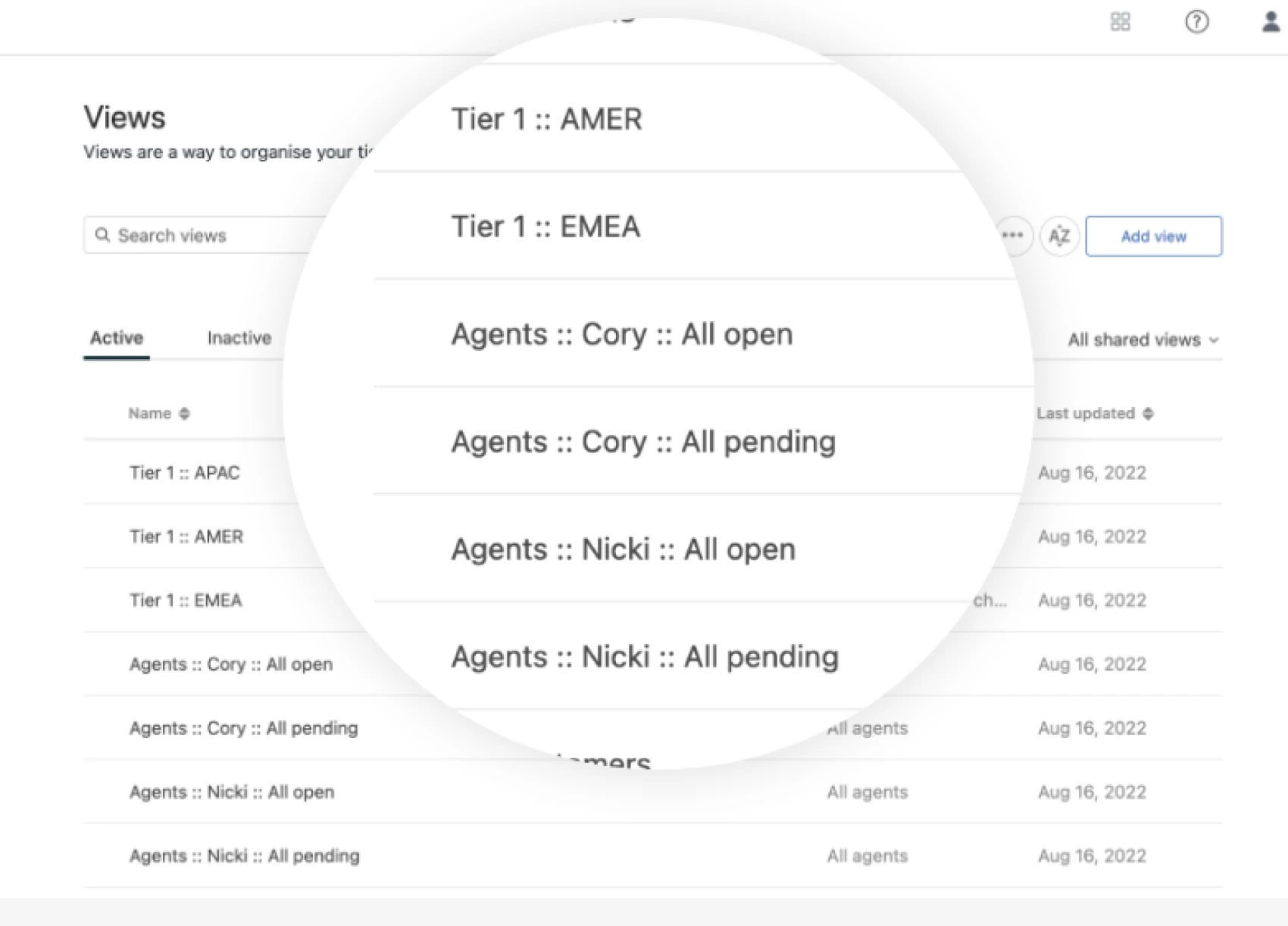
Expanded Limits for EAP

We're pushing the boundaries for our EAP users! The limits have been increased to accommodate up to 100 shared views and 10 personal views, giving you more flexibility than ever before.


Potential Limitations

Please note, as the EAP is in a state of continuous enhancement, you might notice some minor UX limitations within tree navigation. But not to worry—we're smoothing out these edges as we go.


Who can sign up for the EAP?

The EAP is open to users who are keen on adopting new features early and contributing to the development process with their feedback. To ensure you're among the first to experience our new EAP, please take a moment to fill out this form
 

We would love your feedback

Your experiences and insights are invaluable to us. As part of the EAP, we rely heavily on your feedback to identify what we're doing right and where we can improve. We invite you to share your thoughts and suggestions throughout the EAP phase. Your input directly influences the enhancements we make to deliver a product that truly meets your needs and expectations.


13 replies

Gerald11
  • June 27, 2024

Hi! From the above image, Tier 2 - 306, it is possible that when this is clicked, it will show the list of tickets? so it combines all the subviews there in?


View A - combines all subview

Subview 1 

Subview 2

Subview 3


Amie11
  • June 28, 2024

hey @agnieszka12 I think i was expecting the same upon my first time using this. 

When I clicked on the overall category name, I expected all the tickets inside the category to display by default & then when I click into the specific view inside the category, it would display the tickets only in the selected view from there. 


Aside from that - absolutely love this new feature! It's been a long time coming thats for sure. Sharing a quick screenshot from my test account where I've used it to categorize all the Messaging views together. 


Gerald11
  • June 28, 2024

Hi Amie! I would like to ask, how come you have icons in your Views? :) are those emojis added to the view names? 


Amie11
  • June 28, 2024

Hey @gerald11 


Yep they sure are just emojis added into the view names. We find it helps the agents to identify views a bit more easily on the go and brings a bit of fun into the workspace on zendesk. :)


I often use the following sites for emojis: 

  • https://emojifinder.com - This one you can search for a word and it will show you emojis which might match it
  • https://emojipedia.org - like an encyclopaedia of emojis which you can just search through in their categories. 

P.S - Wow that screenshot looks terribly elongated. Def wasn't like that inside the reply UI on this post. 


Gerald11
  • June 28, 2024

Hi Amie, appreicate your reply, and i love the creativity this brings to the agent screen. Now I wonder why this  is not in any View articles I've seen.  


Amie11
  • June 28, 2024

I'm actually not sure, but there's a few spots you can use emojis:

  1. View titles
    1. Note: If you put an emoji into a ticket field name, and then display the field as a column inside a view, the column will also display the field name with the emoji inside the view.
  2. Custom ticket field names & drop-down values. 
  3. Trigger names + inside trigger email body
  4. Macro names
  5. Ticket comments
  6. Dynamic Context 
  7. Help Centre Articles + article content
  8. Group names

Basically anywhere you can input text in Zendesk, you can input an emoji. :)


Hi everyone,


We truly appreciate the time and effort you've taken to share your thoughts with us. Here's an update on our decisions so far:


Displaying category as a View : We are monitoring this feedback to determine if it represents a common challenge.


-Emoji in View Titles: I'll look into requesting an article to describe this. Thank you @amie11  for sharing this on the community!


- The views still have the name of the category into it, which should not be the case

- No updates in the general Adminsettings of the Views, so we don't see enhancements and the categories there


More general, but the screenshots you provide does not match with ours. E.g. in screenshot one i see a symbol for settings left to the refresh button. Also the general design is a bit different.

Would be great to know why it is different to the experience of all customers?


Thank you for your feedback Johannes!


View name: this feedback is accepted and we will implement change in the view name display.


Admin settings: we are planning to develop categories on the admin page as a next step.


Regarding the symbol next to the refresh button, this is a filtering option which will allow to search side bar for a specific View. Currently it is under development and will be added in the coming weeks. 


 The remaining minor differences may come from the fact that pictures included here are designs not real screenshots. 


Nirel
  • July 16, 2024

Loving this feature! We have yet to set it up for our entire team but we're looking forward to using it for all our views. 


At the moment, I have two requests:

  1. Would love for there to be an “expand all” and “minimize all” option.
  2. For process alignment, it would be fantastic to have an view controls that that allows Admins to set certain criteria for each view. Such as:
    1. Agnieszka Pyzik and Amie Brennan's suggestion to click on the category to load all the tickets in the folder. 
    2. Ability to set the different view cateogries to expanded/minimized as a default. 
    3. Enable or disable Play-Mode for specific view categories.


Thank you, Nirel, for your feedback!

We will take into design consideration the option to expand and minimize all categories.


Regarding enhanced category functionalities, such as loading all tickets or setting permissions for categories like setting play mode categories, we cannot implement these features at the moment. However, we will consider them in the future when native categories are available on the admin page.


As for having expanded/minimized categories as the default state, we are implementing a change to remember the last state of the navigation. This means that if you expand a category and leave, it will remain expanded when you return. I hope this improvement enhances your experience.


Jean15
  • August 1, 2024

I would like to say that I found the functionality very good, especially for the customer service supervisors. I would also like to request some attention to the management of views for Administrators. The panel is very simple, and with the increase in views, management will become more complex.

info: I'm using PT-BR -> EN translator


  • Author
  • September 11, 2024

Dear Members,


We want to extend our gratitude to each one of you for your enthusiastic participation in the Early Access Program (EAP). Your insights, feedback, and engagement have been invaluable.


As we move forward, we would like to inform you that we will be closing the EAP and the associated community topic on Friday, September 13. If you haven't had the chance to share your feedback yet, we strongly encourage you to do so before this date. 


This functionality will be released to all Zendesk customers soon. For those of you who have already been using it, rest assured that you will still be able to access it on your accounts where it was enabled.


Your thoughts and experiences are incredibly important to us, and we want to ensure every voice is heard.

Thank you once again for your commitment and support. 


Warm regards,

Agnieszka