visiblity on AI bot tickets | Community
Skip to main content

visiblity on AI bot tickets

  • September 21, 2025
  • 3 replies
  • 0 views

Chienyu

Hi team,


Is it possible to disable the visibility for normal agents?


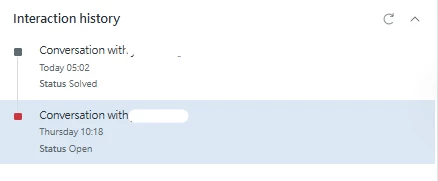
AIbot tickets are also shown in the interaction history.


I really appreciate any help you can provide.
3 replies

  • September 23, 2025

Hi Chienyu, thank you for the feedback! 


To disable visibility for normal agents, you can simply configure and restrict the views where you want AI Agents to appear and make sure they aren't appearing in any views for the agents you don't want to see them in. By default, these are not included in any of the views you have before turning on this feature. 


That is correct that AI bot conversations are showing in the interaction history. This is intentional and is done to provide agents with context for previous interactions your customer may have had with the AI Agent. 


Thanks,


Will 


Monna
  • September 25, 2025

Following up on this matter.


We are accustomed to seeing the BOT conversations within the tickets that the BOT escalates to human agents. With the recent changes, will human agents still have access to the BOT conversations in the same ticket? Is it essential for us to have this feature enabled so that human agents can review the BOT interactions that occurred prior to the ticket being escalated to them?
 

Currently, it is causing confusion among our agents because they receive these tickets but are unable to take action on them. Additionally, we are unsure if the BOT is still engaged with the customer at the time the ticket is created or if there's an error that's happening. 


  • September 26, 2025

Hi Monna, yes, the conversation when escalated to a human will remain in the same ticket. 


If the Bot is still engaged in the conversation, you will have visual markers outlining that the conversation is with an AI agent, in the tab, beside the conversation title and the composer will be removed.
