
Various tweaks needed in Layout Builder | Community
Skip to main content

Various tweaks needed in Layout Builder

  • September 26, 2023
  • 2 replies
  • 0 views

Harper11

Having recently updated our custom Layouts using this EAP, our team has some various pieces of feedback on this feature: 

  1. We need to be able to add additional apps to the Customer Context panel; currently, we're limited to adding only 1 app there.

    Our goal is to move all the relevant apps to the same panel as the Customer Context pane, in the hopes of eliminating the need for agents to click around on the many little tabs in the far right sidebar to get to things.

    Our hope was that alongside Contextual Workspace, Layout Builder would allow us to refine the workspace down enough for each Topic so that agents could ignore the multiple small tabs (Customer Context, Knowledge, Intelligence, Apps), as switching between all these makes their workflow highly cumbersome.

  2. We really need to be able to toggle off the "infinity iframes" that come from adding apps to the Customer Context panel. We want the entire Context Panel and at least the past 10 interactions to show there, along with all added apps below it, using a single scroll bar (not the current behavior of adding a new iframe for every single element).

    Our #1 workflow pain point right now is agents not searching for other existing tickets before starting work on the current ticket. We receive frequent duplicate tickets, which causes duplicate work if agents don't first find and merge those first. Our primary goal in using Contextual Workspace is to force "Interactions" open and put all relevant apps below it, so that agents cannot miss duplicate tickets.

    We don't mind if agents have to scroll past the Interactions to get to their apps, but we absolutely cannot have Interactions hidden; otherwise this behavior defeats the purpose of Custom Layouts for us.

    Notice how adding an app to this pane hides pretty much all "Interactions" and clutters the UI with scroll bars:
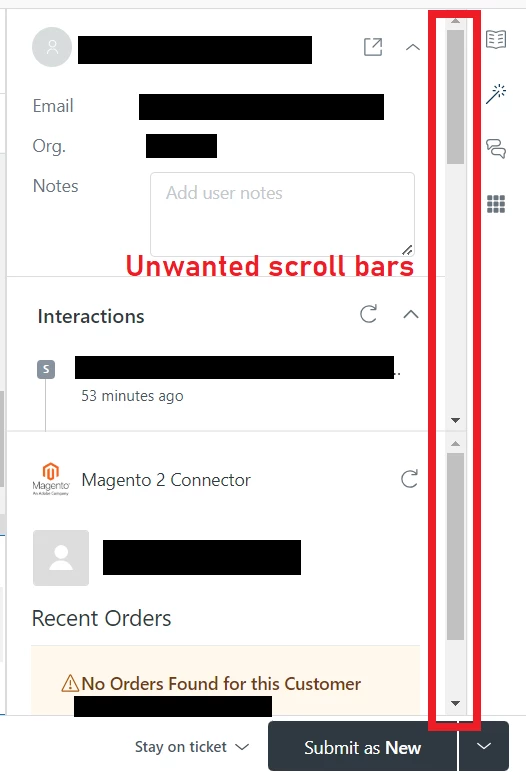


  3. This feedback may be more about "Essentials Card" than Layout Builder, but we find the requester name at the top of the Customer Context Panel takes up unnecessary screen space and is not helpful information. This becomes more of a problem in Layout Builder, when screen space becomes all the more precious (mostly to avoid the iframes).

    The requester's name is already shown both at the top of the ticket to the left of the Ticket ID, and also in the Requester field on the left sidebar. There's no reason to have it displayed in 3 different places on the same page.


2 replies

Paul47
  • October 11, 2023

@harper11 thanks for the feedback you've provided and for your patience with me getting back to you on this thread!

For your first and second bullets, it sounds like you are looking to optimize that column so that customer context and interactions are in full view for your agents, and the relevant apps are stacked underneath and can be scrolled into view when needed. Does that mean it's okay if the agent doesn't see the app(s) at all if their screen size is small and the app is below the fold?

There's an upcoming research project my design partner and I are looking to launch that explores this notion of how to better optimize screen space. We are considering options around accordions / tabs, giving more rows to insert apps, and more. It'd be amazing to have you as part of the conversation if you'd like to participate.

To your third bullet point, I'll pass that feedback to the Essentials card team!

Thanks again for all this great feedback.


Harper11
  • Author
  • October 11, 2023

Hi @paul47,

Does that mean it's okay if the agent doesn't see the app(s) at all if their screen size is small and the app is below the fold?

Yes, you nailed it.

Our agents will need to use the app(s) to work the ticket, so they will scroll down to access that regardless. The main problem we're facing is that data our leadership considers "mandatory" to review first (i.e., Interactions), the agent often does not even see. It's absolutely critical that they see on first glance whether there are other existing / open tickets for the customer.

If the agent doesn't notice duplicate tickets from the same requester, they're wasting 100% of the time they spend working that ticket (since another agent is already working the exact same request). Therefore, we want to force Interactions open and visible, even if that means the agent needs to scroll down to access other app(s).

Happily, the recent addition of "Pinned Apps" seems to make scrolling for apps a non-issue here anyway. :)  If the agent doesn't want to scroll, they can pin the app and click it in the sidebar instead. Either way, agents should always be forced to at least glance at Interactions before they move on to the next task.

We'd love to set up the Customer Context panel as follows: 

  • a single iframe, instead of multiple nested iframes
  • up to 10 previous tickets displayed in "Interactions" (not concealed in a tip-down or iframe)
  • the ability to add more than 1 app below Customer Context

If we could also add flashing neon strobe lights to Interactions, that would also be ideal... but I'm guessing that one won't make it onto the roadmap. 😁


I hope this info helps. Thanks for taking the time to respond!