
UPDATED (20 Feb, 2023): The functionality is GA. Talk calls will be routed by the omnichannel routing engine for the Customers who opt-in to omnichannel routing. Here are more details.
For overview information about Talk in omnichannel routing, see this article.
This article contains an example of a call using triggers, tags, and ticket fields to prioritize calls for VIP customers and transfer them to the billing group.
Before you proceed, it's important to understand the changes to the ticket creation process.
Currently, a support ticket for a call gets created when the agent picks up the call. With omnichannel, the support ticket for the call is created at the point it goes into the queue meaning you can run triggers on the call ticket before the call is answered.
Using the triggers, you can prioritize and assign a group to the ticket and route the call as shown in the following example.
To set the routing to VIP customers
- For each VIP customer you want, go to their end user profile and add the VIP tag as shown in the following screenshot. You can use any tag name you want instead of VIP:
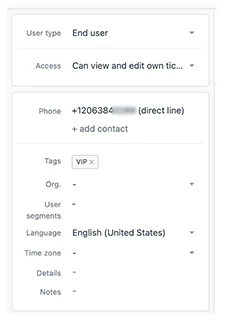
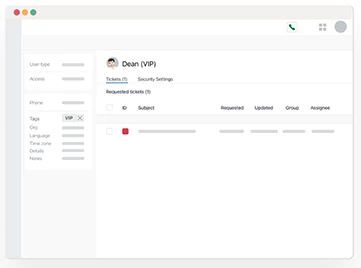
Now, any ticket that gets created by the end user you configured will always contain the VIP tag.
For more help with tags, see Adding tags to users and organizations. - Set up a trigger to automatically assign a priority of Urgent and add the Billing group to any Talk tickets opened by a VIP customer. Assigning the ticket to a group enables you to route the call to the correct place.
Create your trigger with the conditions and actions shown in the following screenshot: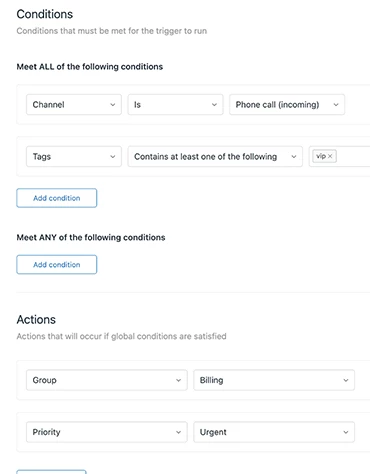
Now, any tickets created by end users from a call and containing the VIP tag will automatically be added to the Billing group and given Urgent priority.
For help creating triggers, see Creating triggers for automatic ticket updates and notifications.
Note: It is not mandatory to assign a group using triggers for call routing. The group you assigned in Talk routing settings still works. However, omnichannel routing currently supports only a single group for call routing; there cannot be multiple fallback groups configured in Talk settings. For more details, see Understanding changes between existing Talk functionality and omnichannel routing.
You’re finished. Next, Talk takes the following actions:
- Information from the call ticket including the ticket group and priority is passed to the omnichannel routing engine.
- Calls are ordered by priority. For example, high priority or urgent calls are added to the omnichannel queue ahead of other calls, messages, and emails with a lower priority. For more information, see Routing tickets and messaging conversations based on priority and agent status.
- When assigning the call, the agent in the billing group with the most capacity and status as Online is chosen. If multiple agents have the same state, the agent with the longest wait time since their last assigned call is chosen.
- The call is assigned to the agent.

