Unable To Clear Notifications on iOS Mobile App After Upgrade to iOS 15 | Community
Skip to main content

Unable To Clear Notifications on iOS Mobile App After Upgrade to iOS 15

  • September 24, 2021
  • 15 replies
  • 0 views

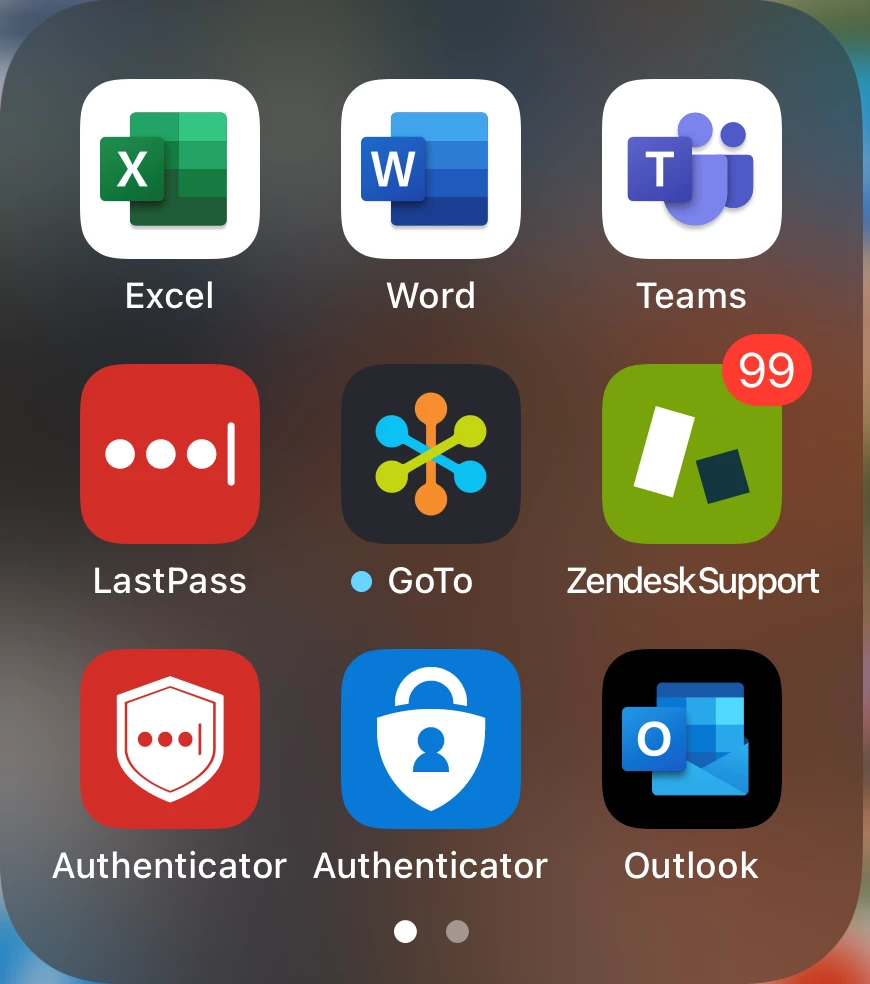
After upgrading my iPhone to iOS 15 the 'ZendeskSupport' app is no longer clearing notifications. It is set at '99' even when I do not have any outstanding notifications in the online or mobile platform.

I have uninstalled the app, restarted my iPhone, and then installed the app, but then the notification issue reappears.

(Screenshot below)
15 replies

  • September 25, 2021

Hi Chad,

We've received several reports from other users about this behavior of notification badges in iOS 15. The team is now looking into this. I'll go ahead and create a private ticket for you. We'll get in touch with you shortly.

Thanks! We appreciate you raising this with us.


  • September 29, 2021

I’m also having the same issue. Have removed and reinstalled the app, but still the same. Is there an ETA on the bug fix?


  • September 30, 2021

Hi Zari,

The team is still investigating the issue. I'm afraid there is no definite ETA yet at this time. I'll update this thread once we have more info to share. Thank you!


Piers11
  • November 24, 2021

Looks like the last comment was left 2 months ago. I’m still having this issue. Any ETA in an update?


Jeff46
  • November 25, 2021

Hi Piers,

Are you able to confirm which version of the Support mobile app are you on? 2.15.3 was just released a few days ago, have you tried to update your app to it and see if the issue persists?


Piers11
  • November 25, 2021

Hi Jeff,

Yes I’m on that version of the app. I have items in the notifications screen, but they’re all read and the double tick icon (mark all as read) is greyed out.


Jeff46
  • November 25, 2021

Piers,

I will create a ticket for you as I will need to gather more information from your end. Please expect an email from me shortly.


Celepli
  • February 24, 2022

Hi,

I’m experiencing this issue on iPhone SE (2nd gen) with iOS 15.3.1.

I’ve deleted Zendesk Support, force restarted the iPhone, clicked on every case in our queue, but the issue persists. The two check marks at the top right corner in the Notifications tab are greyed out and I’ve pulled down to refresh countless times.

Is there a fix?


Dane13
  • February 26, 2022
@Narin,
 
This is currently being investigated. I'll create a ticket for you to keep track of it. 

  • March 22, 2022

Hi,

We have exactly the same issue with IOS 15.3.1 (iPhone 13 PRO Max)
This is a huge issue for our support, we miss some tickets due to that. 

Could you please give us a status quickly ?

Thanks
Virgile 


Dane13
  • March 23, 2022

@service15,

This issue is still being investigated. I'll create a ticket for you so you can keep track of the progress.


  • March 23, 2022

The issue has been resolved on 2 mobiles following that steps:
- Uninstall
- Restart the mobile
- Reinstall 

Hop it will be stable now ;-) 

Virgile


Jacob52
  • August 9, 2022

Uninstall restart and reinstall did not fix the issue. It has been nearly a year and we are on ios 15.6 is there a way to fast track solving this issue


Jacob52
  • August 9, 2022

It seems to work up until I move the app icon


  • September 23, 2022

I have a iPhone 13 Pro Max using iOS 15.7.  To clear the notifications:

1) You must read the notification in the Notification List.  It is difficult to see on my phone.  The background of unread messages have a faint blue highlighted background.  There isn't a flag like a Text message that shows an unread message.

2) While in notification, give your phone a good minute to update.  When you read a message, it doesn't clear immediately.  It takes a minute.

It is a little frustrating there isn't a feature to select them all to clear or even delete.  Once read, it should go away or have an option to "swipe" it to a Trash, the way a text message is deleted.