Tables | Community
Skip to main content

Tables

  • January 20, 2025
  • 9 replies
  • 0 views

There's a few issues with tables:
When you write underneath a table, the text wraps next t it. The only way to get it underneath as wanted, is to hit enter several times and have a huge gap so when you publish it, it looks normal.


If I create a table and no longer want it, there's no easy option to delete it easily. You can only delete one row at a time. Theres an option to sleect the table then click delete on the keyboard but there should be an option that says, delete table, just as there is an option that says, delete row or delete column.

9 replies

Patrycja12
  • January 22, 2025
Hi Jen, 
 
Could you share with us a link/s to the articles where you noticed issue?
 
Thank you, 

Patrycja12
  • February 10, 2025
Hi Jan,
 
Did you have a chance to check my previous message? We wanted to reproduce the issue you mentioned, but unfortunately, everything looks good in our instance. Does the problem still exist on your end? If so, could you please share the links to the articles where you noticed the issue?
 
Best

Niclas11
  • March 7, 2025

One more thing I just noticed in my first try at using the new editor:
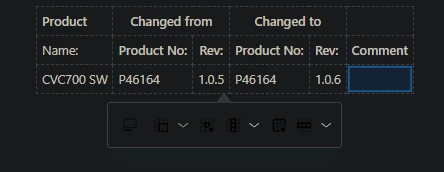
Dark mode does not play well with the tables function.

I user Dark Reader in Chrome, and I can't see the tools:

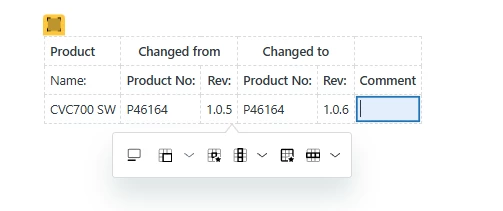
Turning off Dark mode, then it works just fine:


Niclas11
  • March 7, 2025

The styling of tables is different with the new editor. I have not had time to review what's going on. 


Patrycja12

Hi @niclas11, thank you for the information, we will try reproduce this issue and see how easy we can fix this 

Best, 
Pati 


Niclas11
  • March 14, 2025

It's the styling that makes the difference, this is missing:

<table style="width: 100%;" border="1" cellspacing="0" cellpadding="0">

(I copy a table from Microsoft Word document)


  • Author
  • May 14, 2025

Hi Patricia, there's another issue. When you create a table and align text left, the text is almost on top of the line to the left of it. It looks awful. Also, if you cut and paste a table into the editor, it looks exactly as the original until it's published-then when it's published, that alignment issue happens again. 
Here's an example of a table where it's all close to the left table borders.
https://help.mortgagechoice.com.au/hc/en-us/articles/360028628692-State-Office-Contacts


Jesse12
  • May 21, 2025

I also noticed that in the new editor, there is no option to delete the table whereas in legacy, it's an available option. It would be good to add this to the new editor as it will make it much easier to delete the table instead of having to do it row by row or delete it from the HTML code.


Patrycja12

@jesse12 This option is available in the new editor, please click on the marked element and press the Backspace / Delete key on the keyboard