
Organization domain not recognized | Community
Skip to main content

Organization domain not recognized

  • April 30, 2019
  • 15 replies
  • 0 views

Hi support team,


Some email domains are sometimes not being associated properly to an already existing organization.

Please find below an example: a user with email address xxx@mazars.al is not associated to the Mazars organization even after adding the mazars.al to it.
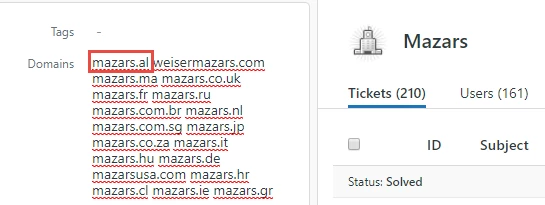



I have other examples where it doesn't work, for example with the domain kpmg.co.nz.


Could you have a look at it?

Thanks,


Romain Miroux

This topic has been closed for replies.

15 replies

Brett13
  • Community Manager
  • April 30, 2019

Hi Romain,

To troubleshoot further I'll need to bring this into a ticket and pass over to our Customer Advocacy team. You'll receive a follow-up email shortly stating your ticket has been created so feel free to reply back to that with any additional info you can provide.

Cheers!


Christian44

Hey, 

Was there ever an answer given to this? as I am also experiencing the same issue.


  • Author
  • January 7, 2020

Haha ... that would be too much to ask!
It's still not working and I've lost hope :)


Christian44

@Romain Miroux thank you for letting me know, i will get in touch with Support also. 


Christian44

I think I found the fix:

1)Click on the drop down next to the users email and verify if not verified

2)Go to the users profile in Zendesk and mess with the name of the user a bit (I removed and added a letter)

3)Click away to make this auto save then refresh

Hope this works for you as it did for me.


Brett13
  • Community Manager
  • January 7, 2020

Thanks for sharing with everyone Christian! Glad you were able to find a fix :)


  • Author
  • January 7, 2020

@Brett - Community Manager I'm sorry but I won't call this a fix ... a workaround maybe ?
@Christian Holmes thank you, I will try it next time it happens!


@Brett - Community Manager

I still have this issue. 

Is there any kind of ETA on a fix?


Devan
  • April 15, 2020

Hello @Alejandro Colon,

I'm going to open up a ticket on your behalf so one of our specialists can look into this further. You should receive an email shortly followed by a response from our Advocacy team.

Best regards. 


M59
  • June 23, 2020

Is there an overall fix for this yet? If an account already has users created, many of which may not be verified, it seems like a bug that you would have to go in and verify each email address one by one in order to get this to work. Also, I've found that if you have multiple orgs that have the same email domain rule, each org can have a different number of members, even if all users are verified. 


Devan
  • June 23, 2020

Hello @Megan Romero,

This a known issue for now with users accessing Zendesk via Safari (cookies recognition). Rest assured that our team is still working on how to manage this restrictions. Alternatively, users can use other supported browsers to access Zendesk (Chrome, Incognito & Firefox).

I recommend you follow our guide here - Zendesk support for cookie-restricted browsers (Safari, Chrome) to receive updates once any remediation is available, and if you have any questions, please let us know.

Best regards. 


Ethan27
  • September 2, 2020

Hi there. Just adding my voice to the conversation. Is there any update on this issue?


Brett13
  • Community Manager
  • September 8, 2020

Hey Ethan,

What sort of issues are you running into on your account with organizations? Are new users not properly being added to the org based on their domain?


Ethan27
  • September 8, 2020

Hi Brett,

Yes, that is correct. New users are not being added to the organization based on the existing domain for that organization. I've been following the workaround @Christian Holmes presented here: 

https://support.zendesk.com/hc/en-us/community/posts/360029430294/comments/360010124973 

That does the trick but it's a manual process. I was hoping there was an automation for this. Based on the previous comments from other users, it sounded like this was a known issue.


Brett13
  • Community Manager
  • September 8, 2020

Hey Ethan,

This is expected behavior if the user doesn't have a verified email address. More information here: Why are my customers not mapped to their organization when they contact us?

This would still require some manual work on the agents side since they would need to mark the email as verified.

Let me know if you have any other questions!